
The Google Search Console shows you the questions your audience is already asking. A single regular expression is enough to filter them out and find the pages that are only a few steps away from page one.
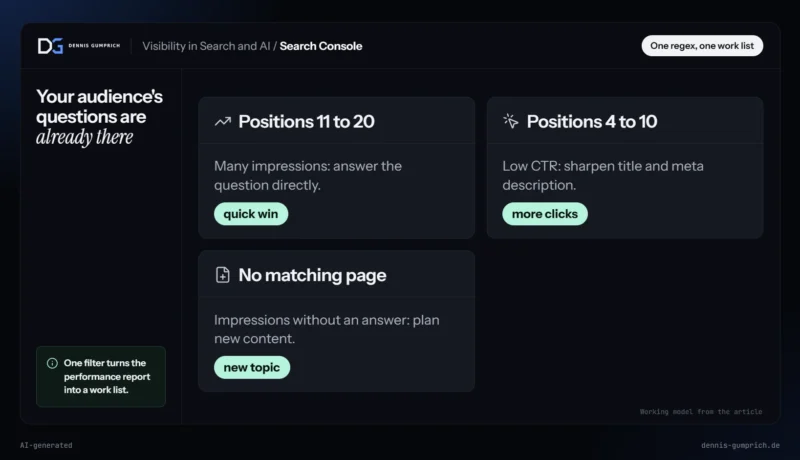
In the Search Console performance report, you filter queries and pages with regular expressions, regex for short. The expression ^(who|what|when|where|why|how|which)\b shows all queries that begin with a question word. Combined with the position filter and sorting by impressions, this produces a prioritized list: questions on positions 11 to 20 with many impressions are your fastest wins, questions on page one with a weak click-through rate need better titles, and questions without a matching page are topics for new content. If your markets search in other languages, swap in the question words of those languages.
This guide is meant for working along: open your Search Console in a second window and go through the steps in parallel. First, the question of what regex actually does in the Search Console.
What is regex in the Google Search Console?
Regex stands for regular expressions. These are search patterns that let you filter many queries or URLs at once in the Google Search Console performance report instead of entering them one by one. The Search Console uses Google's RE2 syntax for this.
The normal filter only knows "contains" and "does not contain" for a single term. With regex, you group whole sets instead: all questions, all comparisons, all queries with a price reference or all URLs of a directory. For SEO in the Google Search Console, that is the difference between a long list and a work list.
You should know four properties before you start:
- Partial match by default. An expression matches as soon as it occurs anywhere in the query. If you only mean the beginning, put
^in front; if you only mean the end, put$after it. - Upper and lower case do not matter. The Search Console ignores case by default. If you want it respected, put
(?-i)at the beginning. For queries you practically never need this. - Include and exclude. After selecting "Custom (regex)", you choose between "Matches regex" and "Doesn't match regex".
- RE2 only. RE2 does not support lookaheads such as
(?!…). You handle exclusions via the "Doesn't match regex" option or a second filter.
Where do you find the regex filter in the Search Console?
In the "Performance" report under "Search results". There you click "Add filter", choose "Query" or "Page", set the dropdown to "Custom (regex)" and enter the expression. With "Apply", the Search Console filters the chart and table.
- Open the performance report. Click "Performance" in the menu on the left and check that the search type is "Web".
- Choose the date range. At least three months for analyses, the full 16 months for seasonal topics. A few days provide too little data for robust patterns.
- Set the filter. "Add filter", then "Query", in the first dropdown "Custom (regex)", in the second "Matches regex".
- Paste the expression and apply. Copy the expression into the regex field and click "Apply".
- Show the metrics. Activate the "Average CTR" and "Average position" tiles at the top. Only then do both columns appear in the table.
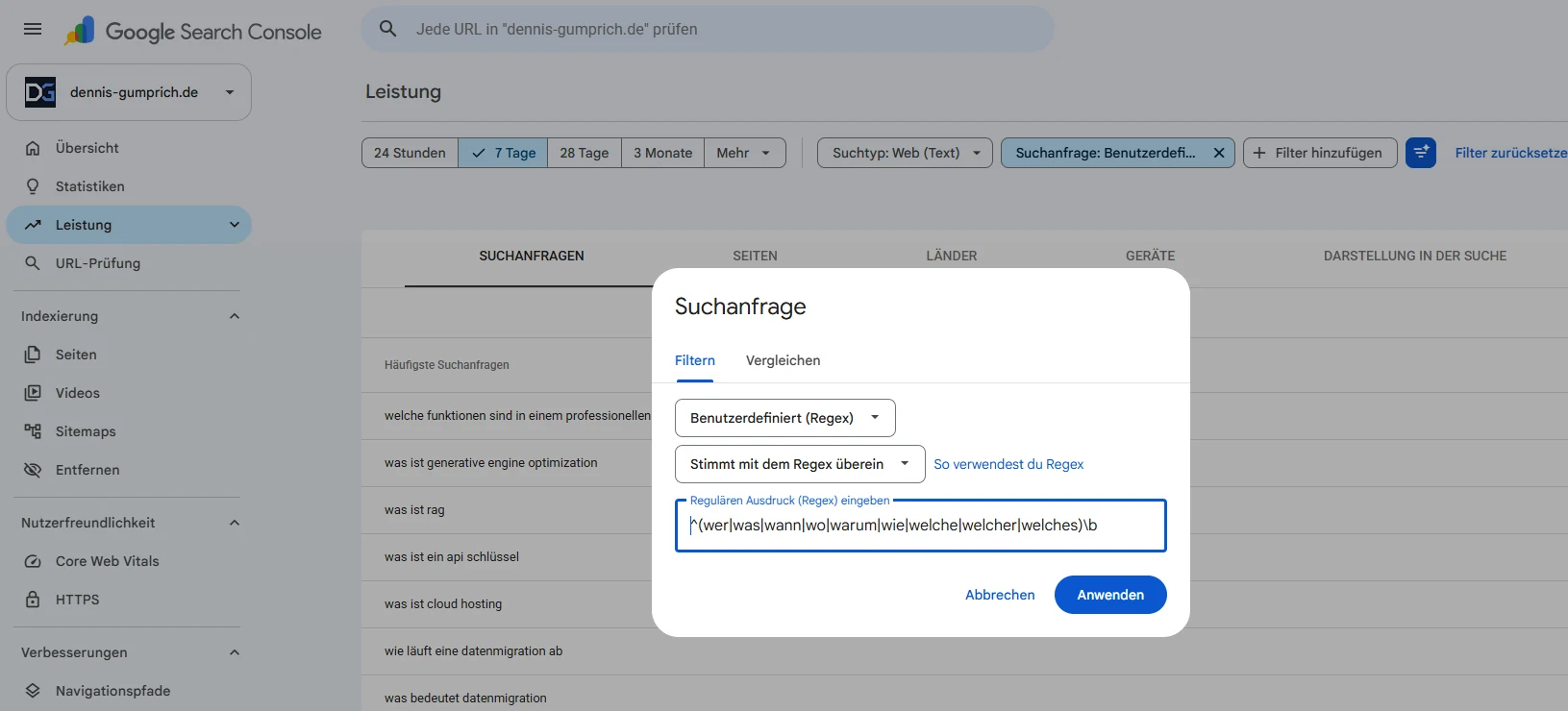
The most important expression: all your audience's questions
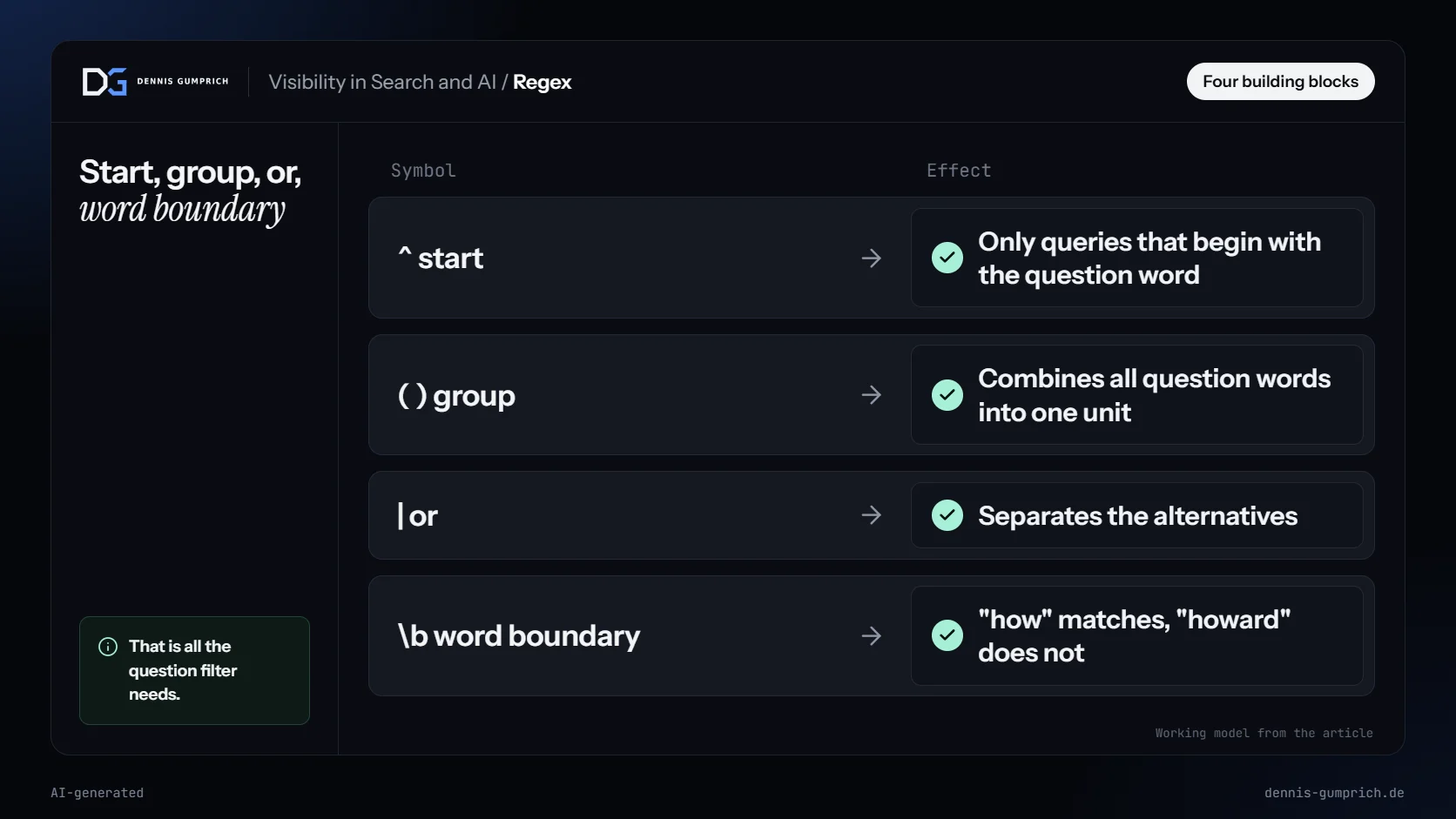
The expression ^(who|what|when|where|why|how|which)\b filters all queries that begin with a question word. The result is a list of real questions for which Google already shows your pages, often with wording that does not appear in any keyword tool.
| Building block | Meaning | Effect in the filter |
|---|---|---|
^ | Start of the query | Only queries that begin with the question word. "seo what is it" is excluded. |
( … ) | Group | Combines all question words into one unit. |
| | Or | Separates the alternatives: who or what or when and so on. |
\b | Word boundary | The question word must be complete. "how" matches, "howard" does not; "who" matches, "wholesale" does not. |
What this produces is shown in the screenshot above from my own Search Console, with German queries such as "what is generative engine optimization", "what is RAG", "what is an API key" or "how does a data migration work". Each of these questions is a hint about which answer a page needs to deliver for Google to show it higher up.
Two extensions are worthwhile once you are familiar with the basic expression:
- More question words:
^(who|what|when|where|why|how|which|can|does|do|is|are|should|will)\balso captures yes or no questions such as "is a headless cms worth it". - Question marks:
\?finds queries that were entered with a question mark. These are often fully phrased questions, the way people also ask AI assistants.
Question words for your other markets
If you serve several countries, filter the questions per language. In RE2, \b only treats the letters a to z, digits and the underscore as word characters. For question words that begin or end with an accented letter, such as "où", "qué" or "när", use ( |$) instead: a space or the end of the query.
| Language | Regex |
|---|---|
| English | ^(who|what|when|where|why|how|which)\b |
| German | ^(wer|was|wann|wo|warum|wie|welche|welcher|welches)\b |
| French | ^(qu'est-ce|qui|que|quoi|quand|où|pourquoi|comment|quel|quelle|quels|quelles|combien)( |$) |
| Dutch | ^(wie|wat|wanneer|waar|waarom|hoe|welke|welk)\b |
| Danish | ^(hvem|hvad|hvornår|hvor|hvorfor|hvordan|hvilken|hvilke|hvilket)( |$) |
| Swedish | ^(vem|vad|när|var|varför|hur|vilken|vilket|vilka)( |$) |
| Norwegian | ^(hvem|hva|når|hvor|hvorfor|hvordan|hvilken|hvilke|hvilket)( |$) |
| Spanish | ^(qué|que|quién|quien|cuándo|cuando|dónde|donde|por qué|por que|cómo|como|cuál|cual|cuánto|cuanto)( |$) |
| Italian | ^(chi|che|cosa|quando|dove|perché|perche|come|quale|quali|quanto|quanta)( |$) |
Many users type without accents, which is why the Spanish and Italian filters contain both spellings. Some question words also have other meanings, for example "que" or "como". Check the first results and remove words that bring in too much noise.
How do you find ranking potential with regex?
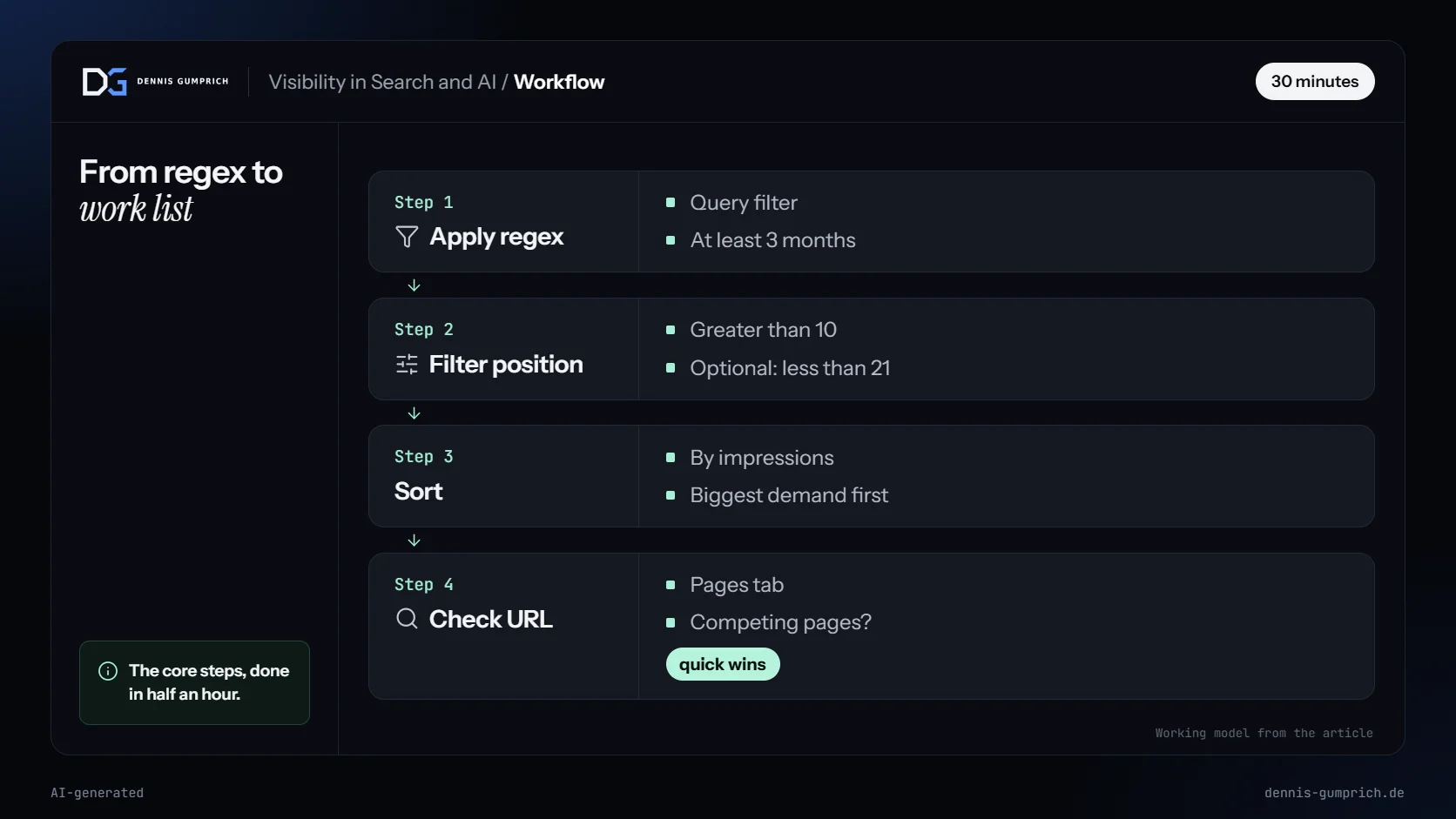
You combine the regex filter with the table's position filter and sort by impressions. Queries on positions 11 to 20 with many impressions are the fastest wins: Google already considers your page relevant, but it sits just behind page one.
- Apply the regex filter. For example, the question filter from above.
- Set the position filter. Click the filter icon above the table, choose "Position", "Greater than" 10. If you want to narrow it down, add a second filter "Smaller than" 21.
- Sort by impressions. Click the "Impressions" column header. The greatest demand is now at the top.
- Check the ranking URL. Click a query and switch to the "Pages" tab. There you see which URL Google shows. If there are two URLs, your pages are competing with each other.
- Define and record the action. Transfer query, URL, position, impressions and planned action to a list. After four to six weeks, use the compare mode to check whether the position has changed.
Not every row requires the same action. The pattern in the report tells you what to do:
| Pattern in the report | What it means | Action |
|---|---|---|
| Position 11 to 20, many impressions | The page is relevant but does not answer the question directly enough | Add the question as an H2 with a two to three sentence answer below it, add internal links with matching anchor text |
| Position 4 to 10, low click-through rate | The page is seen but not chosen | Tailor page title and meta description to the question, name benefit and format clearly |
| Two or more URLs for the same question | Your pages are competing with each other | Define one page as the main page, merge content or separate it clearly |
| Question with impressions but no matching page | Google shows a page that only touches on the topic | Create a new article, FAQ entry or glossary term |
| Position 1 to 3, falling clicks | Answers in search or AI overviews replace the click | Update the content, strengthen citability, also measure visibility without clicks |
The first row is the most productive. Often an additional section that picks up the question verbatim and answers it directly is enough. Which form of answer the question calls for, whether definition, instructions or comparison, is clarified by a look at the search intent. And if you phrase the answer so that it is understandable on its own, you also improve the chance of being cited in AI answers. How this works is described in the guide to answer engine optimization.
Anyone who types "what is rag" into Google today asks ChatGPT or Gemini the same question tomorrow. The questions in your Search Console are therefore the best free source for what your audience also asks AI systems. If you evaluate them regularly and align pages with clear answers to them, you work on search engine and AI visibility at the same time.
Regex library: 13 expressions for your Search Console
These thirteen expressions cover the most common analyses: questions, definitions, how-tos, comparisons, commercial queries, brand searches, long tail, directories and language versions. Copy them into the filter and adapt the terms to your topic and language.
| Purpose | Regex | Filter and setting |
|---|---|---|
| Questions | ^(who|what|when|where|why|how|which)\b | Query, matches |
| Questions extended | ^(who|what|when|where|why|how|which|can|does|do|is|are|should|will)\b | Query, matches |
| Question mark | \? | Query, matches |
| Definitions | ^(what is|what are|what does)\b|\b(meaning|definition)\b | Query, matches |
| How-tos | \b(how to|tutorial|guide|step by step|set up|setup)\b | Query, matches |
| Comparisons | \b(vs|versus|or|compare|comparison|difference|alternative|alternatives)\b | Query, matches |
| Commercial intent | \b(cost|costs|price|pricing|vendor|vendors|software|tool|tools|agency)\b | Query, matches |
| Templates and downloads | \b(template|templates|checklist|example|examples|pdf|excel)\b | Query, matches |
| Without brand searches | (gumprich|gumbrich|gumprecht) | Query, doesn't match. Insert your brand and typo variants |
| Long tail from five words | ^(\S+\s+){4,}\S+$ | Query, matches |
| Short queries with one to two words | ^\S+(\s\S+)?$ | Query, matches |
| Directories | /(blog|guides)/ | Page, matches. Insert your directories |
| Language versions | /(fr|nl|da|sv|no|es|it)/ | Page, matches. Insert your language folders |
It gets particularly revealing when you combine filters. The question filter on queries plus /glossary/ on pages shows, for example, which definition questions your glossary pages already capture and where a question lands on a blog article even though a separate glossary term would fit better. The long-tail filter with position greater than 10 shows detailed questions that you can answer with a section in an existing article instead of writing a new one. And the language folder filter with the question filter for that language shows whether your translated pages are already found for real questions in that market.
What are the limits of regex in the Search Console?
Regex only filters the data the Search Console shows at all. Rare queries are not listed individually for privacy reasons, the table in the interface shows at most 1,000 rows, and RE2 lacks some features of other regex flavors.
- Anonymized queries. Very rare queries do not appear in the table but are included in the totals. The sum of the rows is therefore often smaller than the value in the chart.
- 1,000 rows in the interface. For large websites, narrow the filters or use the Search Console API or Looker Studio, which also understand regex.
- Word boundaries and special characters. In RE2,
\bonly recognizes the letters a to z as word characters. For terms that begin or end with an accented letter or special character, such as é, ü, å or ß, use a space or( |$)instead of\b, or leave out the word boundary. - Existing rankings only. The Search Console shows queries for which you already appear. Demand for which you are not yet visible at all can only be found through keyword research.
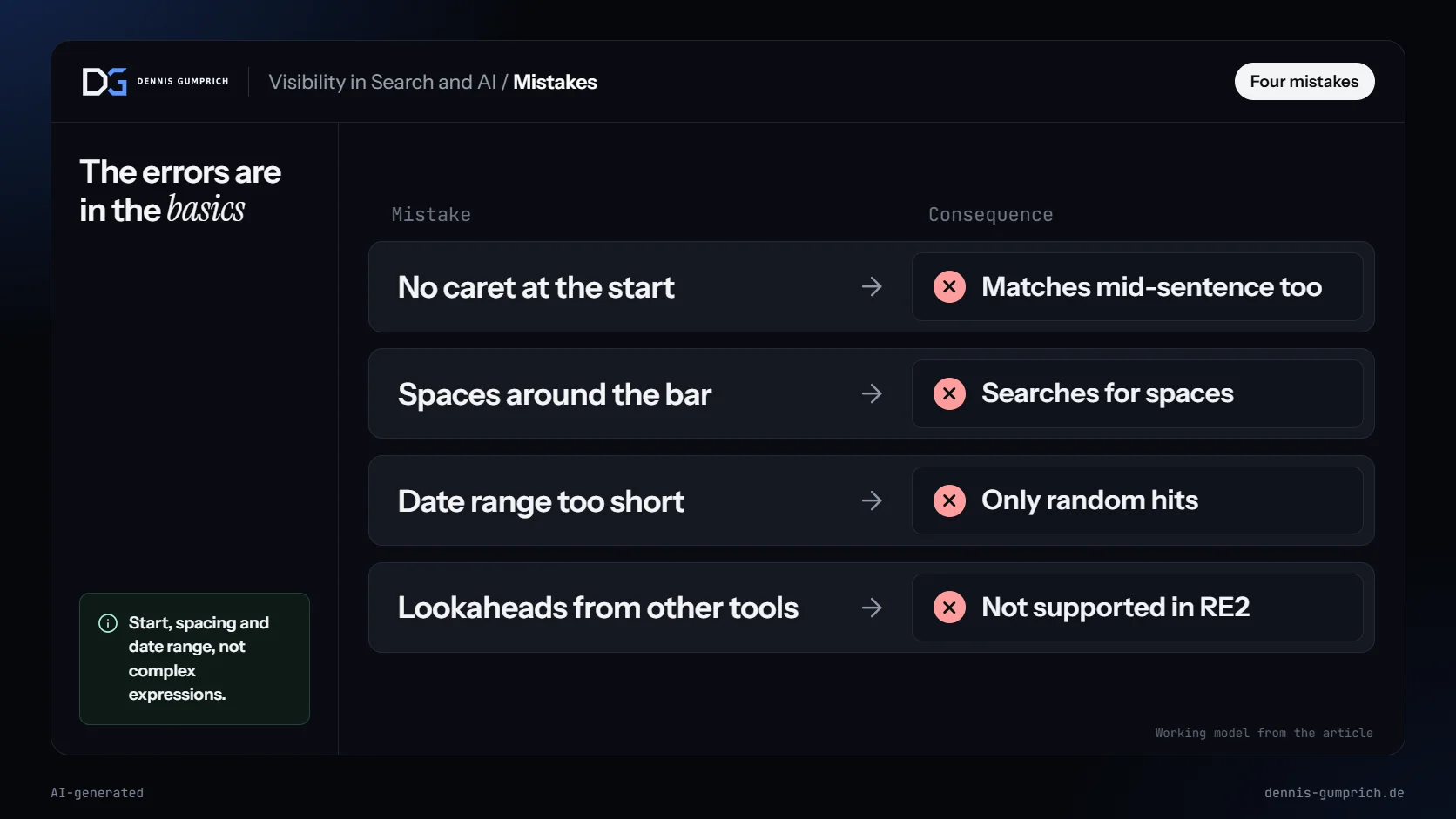
Five mistakes that distort your regex analysis
- Forgetting the caretWithout
^, "what" also matches "seo what is it" and "costs what to consider". The list gets longer, but not better. - Spaces around the vertical bar
how | whatsearches for "how " with a space and " what" with a space. Write the alternatives without spaces. - Date range too shortSeven days are enough for a quick look, not for decisions. For ranking potential you need at least three months.
- Adopting lookaheads from other toolsExpressions with
(?!…)or(?<=…)do not work in RE2. Handle exclusions with "Doesn't match regex". - Not escaping special characters in URLsIn regex, a period stands for any character. If you search for
.pdf, write\.pdf.
Self-check: are you already using the Search Console for ranking potential?
Tick everything that applies to you.
The routine: 30 minutes a month
Once a month is enough: apply the question filter, filter position greater than 10, sort by impressions, transfer the five most important queries to your topic planning and check last month's actions in compare mode.
The last step is decisive. A list of ranking potential achieves nothing if it does not end up in editorial planning. Enter each action with query, URL, starting position and date where new articles are also planned. That way, optimizations do not compete with new topics for attention but are part of the same plan. Improving existing content often delivers results faster than writing new content, which is exactly the idea behind a content refresh.
Proposal for a fixed routine in the Search Console, once a month, about 30 minutes:
1. Performance report, last three months, query filter "Custom (regex)" with ^(who|what|when|where|why|how|which)\b, or the question words of our market's language. 2. Filter the table to position greater than 10 and sort by impressions. 3. For the five most important questions, check the ranking URL and define an action: add a section, sharpen the title, merge pages or plan new content.
We add the actions with their starting position to the editorial plan and check after four to six weeks in compare mode whether they worked.
Conclusion: one expression, one work list
Regex in the Google Search Console is not a topic for developers but a tool for every content team. The question filter ^(who|what|when|where|why|how|which)\b shows in a few seconds which questions your audience asks, and with the question words of other languages it does the same for every market. With the position filter and sorting by impressions, it becomes a list of ranking potential you can work through directly. If you do this every month and transfer the actions to editorial planning, you improve rankings with existing content and learn along the way which answers are also in demand in AI search. How to measure this visibility as well is shown in the guide Measuring visibility without clicks.
Frequently asked questions
Which regex syntax does the Google Search Console use?
The Search Console uses Google's RE2 syntax. The most important characters such as ^, $, |, .*, parentheses and \b work as usual. Lookaheads and lookbehinds do not exist in RE2.
How do I filter for questions in the Search Console?
In the performance report, choose "Add filter", then "Query", "Custom (regex)" and "Matches regex". Enter ^(who|what|when|where|why|how|which)\b as the expression and apply it. For other languages, use the question words of that language.
Is the regex filter case sensitive?
No, by default the Search Console ignores upper and lower case. If you want it respected, put (?-i) at the beginning of the expression. This is rarely needed for queries, occasionally for URLs.
How do I exclude brand searches with regex?
Group the brand name and typical typos, for example (brand|brand name|bran), and choose "Doesn't match regex" in the filter. That way you see how content works for people who do not know your brand yet.
Which positions represent ranking potential?
Queries on positions 11 to 20 with many impressions are the most productive. Google already considers the page relevant, but it sits just behind page one. The second group is positions 4 to 10 with a weak click-through rate: better titles and meta descriptions help there.
Can I also use regex in the Search Console API and Looker Studio?
Yes. The Search Console API supports regex filters for queries and pages, and in Looker Studio, Search Console data can also be filtered with regular expressions. This makes sense when the 1,000 rows in the interface are not enough.
Where does your content process lose time today?
In 30 minutes, we look together at where unnecessary coordination, manual tasks, tool switching or repetitive content work cost you time today.
You get a concrete assessment of which tasks you can simplify, automate or organize better, and where AI and tools actually help instead of adding complexity.
Analyze your content process in 30 minutes Free of charge. You take away concrete starting points you can use internally right away.
Dennis Gumprich
Dennis helps marketing and communication teams fit generative AI into existing content processes without undermining quality, brand voice and approvals. Focus areas: content operations, AI governance and tool selection in mid-sized companies and corporations.
Transparency note: Dennis works for contentbird, a provider of AI-powered content software. Product mentions are marked in the article. More about Dennis (in German) · LinkedIn
Read more
Sources
- Google Search Console Help: Performance report (search results): advanced filtering and comparison, information on RE2, partial matching and case sensitivity. Accessed November 26, 2026.
- Google Search Central Blog: New regex options and tips for the Search Console, June 2, 2021.
- RE2: Syntax reference, including the word boundary
\bas an ASCII word boundary. Accessed November 26, 2026.
How this article was created
This article was created with the help of AI. Structure, research and draft wording were developed with AI support. Professional assessment, review of the statements and the final version are the responsibility of Dennis Gumprich. The English version was translated with AI and reviewed. Read the original German version.
How reliable are the statements?
Information on syntax and filter options corresponds to Google's documentation at the time of publication. The Search Console interface may change, and labels may differ slightly depending on interface language. The question filters for other languages are starting points and should be checked against your own data. The mapping of patterns to actions, the position ranges and the monthly routine are working models from practice, not results of a study. Transparency note: I work for contentbird.