
You open the planning file. Row 12 contains a topic that, according to column F, is in approval. Who is supposed to approve it is not stated. Row 19 contains the same topic again, created by a different person, with a different date.
You copy both rows into a message and ask. Two hours later you know: the agency has already written it, the specialist department had rejected it, and nobody noted this in the file.
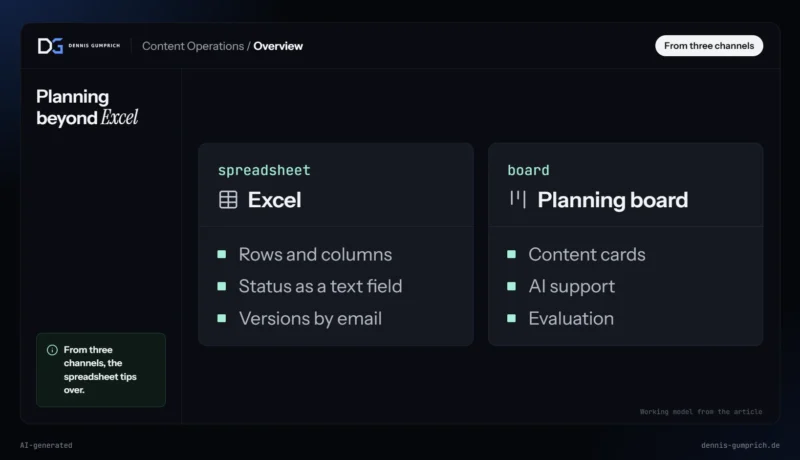
A spreadsheet is suitable for content planning as long as one person maintains it and one channel is served. From around three channels and three people involved, the balance tips: the maintenance effort exceeds the benefit, and the plan no longer reflects the actual status. This is not a weakness of whoever built the spreadsheet. On the contrary: a grown planning file is the most accurate description of your process that exists in-house, and that is exactly why it is the best template for whatever comes next.
Why the spreadsheet worked for so long
A spreadsheet is the most obvious solution because it is immediately available, everyone can use it and it can be adapted at will. Exactly these properties make it unbeatable at the start.
The break does not come from growth in volume but from growth in the number of people involved. A spreadsheet stores states, but it knows no ownership. It shows that something is in approval, but not with whom, since when, and what happens if nothing happens.
As long as one person can keep the overview, they compensate for this gap in their head. As soon as that is no longer possible, the state almost all teams describe arises: the plan exists, but nobody trusts it.
Your spreadsheet is the best process description in-house
Because it does not describe how things should run, but how they do run. Every column is a decision about which information is needed for steering, every status value a state your process knows, every color a rule someone set because something went wrong without it.
Before turning to limits, one point that almost always gets lost in discussions about tools: a grown planning file is not a stopgap you have to get rid of eventually. Whoever built it did requirements work without calling it that. That is more than most requirements specifications written for a tool selection achieve.
This is exactly why proposals to switch tools so often meet resistance. Anyone who hears that the spreadsheet is the problem also hears: your work of recent years was the problem. This reading is wrong, and it leads to the worst rollouts, because the knowledge from the file then ends up unused in the archive and is laboriously reinvented in the new system.
| Element in the file | What it says about your process | What it becomes in a switch |
|---|---|---|
| Column order | The actual work steps | The workflow stages |
| Status dropdown | The states you distinguish | The status model |
| Color codes | Priorities and escalation rules | Labels and rules |
| Tabs per brand or channel | Your organizational structure | Projects, brands or areas |
| Formulas for deadlines | Realistic lead times | Deadlines in templates |
| Notes column | Where coordination regularly gets stuck | Comments directly on the content |
The limits discussed below are therefore not limits of your planning, but limits of the format. The logic you have built remains right. From a certain size, it just needs an environment that can also map ownership, history and content.
Why does content planning in Excel fail?
Because of five break points: the status does not say who has the ball. Changes leave no history. Duplicates arise because search looks for wording rather than meaning. There is always a search between the plan row and the text. And under time pressure, the spreadsheet is the first thing that stops being maintained.
- Status without ownership"In approval" says nothing about who has to act next. Every follow-up question costs half a day of waiting.
- No historyWhen someone changes a cell, the previous state is gone. Discussions about commitments cannot be resolved.
- DuplicatesTwo people create the same topic, because search in a spreadsheet looks for wording, not meaning.
- No link to the contentThe plan refers to files elsewhere. There is always a search between the plan row and the actual text.
- Maintenance competes with workAnyone under time pressure does not update the spreadsheet first. So it goes out of date exactly when it would matter most.
The decisive question is not whether your spreadsheet is well built. It is: how many messages do you write per week to find out what should be in the spreadsheet? This number is your real effort.
Why discipline does not solve the problem
The first reaction to an outdated plan is almost always a reminder: we need to maintain it more consistently. This expectation is understandable and still regularly fails to achieve its goal.
The reason lies in competing tasks. Maintaining a plan is a task without immediate benefit for the person doing it. It benefits everyone else. Under time pressure, the task with one's own result reliably wins, and that is the text, not the status column.
There is also the delay. A status changes the moment something happens, for example when a specialist department gives verbal approval. Maintenance happens later, if at all. Between the two points in time there is a gap in which the plan is wrong without anyone having made a mistake.
This leads to a useful distinction: information that arises as a by-product of the work stays current. Information that has to be entered additionally goes out of date. A plan in which the work happens is therefore structurally more current than a plan that describes the work. That is exactly the difference between a spreadsheet and a working environment, not the number of features.
In practice, this means: before you demand more discipline, check how many entries in your plan are pure extra work. Anything nobody needs for their own work will not be maintained in the long run, regardless of agreements.
When is an Excel spreadsheet no longer enough for editorial planning?
From around five people involved, or as soon as subject-matter approvals are added. With three to five people and three channels it becomes borderline, recognizable by outdated status and the first duplicates. With several brands or locations, the spreadsheet no longer holds up. It is not the spreadsheet that tips over, but the number of handovers. What steering across several countries looks like is shown in Creating content centrally, delivering it locally.
The following classification is a working model, not a measured value. It helps you assess where you stand.
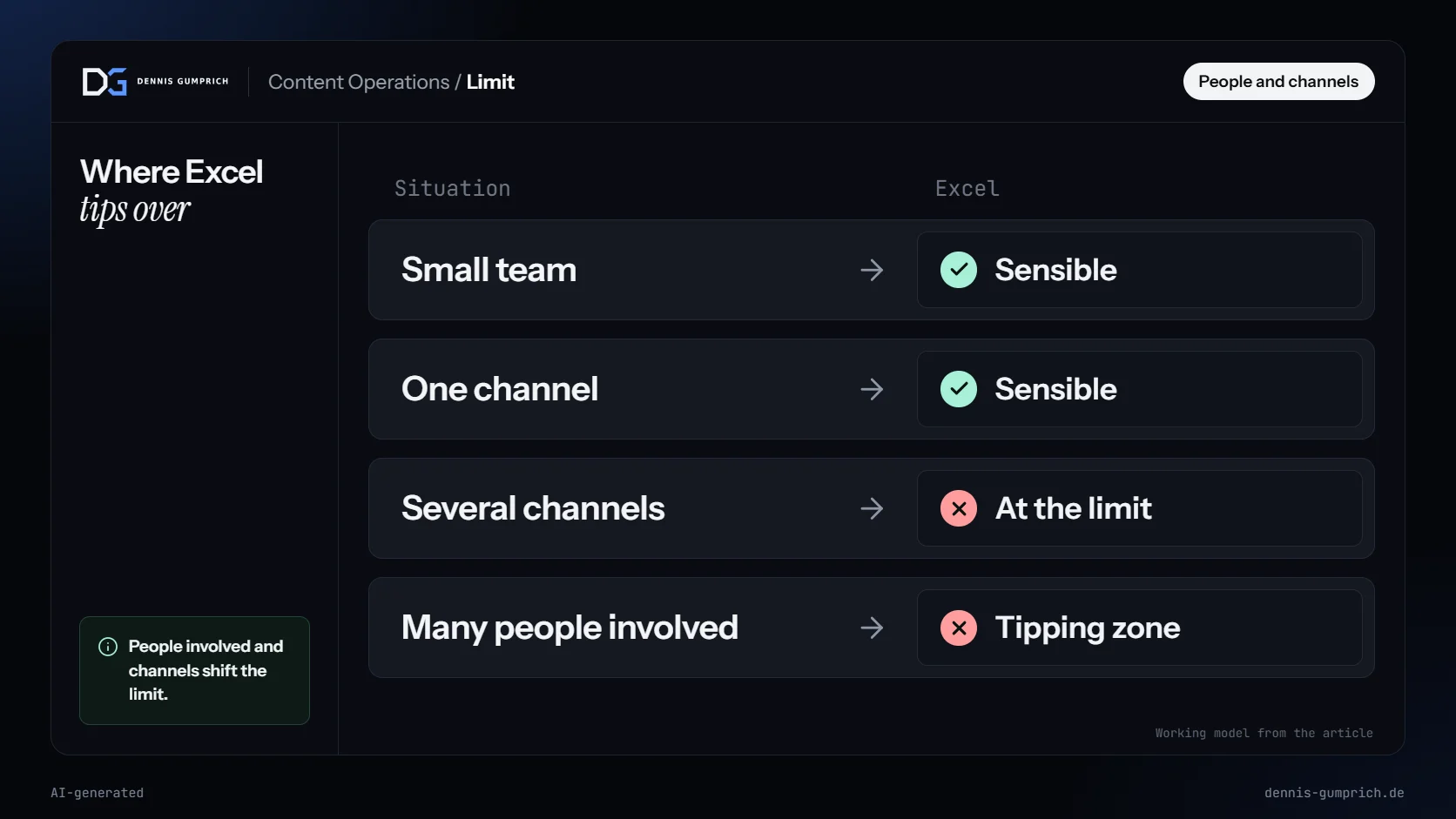
| Constellation | Spreadsheet suitable | Typical symptom |
|---|---|---|
| 1 person, 1 to 2 channels | yes, without restriction | none |
| 2 to 3 people, 2 channels | yes, with discipline | occasional questions about the status |
| 3 to 5 people, 3 channels | borderline | status out of date, first duplicates |
| 5 or more people, or subject-matter approvals | no | plan and reality permanently diverge |
| several brands or locations | no | parallel files, no shared view |
What can be improved without switching tools?
Three measures that cost nothing but a decision: replace the status column with a "who has the ball" column. Give each topic exactly one row, with channel versions as sub-items. And set a fixed joint maintenance date instead of updating on the side.
Not every team can or wants to switch right away. Three measures also work in a spreadsheet and cost nothing but a decision.
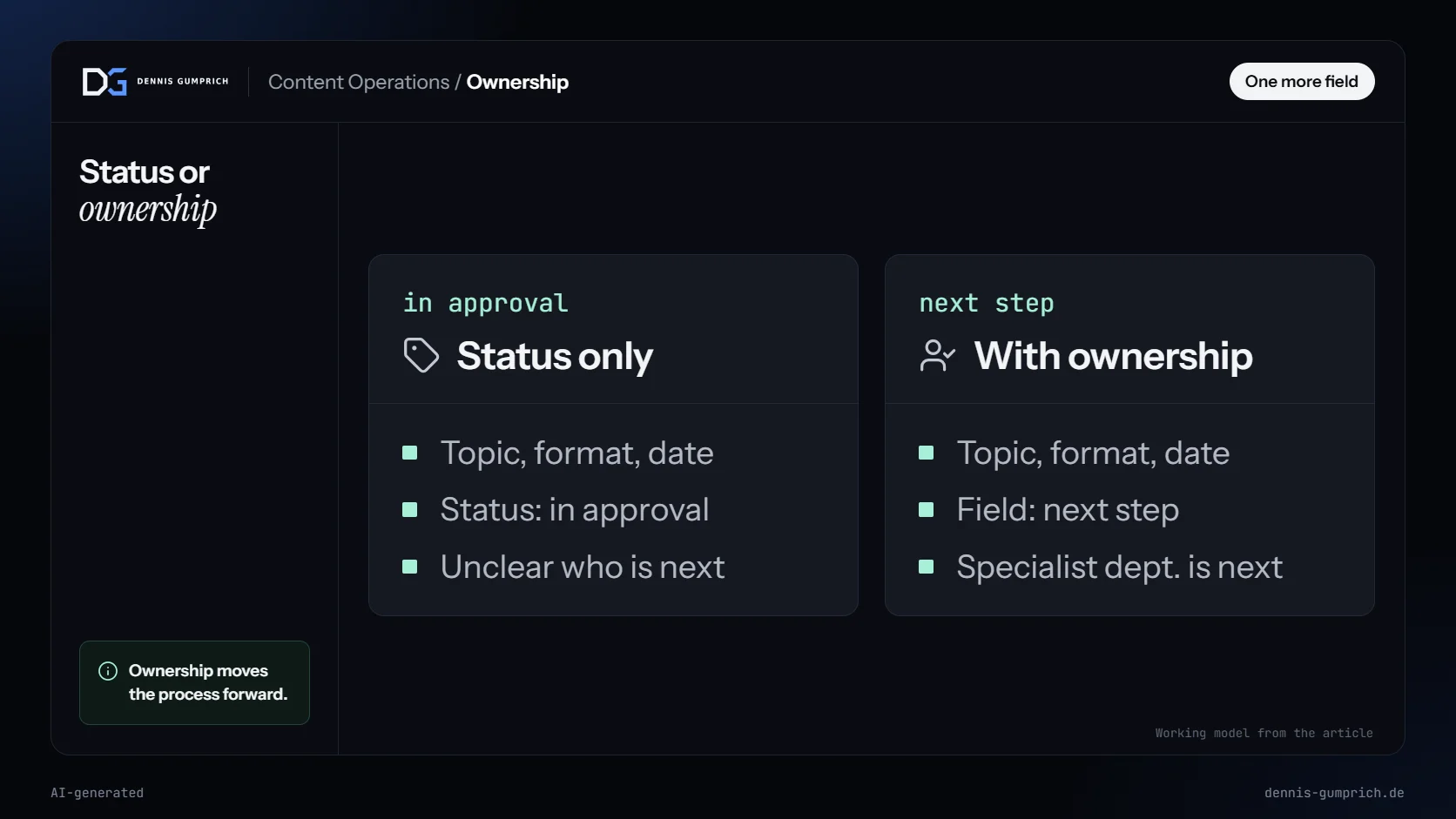
- Ownership instead of statusReplace the status column with a "who has the ball" column. A name is unambiguous, a state is not.
- One entry, one truthA topic gets exactly one row, regardless of the number of channels. Channel versions become sub-items, not separate rows.
- Set a maintenance timeThe file is updated together at a fixed time, not on the side. Maintenance without a fixed time does not happen.
These three measures shift the limit; they do not remove it. With subject-matter approvals and several brands, even the best spreadsheet discipline reaches its limit, because the problem is not the presentation but the missing connection between plan, content and approval.
Before you decide on a new tool, it is worth first looking at the steering logic behind it, that is, at who decides what takes priority in case of doubt. Regardless of the tool used, that is the real precondition.
What you take with you from your file
A grown planning file contains more knowledge than you expect when switching. Before you change anything, it is worth spending an hour extracting four things.
First, the actual distribution of topics. Which topics did you cover how often last year? Almost always, there is a cluster around a few topics and a blind spot for others. That is the most robust basis for the next annual planning, because it shows where requests have determined your plan. How to compare topics by fixed criteria rather than by arrival in future is described in Topic scoring: the criteria that make topics comparable.
Second, the real lead times. If your file contains dates, you can read off how much time passed between planned and actual publication. This difference is a robust figure for the next conversation about capacity, and it is already there.
Third, the recurring formats. Which rows look the same every quarter? Exactly these belong in the new system as templates, not as individual entries. Skipping this maps the same manual work again.
Fourth, the structure itself. Column order, status values, color rules and tabs are the blueprint for setting up the next system. Transfer them as directly as possible: the same labels, the same order of steps, the same states. A team that recognizes its own logic in the new tool works in it after a few days. A team that has a foreign model imposed on it says after a few days that it was faster in Excel, and is usually right.
All four points can only be extracted cleanly as long as the file is complete. After the switch, it is rarely opened again, and these insights can then hardly be reconstructed.
When is switching from Excel to a content platform worthwhile?
When you make decisions based on information that is not correct, and only notice when something goes wrong. That the spreadsheet has become cluttered, by contrast, is not a reason to switch; tidying up solves that.
The spreadsheet has become cluttered. This can be solved by tidying up and is not an argument for a new tool.
You make decisions based on information that is not correct, and only notice when something goes wrong. That is a structural flaw, not a tidiness problem.
What does editorial planning in Excel look like that lasts longer?
Seven columns are enough, and content, channel, ownership and date must be visible separately. Every additional column must justify itself with the question of which decision could not be made without it.
Before you think about switching, it is worth looking at the structure. Most grown planning files do not fail because of the software, but because of too many columns and columns nobody can maintain.
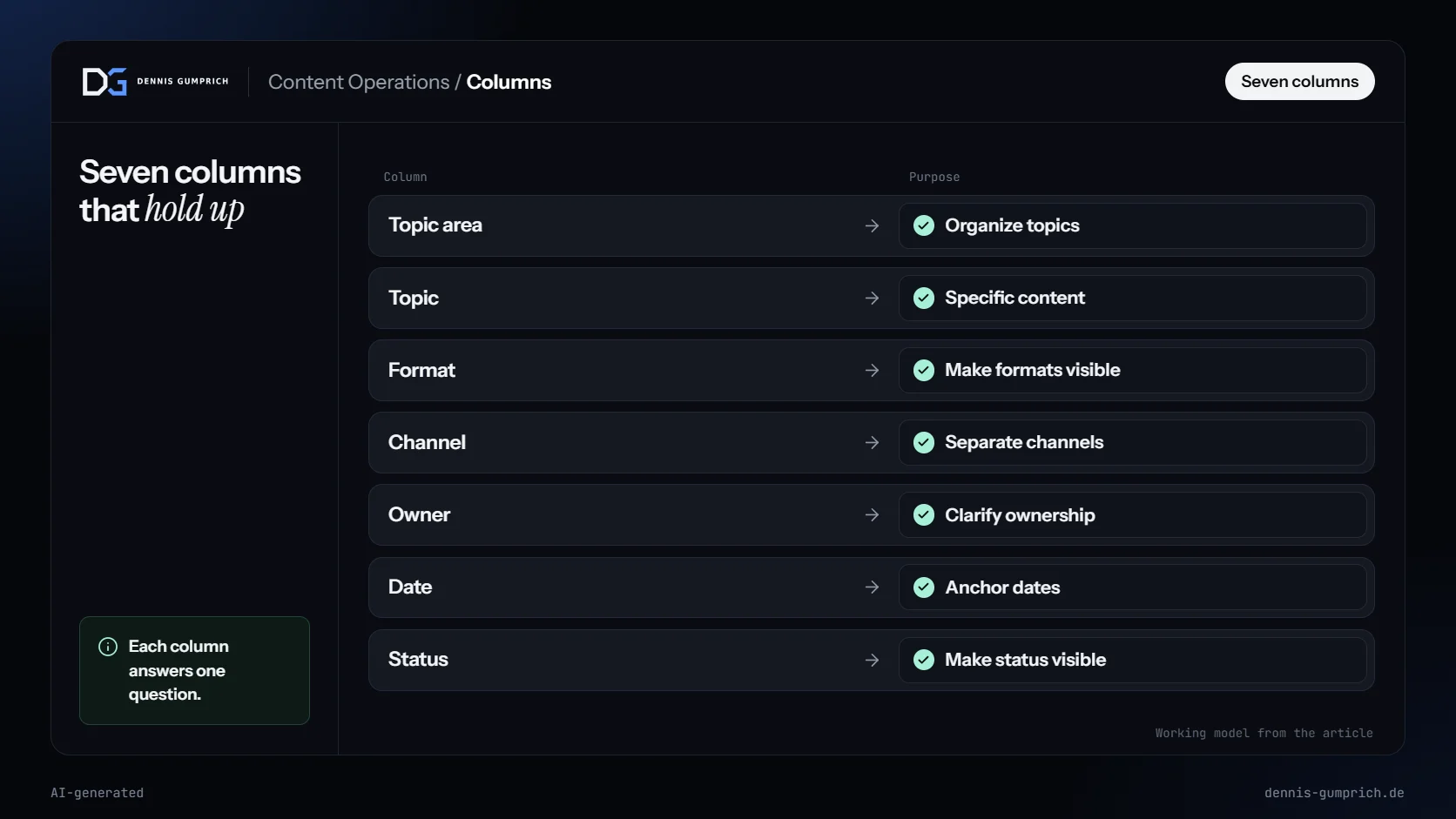
A robust planning spreadsheet makes do with seven columns. Every additional one should have to justify itself with the question of which decision could not be made without it.
| Column | What it is for | Common mistake |
|---|---|---|
| Topic in three words | Spotting duplicates | Only the finished title, so duplicates stay invisible |
| Who has the ball | Replaces the status column | A state instead of a name, so nobody knows who has to act |
| By when | Deadline for the current step | Only the publication date, without interim deadlines |
| Channels | Which derivatives are created | A separate row per channel instead of a sub-item |
| Link to the content | Route from plan to text | Missing, so every access starts with a search |
| Approval required | Subject-matter or legal | Only discovered along the way instead of planned beforehand |
| Note on the latest status | Getting back in after a wait | Agreements stay in the inbox |
The second row is the most important change compared with common templates. A status column describes a state, an ownership column names a person. The difference decides whether your plan answers questions or creates them.
The last row is almost never kept and solves the biggest problem in practice. When a piece comes back after two weeks of waiting, getting back into it takes time. Two sentences on the latest status spare you this reconstruction entirely.
How do you set up planning in Excel in practice?
With five settings that every current version of Excel has. They prevent the most common maintenance errors and significantly extend the lifespan of your planning, without you needing a new tool. The columns follow the model above: topic, who has the ball, by when, channels, link, approval, note.
- Setting 1Format as a tableSelect the range and convert it into a formatted table with Ctrl+T. New rows then automatically take over formulas, formats and filters, and the header row stays visible when scrolling.
- Setting 2Dropdown lists instead of free textFor "who has the ball" and "channels", store fixed values via Data, Data Validation, List. This prevents the same channel from appearing in three spellings and filters from coming up empty.
- Setting 3Highlight overdue stepsConditional formatting with the formula =AND($C2<>"",$C2<TODAY()) colors every row whose deadline has passed. This lets you see bottlenecks without reading through the spreadsheet. Column C is "by when". Depending on your regional settings, Excel uses a semicolon instead of a comma as the separator.
- Setting 4Views per channel and personVia Insert, Slicer, you get buttons for channel and ownership. Everyone sees with one click what is with them, without their own copy of the file.
- Setting 5Use version historyIf the file is stored in OneDrive or SharePoint, the version history shows earlier states. In Excel for Microsoft 365, the "Show Changes" feature also shows who changed which cell when. This largely closes the "no history" gap, but does not replace a record of which version of a text was approved.
These five settings take an hour and often carry a team with one or two channels for a long time. But they do not solve the structural break points: coordination still runs via the inbox, and a search remains between plan row and text. At the latest when approvals regularly get stuck, it is worth looking at faster approval processes.
The intermediate solution that is often overlooked
Between spreadsheet and content platform lies a stage that many teams skip: the task tool that already exists in the company. In many cases, other departments' project work already runs there.
This intermediate stage reliably solves three of the five break points: ownership, history and notification. Who has the ball is attached as a person to the process. Who changed something is traceable. And whoever is waiting does not have to ask.
The content-related break points remain unsolved. The text is still elsewhere, as are brand voice and templates, and channel derivatives arise independently of each other. The handover between planning and content therefore remains.
Whether this stage is enough depends on where your effort actually arises. If it lies mainly in coordination and status questions, a task tool is the more economical choice. If it lies in creating, deriving and finding content, you are only shifting the problem.
The advantage of this intermediate stage is the low entry effort if the tool is already in-house. You need no procurement and no data protection review, just a decision about the structure. That is a realistic first step for teams for whom a larger purchase is currently not feasible.
Which tool helps if your editorial plan is still in Excel?
That depends on which of the five break points costs you the most. If only history and collaboration are missing, a shared spreadsheet with version history is enough. If ownership is missing, the task tool you already have helps. Only when approvals, several channels and AI creation come together is an editorial tool or content platform worthwhile. Do not jump two stages at once.
| Stage | Typical tools | Solves | Does not solve |
|---|---|---|---|
| Shared spreadsheet with history | Excel in Microsoft 365, Google Sheets, Airtable | Simultaneous work, version history, dropdown lists | Who has the ball, deadlines, approvals |
| Task tool | Microsoft Planner, Trello, Notion, Asana, monday.com | Ownership, deadlines, reminders | The text itself is elsewhere, review on the content stays cumbersome (when it is still enough) |
| Editorial tool or content platform | contentbird* | Plan, content, approval and delivery in one place | Unclear processes, which this tool also only maps |
One point is often underestimated in the selection: versioning. A spreadsheet records that a cell has changed, but not which version of a text was approved. As soon as approvals need to be documented, that is the real reason for switching, not the clutter.
From a consulting perspective, Nils Becker of Mediamoss comes to a similar conclusion. In his article "The four tools in the corporate newsroom" (in German), he describes planning tools that map several time horizons and are linked to the topic architecture as significantly more efficient than Excel lists or individual calendars. Without such a tool, according to the article, lead times and coordination loops become longer. This is backed by consulting experience, not figures, and Mediamoss itself advises on newsroom implementations. For you, this means: measure lead time and coordination rounds before switching, so you can prove the effect yourself afterwards.
The special case of several brands or locations
As soon as several brands, countries or locations are planned, the task changes fundamentally. It is then no longer about more rows, but about several parallel truths that have to be reconciled.
The typical course is always the same. First there is a shared file with one column per brand. It becomes cluttered, so each brand gets its own file. The overall view is then lost, and nobody can say any more whether a topic has already been covered elsewhere.
Both states have the same origin: a spreadsheet cannot map relationships between rows. A core topic delivered differently for three brands is, in a spreadsheet, either one row with unclear ownership or three rows with no recognizable connection.
For exactly this situation, Robert Weller recommends a single point of truth in his article "Topic plan, content plan, editorial plan" (in German): a database with several views instead of several files. He distinguishes three planning levels: a strategic one, a tactical one for three to six months including revisions and audits, and an operational one for a few weeks. Among the risks he names is the institutionalization risk: positioning exists only in individual people's heads and is lost when staff change. This is a consultant's assessment without data collection. For you, this means: with parallel files, first check whether all views are fed from one shared source.
If you are in this constellation, the question of the tool has already been answered. The effort then no longer lies in maintenance but in agreeing which version applies. No spreadsheet discipline can resolve this effort.
What does switching from Excel to an editorial tool cost?
The bigger item is not the license but the transition: two to four weeks for setup and transfer of ongoing topics, four to eight weeks of getting used to it with parallel operation, plus a cut-off date. The middle block decides success or failure.
The cost question is usually reduced to the license. The bigger item is the transition, and it is regularly underestimated. Expect three blocks, all of which arise internally.
The middle item decides success or failure. As long as the old file remains editable, it gets used, because it is familiar. That creates two versions, and the new one loses credibility. A cut-off date followed by read-only access solves this more reliably than any training.
Do not transfer the complete history. Ongoing topics and those planned for the next three months are enough. Anything older is archive and does not belong in a new system, where it burdens the overview you were just trying to gain. How the new plan should be structured so that it steers by topic rather than channel is described in From editorial plan to topic plan: what actually changes.
Self-check: does your planning still hold up?
Tick everything that applies to you.
A short assessment of our content planning:
We currently plan in a spreadsheet. That has worked for a long time, but is reaching a structural limit: a spreadsheet stores states, but no ownership. This creates follow-up questions, duplicates and decisions based on outdated information.
We will first implement three measures without a new tool: ownership instead of status, one entry per topic and a fixed maintenance date.
Important: our existing file remains the basis. It reflects our actual process, and we would adopt exactly this logic in a later switch instead of reinventing it.
If plan and reality still diverge afterwards, that is not a discipline problem but an indication that planning, content and approval belong together. Then we should talk about where things are stored, not about more diligence.
Conclusion: the spreadsheet is not the problem
Excel is an excellent tool for what it was built for. Content planning is part of that only as long as the plan is maintained and read by few people. Switching is not worthwhile because a spreadsheet is old-fashioned, but when you make decisions based on information that is no longer correct.
And when the switch comes, your spreadsheet is not what you leave behind. It is the template by which the new system is set up. How planning, roles, approvals and metrics interact is described in the basics article on content operations.
Frequently asked questions
Isn't a better spreadsheet template enough?
A good template noticeably shifts the limit, above all through clear ownership and fewer columns. But it does not solve the missing connection between plan entry, content and approval. That is exactly where waiting time arises.
Our spreadsheet has worked for years. Do we have to give it up?
No, as long as the status in the file matches reality. The self-check above shows whether that is still the case. And even if a switch is coming up, you do not give up the spreadsheet but translate it: columns, status values and color rules become the template for setting up the new system.
Can we transfer our Excel logic into an editorial tool?
In most cases yes, and you should. Many editorial tools import spreadsheets directly, including topics, dates and ownership. More important than the technical import is the mapping beforehand: which column becomes which field, which status value becomes which workflow stage. This translation usually takes an hour and decides whether the team recognizes itself in the new system.
What about project management tools?
They reliably solve ownership and history and are a clear step forward compared with a spreadsheet. The content level remains open: brand voice, templates and channel derivatives are still elsewhere. Whether that is enough depends on where your effort actually arises.
How do we migrate a grown spreadsheet?
Not completely. Take the ongoing topics and those planned for the next three months, and archive the rest. A complete migration takes longer than it is worth, because most of the old rows are no longer current anyway.
Our team is small. Do we need this at all?
If two of you serve one channel, the spreadsheet remains the right choice. What matters is not team size but how many people are involved per piece of content and whether there are subject-matter approvals.
Does it help to assign maintenance to one person?
In the short term yes, in the long term it creates a dependency. This person becomes the bottleneck, and when they are absent the overview stops. It makes more sense to reduce the number of fields needing maintenance than to centralize maintenance.
What about collaboratively editable spreadsheets in the cloud?
They solve the version problem and simultaneous access, which is a real step forward compared with local files. Ownership, approvals and the connection to the content remain open. So the limit shifts; it does not disappear.
How can we tell that our plan is no longer correct?
By the number of follow-up questions. Count for one week how often someone asks about a status that should actually be in the plan. This number is more meaningful than any assessment and can be collected again after a change.
Where does your content process lose time today?
In 30 minutes, we look together at where unnecessary coordination, manual tasks, tool switching or repetitive content work cost you time today.
You get a concrete assessment of which tasks you can simplify, automate or organize better, and where AI and tools actually help instead of adding complexity.
Analyze your content process in 30 minutes Free of charge. You take away concrete starting points you can use internally right away.
Dennis Gumprich
Dennis helps marketing and communication teams fit generative AI into existing content processes without undermining quality, brand voice and approvals. Focus areas: content operations, AI governance and tool selection in mid-sized companies and corporations.
Transparency note: Dennis works for contentbird, a provider of AI-powered content software. Product mentions are marked in the article. More about Dennis (in German) · LinkedIn
Read more
Sources
- Microsoft Support: Keyboard shortcuts in Excel, documentation: Ctrl+T opens the Create Table dialog box. Accessed October 31, 2026.
- Microsoft Support: Apply data validation to cells, documentation: dropdown lists via Data, Data Validation, Allow: List. Accessed October 31, 2026.
- Microsoft Support: Use slicers to filter data, documentation: slicers filter tables and PivotTables by button. Accessed October 31, 2026.
- Microsoft Support: Restore a previous version of an Excel file, documentation on version history, including for files in OneDrive. Accessed October 31, 2026.
- Microsoft Support: View changes made to a workbook, documentation on Excel for Microsoft 365: shows who changed which cell when, including the previous value, for the last 365 days. Accessed October 31, 2026.
- Robert Weller (toushenne.de): Themenplan, Content-Plan, Redaktionsplan (in German), article from March 12, 2026: three planning levels (strategic, tactical for three to six months including revisions, audits and repurposing, operational for a few weeks), production, strategy and institutionalization risk, recommendation of a single point of truth as a database with several views. Opinion and professional article by an independent consultant without data collection, who names contentbird as a project reference. Accessed October 31, 2026.
- Nils Becker, Mediamoss: Die vier Werkzeuge im Corporate Newsroom (in German), blog post from May 21, 2026: four tools (conferences, topic planning tool, content strategy, planning process); conferences across several horizons from year to daily morning briefing; planning tools with several time horizons linked to the topic architecture are considered significantly more efficient than Excel lists or individual calendars; without a tool, lead times and coordination loops become longer. Self-publication by a consultancy, assessment from consulting experience without figures. Accessed October 31, 2026.
How this article was created
This article was created with the help of AI. Structure, research and draft wording were developed with AI support. Professional assessment, review of the statements and the final version are the responsibility of Dennis Gumprich. The English version was translated with AI and reviewed. Read the original German version.
How reliable are the statements?
Evidence exists for the Excel features described, that is, tables via Ctrl+T, dropdown lists via data validation, slicers, version history and the Show Changes feature, from Microsoft documentation, as well as the recommendation of a single point of truth and the institutionalization risk from Robert Weller (article by a consultant without data collection) and the assessment that linked planning tools are more efficient than Excel lists from Mediamoss (consulting experience without figures, self-publication by a consultancy). The thresholds and the suitability table are explicitly marked as working models. They are based on observations from conversations with content teams and are not measured values. This also applies to the time figures for switching, the column model and the classification of tool stages, which is not an assessment of individual products. As of October 31, 2026.