
The content meeting starts with the board in the project management tool. 23 tasks are set to "In review", each with a deadline, an owner and a colored label. Then product management asks which version of the white paper has actually been approved: the one in the linked document, the attachment with "final_v4" in the file name or the one from Thursday's comment.
Nobody can say right away. The LinkedIn post on the white paper was already created from an older version, the newsletter section from a third. The board is fully maintained and still does not answer the most important question: which text is valid?
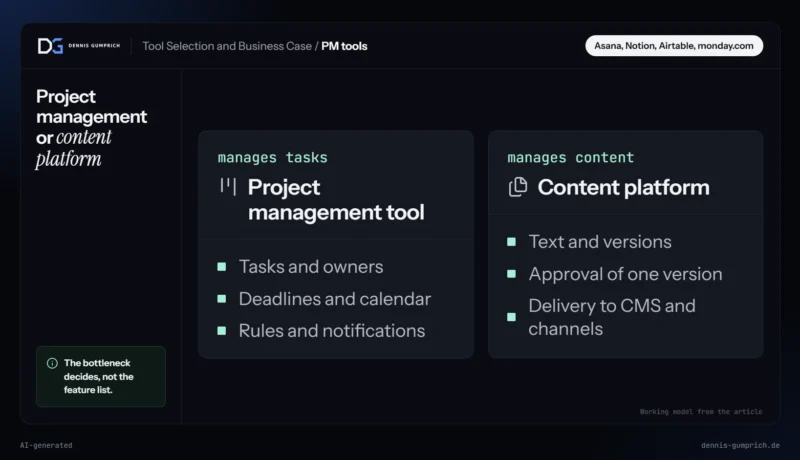
A project management tool such as Asana, Notion, Airtable or monday.com is enough as long as your bottleneck is tasks, deadlines and responsibilities: few channels, one approval stage, a team working among itself. A specialized content marketing platform pays off when the bottleneck is the content itself: brand voice, AI with company context, approvals on one text version, delivery to channels and the CMS. As a working model: once two thresholds are exceeded for channels, people involved, approval stages, volume or languages, you should test a platform.
Asana or a specialized content marketing platform for our team?
That depends on where your effort arises. If it lies in tasks, deadlines and responsibilities, a project management tool like Asana is the more economical choice, especially since it is often already in place. If it lies in the content itself, meaning creating, reviewing, deriving and delivering texts, a project management tool only manages the shell around the actual problem.
Both categories overlap on the surface: calendar, status, comments, responsibilities. The difference lies in the object. A project management tool manages tasks, and a piece of content is a task with an attachment there. A content platform manages content, and a task is a step in the life cycle of a text there. All further differences follow from this shift.
| Feature | Project management tool | Content platform |
|---|---|---|
| Object | Task with deadline and owner | Content with versions, channel versions and status |
| Location of the text | Usually a linked document or an attachment | In the tool, directly on the item |
| Approval | The task is approved, partly with annotations on files | A version of the text is approved, with history |
| AI | General assistance with context from the workspace | Creation with stored brand voice, audiences and review criteria |
| Delivery | Via integrations or by copying | Handover to CMS and channels as part of the workflow |
| Reporting | On-time delivery, workload, open tasks | Depending on the vendor, additionally lead time and metrics per piece and channel |
| Typical examples | Asana, Notion, Airtable, monday.com, Trello | contentbird* |
The question in the headline is therefore less a tool question than a question about the bottleneck. The fundamental trade-off between individual tools and a platform, with the tipping point at the number of handovers, is covered in Individual tools or platform: when switching pays off. This article focuses on the most common starting point: a project management tool is already there, and the question is whether it is enough for content.
What can Asana, Notion, Airtable and monday.com do for content teams?
More than they are often given credit for. All four map an editorial calendar with status, deadlines and responsibilities, and all offer automations that notify on status changes or pass items on. Asana has approvals as a separate task type, in Notion the draft can be written directly in the calendar entry. The differences lie in the details and in the pricing plan.
The following overview reflects only what the vendors themselves describe on their help and product pages. It is not an evaluation and not a complete feature list. Trello is added because it is frequently mentioned in searches for an editorial calendar.
| Tool | What the vendor pages document | What remains open for content |
|---|---|---|
| Asana | Template for an editorial calendar with calendar view and fields for channel, content type, status and approval status. Approval as a task type with the responses Approve, Request changes and Reject. Annotations directly on PDF and image files in certain paid plans. Rules made of trigger and action, for example for reminders. | The task or an attached file gets approved. You have to regulate yourself which text version is valid. |
| Notion | Calendar view for databases with at least one date property. Each entry is a page that can hold the briefing and draft. Notion AI searches the workspace and connected apps within permissions and fills database fields such as summaries, according to Notion in the Business and Enterprise plans. | Approval stages with deadlines and delivery to channels are not part of the described editorial calendar and have to be built yourself. |
| Airtable | Calendar element in interfaces that shows records with a date field and lets you move them with the right permissions. Automations with triggers such as a changed record and actions such as email, Slack or Teams messages, with a limited number of runs per month depending on the plan. | You design and maintain the data model, approval logic and interfaces yourself. |
| monday.com | Template for a content calendar with status per piece, calendar view, reminders and forms. Automations that notify on a status change, shift dates or move items. For approvals with annotations on the document, versions and comparison, monday.com refers to the integration with the PageProof app. | Approval on the document runs via an add-on app. Text and brand voice live outside. |
| Trello | Calendar view for cards and checklists with dates, according to Atlassian only in the Premium and Enterprise plans. | The pages reviewed do not describe a dedicated approval feature. |
Two points deserve a closer look, because they regularly come up in searches such as "Asana content approval" or "Notion editorial calendar".
First, approval. In Asana, an approval is a task type with three responses. According to Asana's help center, annotations can be placed at exact spots in PDF, PNG, JPG, GIF and BMP files, and each annotation becomes a subtask. For graphics, ads and designed PDFs that is a usable review path. For an expert text revised in three rounds, it remains open which text version was approved in the end, unless you ensure that yourself through files and naming rules.
Second, the location of the text. Notion differs from the other tools here: every entry in a calendar or board database is a full page that can hold the briefing, outline and draft. Plan and text are therefore in one place. What is missing are the parts a content platform brings around the text: approval stages with deadlines, stored brand voice as a requirement and handover to channels.
Where do project management tools end for content?
At the points where it is about the text itself and not the task around it. There are six typical limits: the content lives elsewhere, the brand voice is not stored, the AI only knows your context as far as it is maintained in the workspace, the handover to channels and CMS is manual, versions are not attached to the text, and reporting counts tasks instead of content.
| Limit | What happens in operation | How to cushion it in the PM tool |
|---|---|---|
| 1. Content lives elsewhere | Between task and text there is a link, a search or an attachment | Fixed filing scheme and exactly one link per task |
| 2. No stored brand voice | Everyone writes and reviews by their own understanding | Brand guidelines as a linked page in every briefing template |
| 3. AI without binding context | Drafts sound generic, technical details get added instead of sourced | Maintained knowledge pages the AI may access |
| 4. Handover to channels and CMS | Approved text is copied, formatting is rebuilt | Integrations or automation services, if the CMS supports them |
| 5. Versions on the text | Unclear which version was approved | Approval only on one named version, archive older versions |
| 6. Content-specific reporting | Completed tasks are visible, not lead time per piece or impact per channel | Own date fields for start, approval and publication, analysis via export |
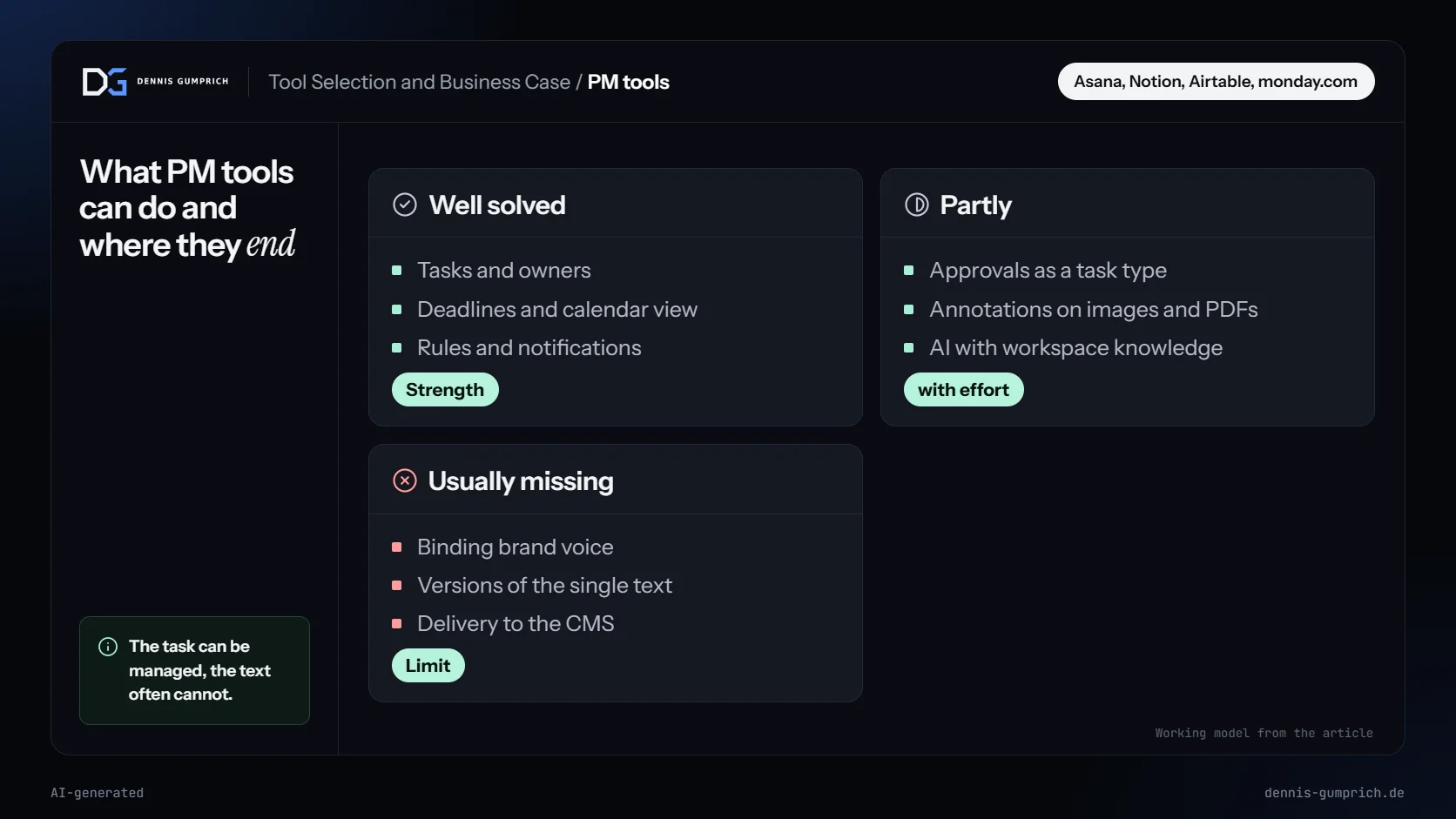
With AI, the situation has shifted in recent months, and a fair assessment has to take that into account. Notion describes that Notion AI searches the workspace and connected apps, limited to what the respective person is allowed to see. Asana shows in its own examples AI teammates that work with task descriptions, linked guidelines and existing articles and submit drafts for review. So the context is there if you maintain it. The difference from a content platform lies in whether brand voice, audiences and review criteria apply as fixed requirements to every draft or whether every person has to keep them in mind when phrasing the request.
That the process question overrides the AI question is also shown by Gartner's 2026 CMO Spend Survey: the 401 CMOs surveyed put 15.3 percent of their marketing budget into AI, but only 30 percent consider themselves ready to scale AI capabilities. How to store brand voice so that it applies independently of the individual person is described in Storing brand voice.
The handover to the CMS is the limit that is least noticeable in the project management tool, because it happens after the last task. The task is done, the text is copied, subheadings, links and captions are rebuilt. What that costs per article and how it works without copying is covered in The last mile: approved content into the CMS without copy and paste.
When is a project management tool no longer enough?
When at least two of five thresholds are exceeded: four or more channels, ten or more people involved including subject matter experts, three or more approval stages, 40 or more pieces a month, three or more languages or markets. A single value does not justify a switch. The thresholds are a working model from consulting practice, not a collected measurement.
Behind every threshold is the same mechanism. With every additional channel, every further person and every further approval stage, the number of handovers grows faster than the number of pieces. A project management tool maps every handover as a task and stays clear doing so. What it does not map is the relationship between the pieces: which channel version comes from which approved version and which translation needs to be updated when the source text changes.
| Criterion | PM tool is enough | Borderline | Test a platform |
|---|---|---|---|
| Channels per topic | 1 to 2 | 3 | from 4 |
| People involved per piece, including subject matter experts | Team among itself, up to 5 | 6 to 9 | from 10 or with external approvers |
| Approval stages | 1 | 2 | from 3 or regular legal review |
| Pieces per month, channel versions included | up to 15 | 16 to 39 | from 40 |
| Languages or markets | 1 | 2 with a translation service | from 3 |
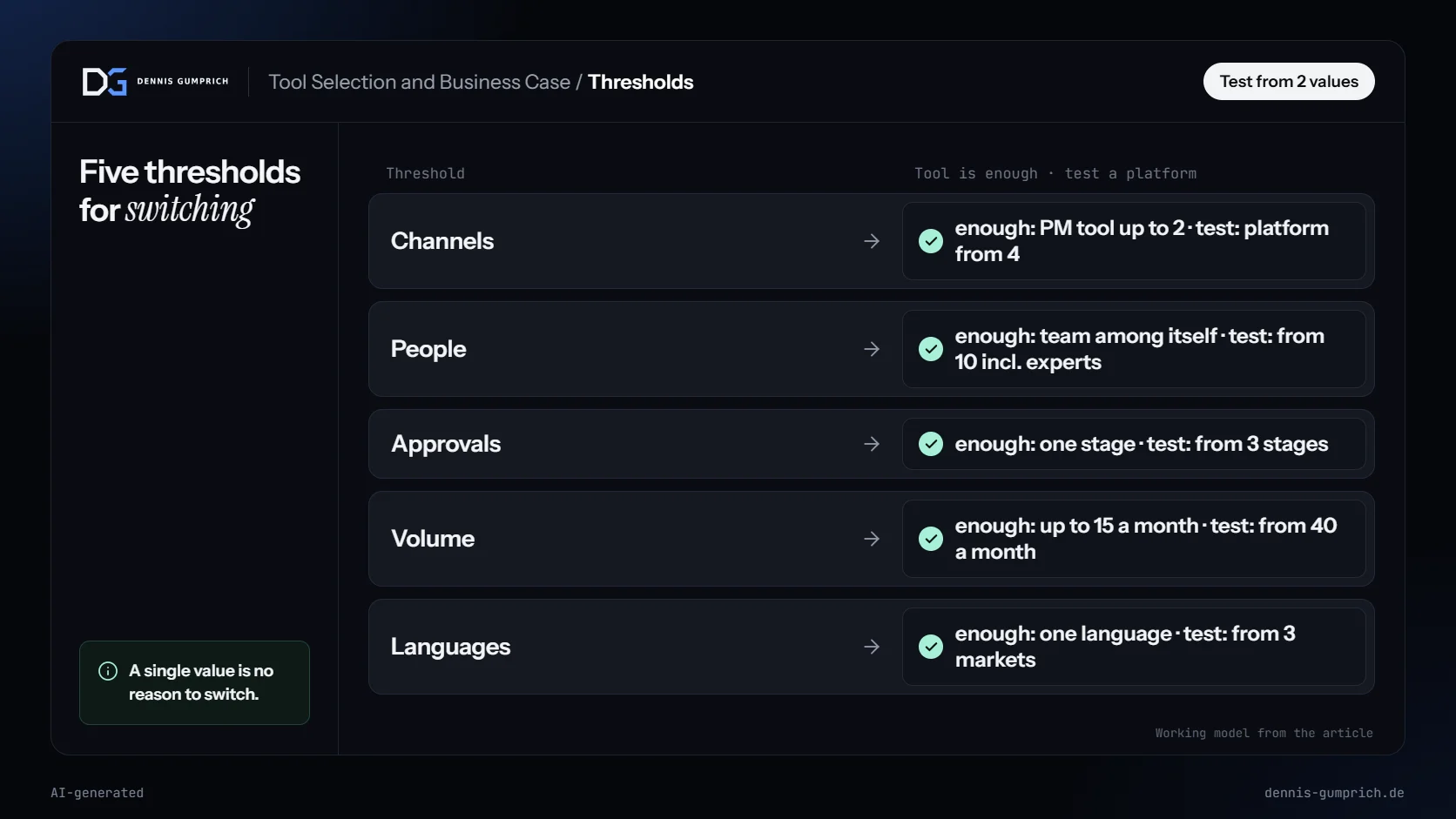
Count channel versions too. An expert article from which a LinkedIn post, a newsletter section and a version for sales are created counts as four pieces for the threshold, not one. Exactly these derivations make the difference between 15 and 40 pieces a month in many teams.
The thresholds tie in with the assessment of Excel planning: the spreadsheet holds up to about five people involved, the project management tool much further, as long as the bottleneck is coordination. With multi-stage approvals, a second factor comes in. In Cision's study Inside PR 2026 (press release in German), 53 percent of the roughly 600 PR professionals surveyed cite slow approvals as an obstacle. How to streamline stages and deadlines regardless of the tool is covered in Approval processes: why three weeks is normal and how to halve it.
We still organize our editorial plan in Excel. Which tool helps?
The tool that solves your biggest bottleneck, not necessarily the one with the most features. If responsibility and history are missing, a project management tool helps, and you often already have one. If the connection between plan and text is missing because content is created in several channels and languages, you are better off skipping this stage and testing a content platform directly.
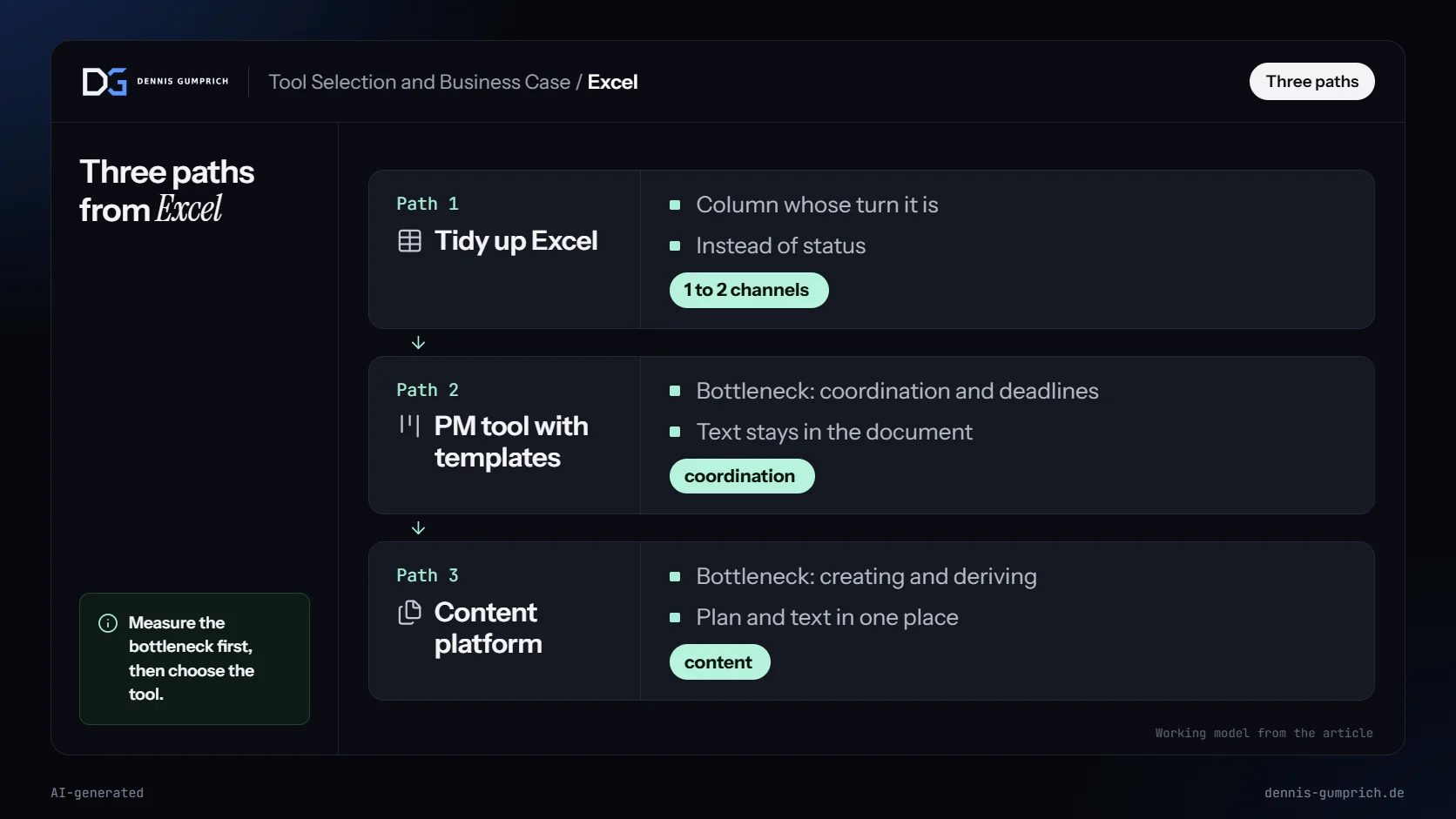
From the spreadsheet there are three sensible paths, and none is right in principle.
Path 1: tidy up Excel. With one to two channels and a small team, a better spreadsheet is often enough: a column "whose turn is it" instead of "status", one row per topic, a fixed shared maintenance slot. What that looks like in concrete terms and why the spreadsheet fails from three channels is covered in Content planning in Excel: why it fails from three channels. The free editorial plan template 2027 works as a starting point.
Path 2: project management tool with templates. If coordination and deadlines are your bottleneck, a project management tool solves three typical breaking points of a spreadsheet: responsibility, history and notification. The text stays in the document, the way there gets shorter. If the tool is already in place, procurement and a new data protection review are not needed.
Path 3: content platform. If your effort lies in creating, deriving and finding content, a project management tool just moves the problem into another window. Then it is worth testing a platform directly, in which plan, text, approval and delivery are connected.
Regardless of the path, it pays to look at the planning logic before moving. An editorial plan that only manages dates becomes a list in any tool. How to get from a schedule to a plan that steers topics by goal and impact is described in From editorial plan to topic plan.
The consultancy Mediamoss describes this difference in the article "Die vier Werkzeuge im Corporate Newsroom" (in German) from May 2026. Planning tools that cover several time horizons and are linked to the topic architecture are considered much more efficient there than Excel lists or individual calendars. This is consulting experience without published figures and comes from the context of corporate newsrooms. For you this means: when moving, check whether the new tool manages topics across several time horizons and not just dates.
What does software for content production with roles, status and an approval process need to do?
Seven things: roles with different permissions, a status model per content type, deadlines with deputies, approval of one named version with history, simple access for people who only approve, stored brand voice and handover to channels. Project management tools usually cover the first three completely, the rest partly or via add-on tools.
| Requirement | How you recognize it in a test | Typically in a PM tool |
|---|---|---|
| Roles and permissions | The subject matter department can comment but not publish | solved |
| Status model per content type | Social post and expert article go through different stages | solved via projects or templates |
| Deadlines and deputies | Every stage has a date and a second responsible person | Deadlines and rules solved, deputies by hand |
| Approval of one version | You can prove which text was approved | partly, via files and annotations |
| Access for approvers | Those who only approve find their way without training | depends on tool and license model |
| Stored brand voice | A new draft follows the guidelines without asking | via linked documents |
| Handover to channels and CMS | The approved text arrives without copying | via integrations or not at all |
The terms "status" and "approval" sound the same in both categories but mean different things. In every demo, ask what an approval refers to: a task, a file or a version of the text. The answer says more about suitability for content than any feature list. How to structure the entire selection, from clarifying needs to the shortlist, is covered in Choosing content marketing software for teams.
One point is regularly underestimated in the selection: the people who only approve. Subject matter departments, legal and management open the tool a few times a month. If they need training for it or a license is missing, the approval lands back in the inbox, and the best status model loses its value. So test this path with exactly the people who will use it later.
What intermediate paths are there between a project management tool and a content platform?
Two that hold up in practice: extend the existing project management tool with good templates, or connect both tools with a clear division of labor. The first path pushes the thresholds upwards. The second leaves campaign and resource planning where it runs today and moves only content work into a platform.
Intermediate path 1: project management tool plus templates. Most of the limits in the table above cannot be removed but can be cushioned considerably. Four templates that every new task brings along automatically are decisive.
- Template 1BriefingGoal, audience, core message, sources and a fixed link to the brand guidelines. Anyone creating a briefing without these fields sees it immediately.
- Template 2Status model per content typeA social post from an approved core does not need its own approval stage, an expert article with product claims needs two. Set up separate workflows for this instead of a one-size-fits-all board.
- Template 3Approval taskDeadline, named deputy, scope of review and a link to exactly one version of the text. Older versions get archived, not attached.
- Template 4Review criteriaA short checklist per content type that is worked through before approval. A template for this is offered in Review criteria for AI texts.
Intermediate path 2: integration with a clear division of labor. Many companies manage campaigns, budgets and resources across departments in a project management tool. This management does not have to move. A division of labor holds up: the platform manages the content with text, versions, approvals and delivery, the project management tool manages dates and dependencies at campaign level. Both are connected via interfaces or automation services, so that a status change on the content updates the task in the project management tool. What needs to be clarified technically is described in MCP or API.
For intermediate path 2, define in writing which system leads for which information: dates in the project management tool, text version and approval status in the platform. A status maintained by hand in two systems is wrong in at least one of them after a few weeks.
In his article "Themenplan, Content-Plan, Redaktionsplan" (in German) from March 2026, consultant Robert Weller recommends a single point of truth: one database with several views for the strategic, tactical and operational planning level. He also warns of an institutionalization risk when positioning exists only in the heads of individual people and gets lost when staff change. This is an expert opinion, not a survey. For you this means: even if you use two systems, every piece of information needs exactly one leading place from which all other views are fed.
How do you test the decision before you make it?
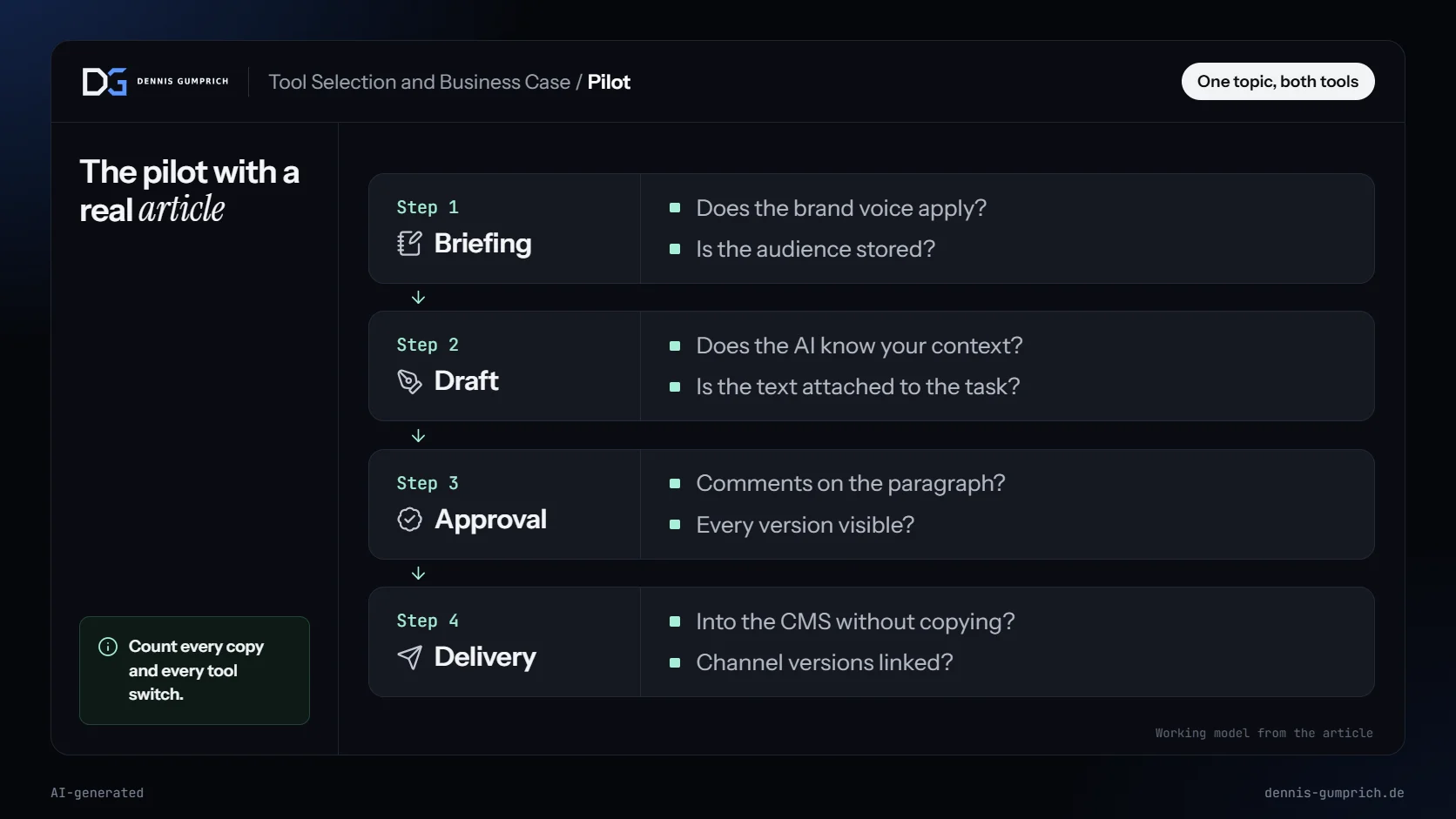
With a real article that goes the entire way in both variants: briefing, draft, approval and delivery to at least two channels. Count every copy, every switch between tools and the calendar days from briefing to publication. These three numbers decide, not the impression from a demo.
- Step 1BriefingCheck whether brand voice and audience apply without asking or whether someone has to dig them out of another document.
- Step 2DraftCheck whether the AI knows your context and whether the text sits on the item or is created in yet another window.
- Step 3ApprovalCheck whether comments on the paragraph are possible and whether you can prove which version was approved.
- Step 4DeliveryCheck whether the text gets into the CMS without copying and whether the channel versions stay connected to the approved core.
Then extrapolate the difference to your annual volume. A calculation example: with 40 pieces a month and 15 minutes for copying and reformatting per piece, that is ten hours a month, or 120 hours a year, just for the last mile. Realistic values for the other process steps are in What does a content workflow tool really save? With the ROI calculator (in German) you can run this calculation with your own values. How to turn the test into a rollout that lands with the team is covered in Pilot and rollout.
Five mistakes when choosing between a project management tool and a content platform
- Comparing feature lists instead of bottlenecksBoth categories have calendars, status and comments. The list says nothing about what an approval refers to and where the text lives.
- Never setting up the existing tool properlyUsing Asana or Notion without templates, status model and review criteria does not test the tool but the lack of structure.
- Not counting channel versionsVolume is counted by topic, effort arises per version. That keeps the actual load invisible.
- Asking approvers only after the decisionThose who only approve decide on acceptance. Test the approval path with the people who will use it later.
- Running two systems without a leading sourceIf status is maintained in both, soon nobody trusts either. Define beforehand which system applies to which information.
Disclosure
I work for contentbird, which is named in the content platforms category in this article. The same five thresholds and the same test with a real article apply to contentbird as to any other platform. If your values are below the thresholds, a well set-up project management tool is the more economical choice.
Self-check: do you have the basis for the tool decision?
Tick everything that applies to you.
A short assessment of whether our project management tool is enough for content:
The tool reliably manages tasks, deadlines and responsibilities. But our effort increasingly arises at the text itself: versions, approvals, channel derivations and transfer into the CMS run outside the tool and by hand.
Proposal: we apply five thresholds to our numbers (channels, people involved, approval stages, volume, languages). If two or more are exceeded, we test one real article once in the existing tool with improved templates and once in a content platform.
The decision is based on three numbers from the test: copy operations, tool switches and calendar days from briefing to publication. The effort for the test is a few days.
Conclusion: name the bottleneck first, then the tool
Asana, Notion, Airtable and monday.com are not a stopgap for content teams. They reliably manage tasks, deadlines and responsibilities, offer calendars, automations and in some cases approvals, and they are often already in place. As long as your bottleneck is coordination, they are the more economical choice with good templates. Which building blocks a content operation needs regardless of the tool is covered in Content operations: what it is, what it consists of and how to build it.
A content platform pays off when the effort arises at the text: in brand voice, versions and approvals, channel versions, languages and handover to the CMS. Five thresholds and a test with a real article show whether you have arrived there. How project management tool and platform work together in the bigger picture of tool selection is described in Individual tools or platform.
Frequently asked questions
Can Notion replace a content marketing platform?
For small teams with few channels often yes, because plan and draft can sit on the same page in Notion. With several approval stages, languages and channel versions, you have to build and permanently maintain approval logic, brand voice and delivery yourself. Then this maintenance effort is the real price.
Is Asana's approval feature enough for content?
For designed content such as graphics, ads and PDFs often yes. Asana offers approvals as a task type and annotations directly on image and PDF files, according to Asana's help center in certain paid plans. For expert texts with several revision rounds, the fixed link to the text version is missing, which you then have to establish via files and naming rules.
Can we use Asana and a content platform in parallel?
Yes, and in larger organizations that often makes sense. Campaigns, budgets and resources stay in the project management tool, text, versions, approvals and delivery run in the platform. The prerequisite is a clear rule on which system leads for which information, and a connection via interfaces instead of double maintenance.
Are monday.com or Airtable better suited for content than Asana?
That depends less on the tool than on your structure. Airtable gives the most freedom in the data model and requires the most own setup in return. monday.com comes with a ready-made content calendar template and refers to the PageProof add-on app for approvals with annotations on the document. The limits at the text apply equally to all three.
What does switching to a content platform cost?
Prices differ by vendor, number of users and modules and change frequently, so this article does not name any. Instead, calculate the other side: the hours for copying, coordination and searching per piece, extrapolated to your annual volume. The ROI calculator (in German) lets you do this with your own numbers.
Where does your content process lose time today?
In 30 minutes, we look together at where unnecessary coordination, manual tasks, tool switching or repetitive content work cost you time today.
You get a concrete assessment of which tasks you can simplify, automate or organize better, and where AI and tools actually help instead of adding complexity.
Analyze your content process in 30 minutes Free of charge. You take away concrete starting points you can use internally right away.
Dennis Gumprich
Dennis helps marketing and communication teams fit generative AI into existing content processes without undermining quality, brand voice and approvals. Focus areas: content operations, AI governance and tool selection in mid-sized companies and corporations.
Transparency note: Dennis works for contentbird, a provider of AI-powered content software. Product mentions are marked in the article. More about Dennis (in German) · LinkedIn
Read more
Sources
- Asana Help Center: Giving feedback and approvals. help.asana.com. Accessed October 31, 2026.
- Asana: Rules, workflow automation. asana.com. Accessed October 31, 2026.
- Asana: Editorial content calendar template. asana.com. Accessed October 31, 2026.
- Asana: The three marketing roles we're powering with AI Teammates. asana.com. Accessed October 31, 2026.
- Notion Help Center: Calendar view databases. notion.com. Accessed October 31, 2026.
- Notion: How to create a content calendar for your marketing team. notion.com. Accessed October 31, 2026.
- Notion Help Center: What is Notion AI? and Notion AI for databases. notion.com. Accessed October 31, 2026.
- Airtable Support: Interface element: Calendar. support.airtable.com. Accessed October 31, 2026.
- Airtable Support: Getting started with Airtable automations. support.airtable.com. Accessed October 31, 2026.
- monday.com: Content calendar template. monday.com. Accessed October 31, 2026.
- monday.com: Simplify approval process. monday.com. Accessed October 31, 2026.
- monday.com Support: Status change automations. support.monday.com. Accessed October 31, 2026.
- Atlassian Support: Trello calendar view. support.atlassian.com. Accessed October 31, 2026.
- Gartner: 2026 CMO Spend Survey, press release from May 11, 2026, 401 CMOs surveyed. gartner.com. Accessed October 31, 2026.
- Cision: Inside PR 2026, press release via PR Newswire (German edition), around 600 PR professionals surveyed in the US and the UK. prnewswire.com (in German). Accessed October 31, 2026.
- Nils Becker, Mediamoss: Die vier Werkzeuge im Corporate Newsroom (in German), blog post from May 21, 2026: four tools (conferences, topic planning tool, content strategy, planning process), conferences across several horizons from the year down to the daily morning briefing; if a tool is missing, lead times and coordination loops get longer; planning tools with several time horizons linked to the topic architecture are considered much more efficient than Excel lists or individual calendars. Self-publication of a consultancy, consulting experience without figures. Accessed October 31, 2026.
- Robert Weller, Toushenne: Themenplan, Content-Plan, Redaktionsplan (in German), article from March 12, 2026: three planning levels (strategic; tactical with three to six months including revisions, audits and repurposing; operational with a few weeks); production, strategy and institutionalization risk, the latter when positioning exists only in the heads of individual people; recommendation of a single point of truth as one database with several views. Opinion and expert article by an independent consultant who names contentbird as a project reference. Accessed October 31, 2026.
How this article was created
This article was created with the help of AI. Structure, research and draft wording were developed with AI support. Professional assessment, review of the statements and the final version are the responsibility of Dennis Gumprich. The English version was translated with AI and reviewed. Read the original German version.
How reliable are the statements?
Backed by sources are the feature details on Asana, Notion, Airtable, monday.com and Trello from the vendors' help and product pages as of October 31, 2026, and the figures from Gartner and Cision with linked sources, as well as, as expert opinions, the assessment of the consultancy Mediamoss on planning tools with several time horizons (consulting experience without figures) and the recommendation of a single point of truth by Robert Weller (article by an independent consultant who names contentbird as a project reference). Features and plan assignments change frequently, check them in your own test. The five thresholds, the classifications in the tables and the test with a real article are working models from consulting practice, not collected measurements. The calculation example on copying effort is based on assumed values for illustration.