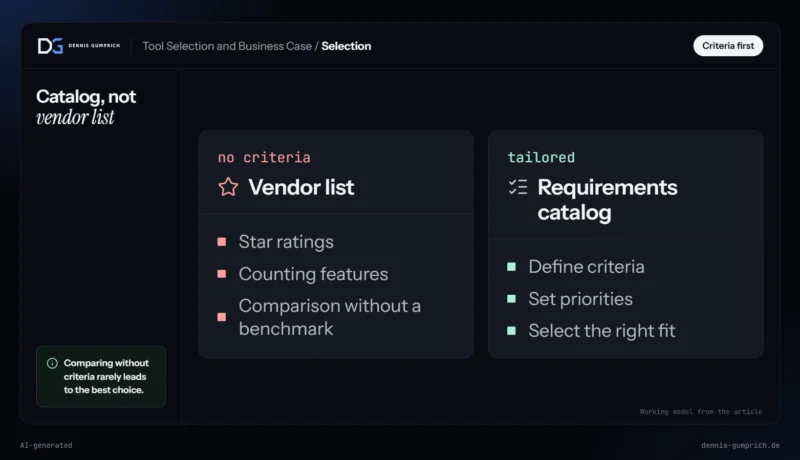

Vendor lists answer what software can do. A good requirements catalog answers how you decide.
A reliable requirements catalog for newsroom software does not come from vendors' feature lists, but from your decision paths. In practice, six blocks tip the balance: topic management, roles and permissions, production and channels, AI governance, integrations and compliance. The award is rarely decided by a single feature, but by whether the system reflects your approval chain and your readers without license costs spiraling out of control.
The following sections show how to fill the six blocks with your own decision paths. First, a clarification so it is clear what kind of software this is about.
What is newsroom software, and what types are there?
Newsroom software is software with which companies or editorial teams centrally plan, create and publish news and content. The term covers three different categories: the online newsroom as a press portal on the website, software for steering a corporate newsroom and editorial systems in media companies. This article covers the second category.
| Type | What it is for | Typical users |
|---|---|---|
| Online newsroom (PR newsroom) | Publishing press releases, images and contacts | Press offices, corporate communications |
| Steering software for the corporate newsroom | Steering topics, channels, roles, approvals and production across all channels | Communication and marketing teams |
| Editorial system in journalism (newsroom computer system) | Managing wire reports, broadcast rundowns and stories in media companies | Newspaper, TV and radio newsrooms |
What this article covers, and what it doesn't
Newsroom software is a category of its own and not the same as an editorial calendar or a content marketing tool. The difference is not one of degree, but structural: an editorial calendar shows what appears when and where. A newsroom system shows who decides on a topic before it even has a channel.
This leads to the most important sentence for the entire selection: the software must reflect your decision paths, not your channel list. If you only compare channels, you end up buying a publishing tool and wonder why alignment takes just as long as before. Which prioritization criteria a system must support for this is described in Topic scoring: the criteria that make topics comparable.
If you are still facing the organizational question, meaning it is not yet clear who prioritizes topics and who decides in a conflict, then tool selection is the wrong next step. This order is not theory: in the selection processes I support, the newsroom idea was almost always already in place or at least the goal before anyone looked for a system. The tool decision follows the organizational decision, not the other way round. What that organizational decision looks like is described in the article on the corporate newsroom as a steering model.
Not covered here is the question of whether you need a platform at all or can get by with individual tools. That needs to be settled one step earlier. Nor is this about content marketing software for teams, which is a different market with different buyers.
Where the criteria come from
The criteria in this article do not come from vendor brochures, but from selection processes I support in my consulting practice. These are conversations with communication and marketing leaders across industry, the public sector, tourism, insurance, publishing and consulting, from two-person teams to departments with several dozen people involved.
This includes a disclosure you should take into account: I work as a Senior Consultant at contentbird, a vendor in exactly this market. The conversations I refer to are consulting conversations ahead of a system decision. This creates a bias I don't want to explain away: anyone seeking advice already has a problem. Organizations whose existing way of working holds up don't appear in such conversations.
What can be derived from this are recurring patterns in requirements and procurement processes. What cannot be derived are market shares, satisfaction scores or any statement about which system is better. That is why this article deliberately contains no vendor comparison and no product recommendation, not even for my employer's system. It provides the structure with which you compare yourselves.
What the tool landscape actually looks like today is shown by the Corporate Newsroom Study 2026 (in German): alongside specialized newsroom solutions, standard tools such as Excel, Outlook and Teams still carry a large part of planning and coordination, plus chat-based AI tools. The researchers conclude that newsrooms depend on several tools working together, not on a single system. For your catalog, this means: interfaces and data exchange deserve the same weight as feature scope.
The Mediamoss assessment model offers a second point of comparison. The consultancy's Corporate Newsroom Score checks seven criteria: strategy, transparency, planning and data, steering, topic management, media management and creative management. In the Mediamoss study "The Corporate Newsroom Effect" (in German) from October 2026, with before-and-after values for 76 institutions, of all things the planning and data area developed weakly after implementation: insights from performance measurement often do not flow back into topic selection. This leads to a check question for the demo: can results be assigned to the individual topic and found again in the next planning round, or does the system only show channel metrics? A caveat: Mediamoss itself advises on newsroom implementations and measures with its own model; the study does not mention a control group.
Which requirements belong in a newsroom software catalog?
Six blocks, starting with topic management. That is where it is decided whether a system is a newsroom system or a relabeled calendar. Without a topic hierarchy over several levels, from topic area via topic and story to the individual piece of content, you end up with a flat list again, in which a social post and an annual focus topic sit side by side as equals.
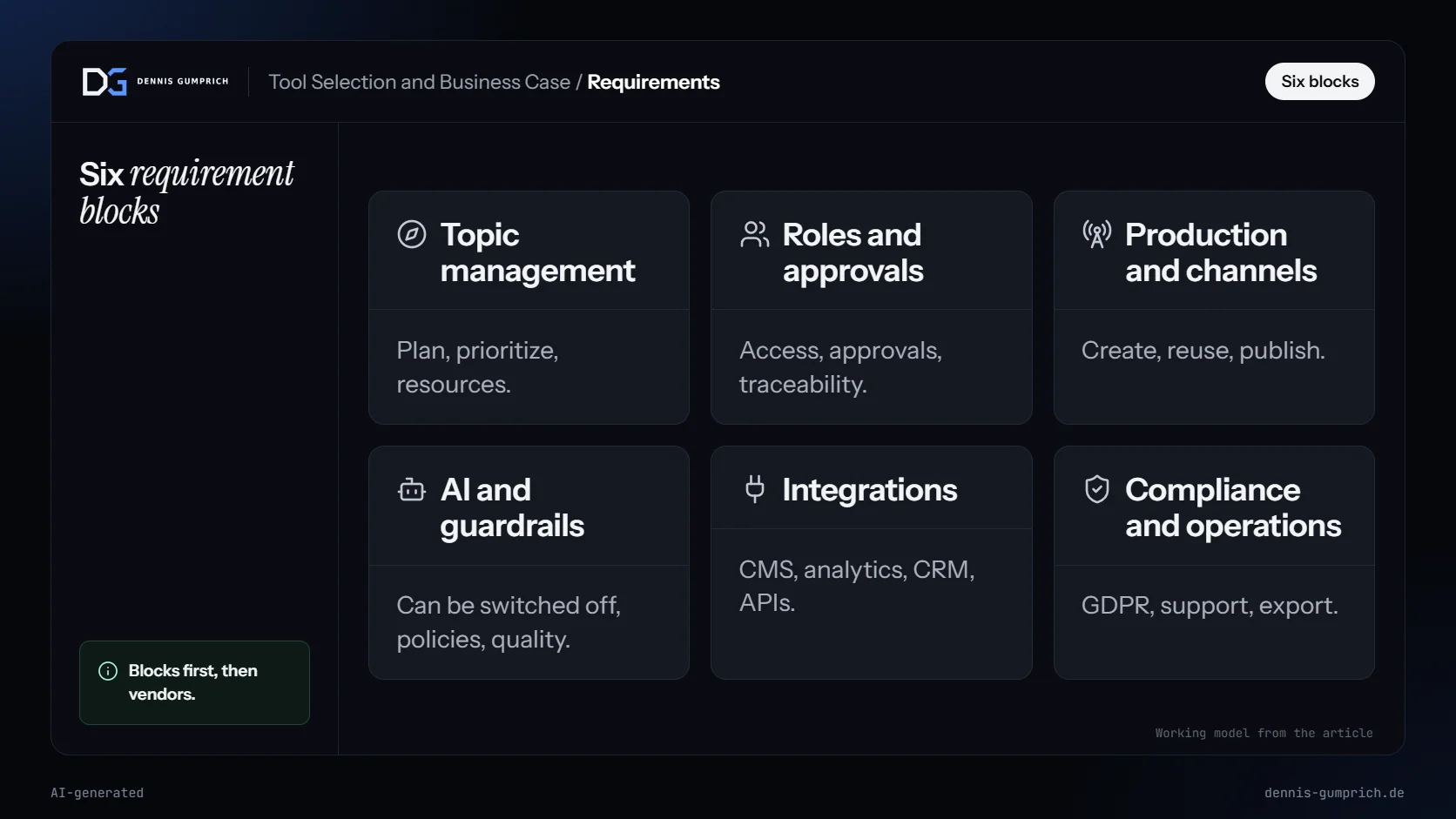
Sorted by what is actually discussed in selection processes, not by what is at the top of product pages.
Block 1: Topic management
This is where it is decided whether the system is a newsroom system or a relabeled calendar.
- Topic hierarchy over several levels. Topic area, topic, story, individual piece of content. Without this separation, you end up with a flat list again, in which a social post and an annual focus topic sit side by side as equals.
- Prioritization with transparent criteria. Topics must become comparable, otherwise the loudest requesting department decides. Whether the system calls it scoring or something else is secondary; what matters is that the criteria are stored and visible to everyone.
- Annual planning and operational calendar in the same system. The most common break in practice: annual planning is created once in a presentation and is out of sight by February. Explicitly check whether the strategic and operational views show the same data.
- Meeting function for different rhythms. Daily, weekly, monthly and quarterly meetings have different participants and different decisions. What is needed is a shareable, filterable view per meeting, not another export into a presentation.
- Audience and journey reference on the topic. So that you can later evaluate whether a topic area actually reaches the intended group.
That it is precisely the connection of time horizons that makes the difference is also described by Nils Becker of Mediamoss in the article "The four tools in the corporate newsroom" (in German) from May 2026. Planning tools that cover several time horizons and are linked to the topic architecture are considered there to be significantly more efficient than Excel lists or individual calendars. In this model, meetings run across the year, quarter, month, week and a daily morning briefing. So check in the demo whether a topic from the quarterly meeting shows up in the weekly view without being transferred. A caveat: this assessment comes from a consultancy's consulting experience and is not backed by figures.
Block 2: Roles, permissions and approvals
The block that is underestimated in feature lists and discussed longest in selection processes.
- Differentiated roles and permissions model. A must-have criterion in almost every selection process. It must be possible to set up one person to plan, another to approve and a third to only read, matching the roles in the newsroom.
- Observer and approver roles without full access. More on this below; it is the single most important point in the entire catalog.
- Configurable workflows per content type. A press release goes through a different chain than a social post. A system with exactly one approval path forces you to apply the slowest one everywhere and unnecessarily lengthens your approval times.
- Involving external participants. Agencies, freelancers, subject matter experts. In conversations, the interface with subject matter experts is regularly the most conflict-prone, more often than the one with the agency.
- Traceability of changes. Who changed and approved what and when. Non-negotiable in regulated environments, and in all others the prerequisite for ending arguments about versions.
Block 3: Production and channels
- Central repository with reuse. The most frequently mentioned concrete feature request of all: deriving further formats from existing content instead of writing from scratch every time.
- Channel coverage including the inconspicuous channels. Website and social are a given, for social including replies to comments and messages via a social inbox. Check whether internal communications, newsletters, press and, where relevant, print are covered as well. Internal communications are often added late to requirement lists, even though they are regularly named as a channel of their own in conversations.
- Templates, including for emergencies. Crisis communication needs prepared processes, not improvisation under time pressure.
- Multilingual and multi-brand capability, if relevant for you. If so, treat it as a knockout criterion and not as a convenience, because retrofitting practically never works here. What the translation process behind it must deliver is described in Marketing content for other markets.
Block 4: AI and its guardrails
Expectations on maturity vary widely. For some organizations, AI is a must-have with immediate need; for others, it is explicitly not decisive for the purchase. On the guardrails, by contrast, expectations are almost uniform.
- Can be switched off. Completely, also per team or per content type.
- No model training on your content. In writing, not as an assurance in a conversation.
- Processing within the European legal area. Regularly a knockout criterion in the public sector and regulated industries.
- Brand guidelines, wording and personas feed into the results. Otherwise you get exactly what many organizations already have without a system: many voices instead of one. The prerequisite is a stored brand voice.
- Traceability, meaning whether it remains recognizable which share of a text was machine-generated.
The most important test for this block: don't let anyone show you AI on a sample text, but on your most unwieldy expert content. That is exactly where it is decided whether the benefit is real and whether the system actually uses your knowledge base.
Block 5: Integrations
- CMS, in practice most often WordPress.
- Web analytics. In the public sector, a privacy-friendly solution is often mandatory instead of the market standard; clarify this early.
- CRM and newsletter systems.
- Internal communication platforms, if you have them.
- Digital asset management, if you maintain your own image and video library.
- Open interface. Even if you don't use it at the start: it is your insurance in case another system is added in two years. Which approach fits is described in the article on MCP or API.
For every integration, check not whether it exists, but what it transfers and in which direction. "Integration available" can mean anything from genuine two-way synchronization to a manual export.
Block 6: Compliance and operations
- Server location in your jurisdiction or the EU.
- Certification to a recognized standard.
- Data processing agreement and completed IT security questionnaire.
- Availability and support commitments, including in which language and at what times.
- Exportability of your data. The question of how you get out again belongs in the selection, not in the termination.
In regulated environments, meaning banks, insurers, public authorities, pharma and non-profit organizations responsible for donations, these points are non-negotiable. If you only check them after the professional decision, you regularly lose weeks. This can be avoided by involving IT and data protection early.
Which newsroom software requirement is most often overlooked?
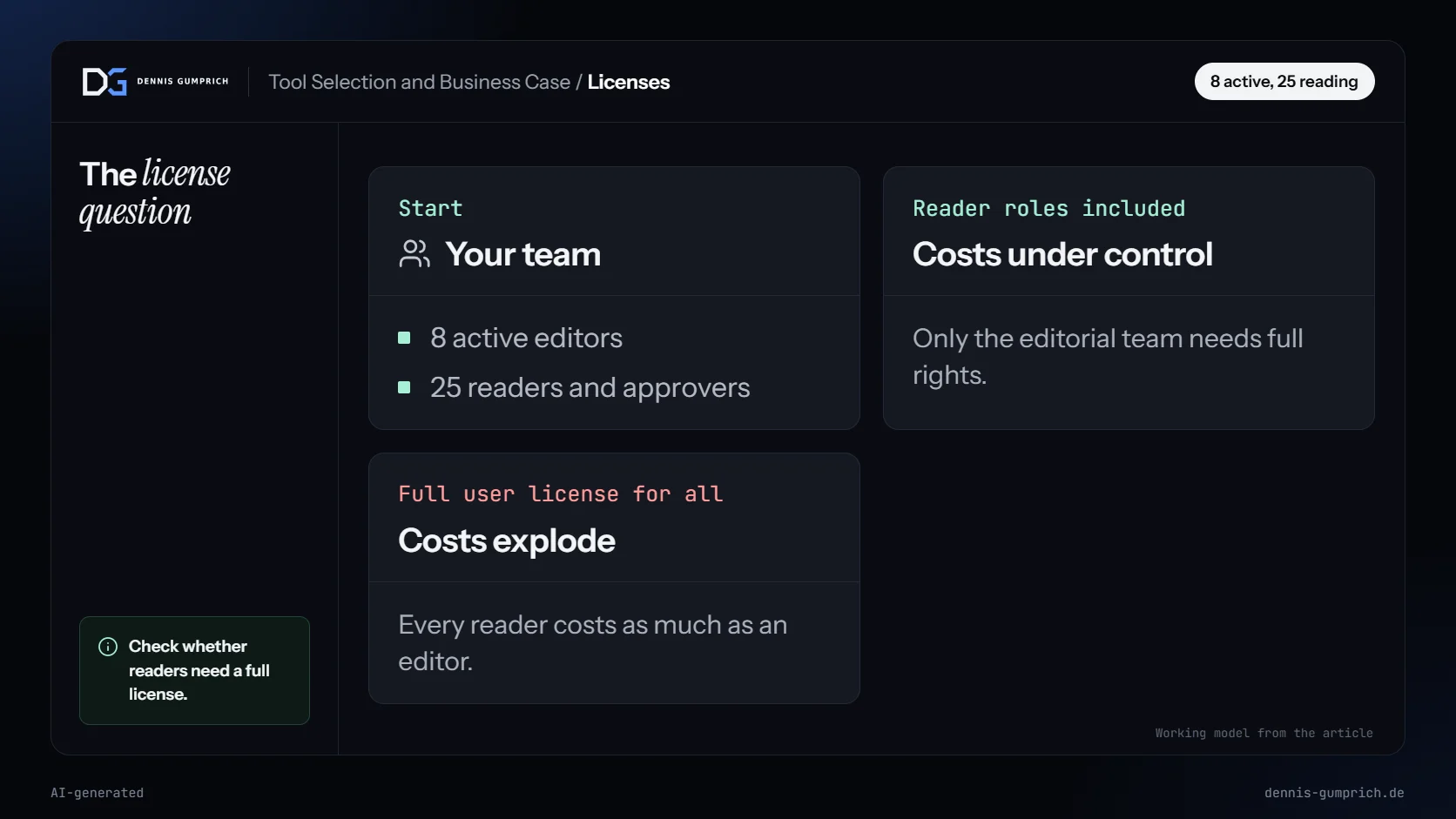
If I had to pick a single criterion from all the selection processes I have supported, it would be this one: how many people have to pay in order to read and approve?
The reason is simple and is still almost always noticed too late. In almost every organization, the number of readers and approvers clearly exceeds the number of active editors. The subject matter experts who check a text for accuracy. The legal department that approves something once a quarter. The division head who wants to see the plan. The external reviewer. These people don't work in the system every day, but without their approval the process stalls.
Do a rough calculation: with eight active editors and twenty-five occasional readers and approvers, the license model makes a difference of a factor of four in price. A system that charges the same license for observer and approver roles as for full users either becomes unaffordable, or you save at exactly the point where the delays arise and keep sending approvals through the company by email.
That is why this question does not belong in the pricing part of your request, but in the requirements part. Phrase it concretely: how many users with read-and-approve-only rights are included in the stated price, and which functions are available to them?
- The last mile into the CMS. Catalogs list planning, workflows and AI, but rarely how a finished text ends up in TYPO3, WordPress or SharePoint. At an industrial supplier, that was exactly the decisive deep dive. At a care portal, a selection failed because this publishing step was missing.
- The weekly meeting itself. People ask about calendars and editorial plans, but hardly about the meeting where decisions are made. A public housing company wants a board with a single question: "Is this due this week, yes or no?"
- Request management. At the housing company, press and stakeholder requests are spread across several Excel lists. Nobody can answer the question "What did outlet X ask about topic Y last year?" today.
- Reading along without login and without a license. Board, legal, experts and agencies should comment and approve, but not have to learn yet another tool.
- Reporting upwards. A press office has so far compiled the monthly report to the board by hand.
How do you weight requirements instead of just collecting them?
With three levels: must, should and could. An unmet must-have criterion excludes the vendor without further assessment. Should-haves are weighted into the score; could-haves don't change the workflow. You should not assign more than ten must-have criteria.
A list of 74 equally important lines is not a basis for a decision. Why feature lists are fundamentally misleading is described in more detail in the article Individual tools or platform. Here, it is about the practical step that turns a collection into a selection: weighting. Three levels are enough.
| Level | Meaning | Consequence in the comparison |
|---|---|---|
| Must | Without this feature, the system cannot be used by us | Not meeting it excludes the vendor, without further assessment |
| Should | Clear difference in daily work, but can be bridged | Weighted into the score |
| Could | Nice to have, but doesn't change the workflow | Recorded, but never decisive |
Two rules make this classification effective.
First: there are no more than eight to ten must-have criteria. If your list contains twenty must-have criteria, you don't have particularly high standards; you haven't prioritized. The test is simple: would you actually reject an otherwise convincing vendor because of this one point? If not, it is not a must.
Second: every criterion needs a check question that can be answered in a demo. "Good usability" is not a criterion. "A person without training creates a topic and assigns it to a topic area in under three minutes" is one.
An Excel template with weighting, knockout logic and demo scenarios is available in the free evaluation matrix for content software.
What appears in requirement lists but never decides
From the conversations, a few points can be named that are regularly weighted highly in requirement lists but still rarely tip the balance.
Feature scope in detail. The award is rarely decided by a single feature. It is decided by end-to-end coverage from planning to evaluation in one system, combined with usability that occasional users can manage too.
The number of integrations. Twenty available connections are useless if the three you need only work superficially.
Pure output volume. More content is not a goal. The situation interviewees describe is almost never too little output as such, but duplicate work because nobody has an overview of what already exists or is being created.
Conversely: what almost never appears in the lists and hurts most later is the implementation effort. How long does it take until the system reflects your structure, who does this work, and what does it cost on top of the license? This question belongs in the request, with a request for a figure rather than an estimate.
- Strategy frameworks. A measurement services provider pays almost 20,000 euros a year for a strategy-heavy tool. The content lead doubts that the team needs the heavy strategy layer in daily work.
- Feature breadth. The longer the list, the greater the team's worry about being overwhelmed.
- Everything in one system. Press distribution lists and newsletter sending are often in the catalog, even though established tools exist for them. A clean handover via an interface is usually enough.
Who needs to be involved in selecting newsroom software?
The professional lead almost always lies with the head of communications or marketing, who also steers the selection. Alongside them are two bodies that are often forgotten in planning.
IT and data protection have a de facto veto, especially for AI features and cloud operation. They don't co-decide on the award, but they can stop any candidate. Involve them before you build a shortlist, not afterwards. How they assess AI software is described in GDPR-compliant content marketing software.
Management or the board gives final approval, often with the condition of bringing in at least one more vendor for comparison. Expect this from the start, then you won't have to construct the comparison retrospectively. In large corporations, procurement is added as a separate body with its own deadlines.
The most common reason selection processes stall is not a content objection. It is that the person driving the process cannot decide alone and has no document with which to convince internally. This document is not created at the end. It is created in parallel, and the requirements catalog is its core.
How to win these groups over for implementation and which arguments hold up in decision meetings is shown in the free white paper Introducing a corporate newsroom.
How does the requirements list become a decision paper?
In seven steps, and step one sets the course, not the demo: take three real processes from recent months and trace who decided what and when. That gives you your criteria. Then weight them, involve IT and data protection in advance and only then approach vendors.
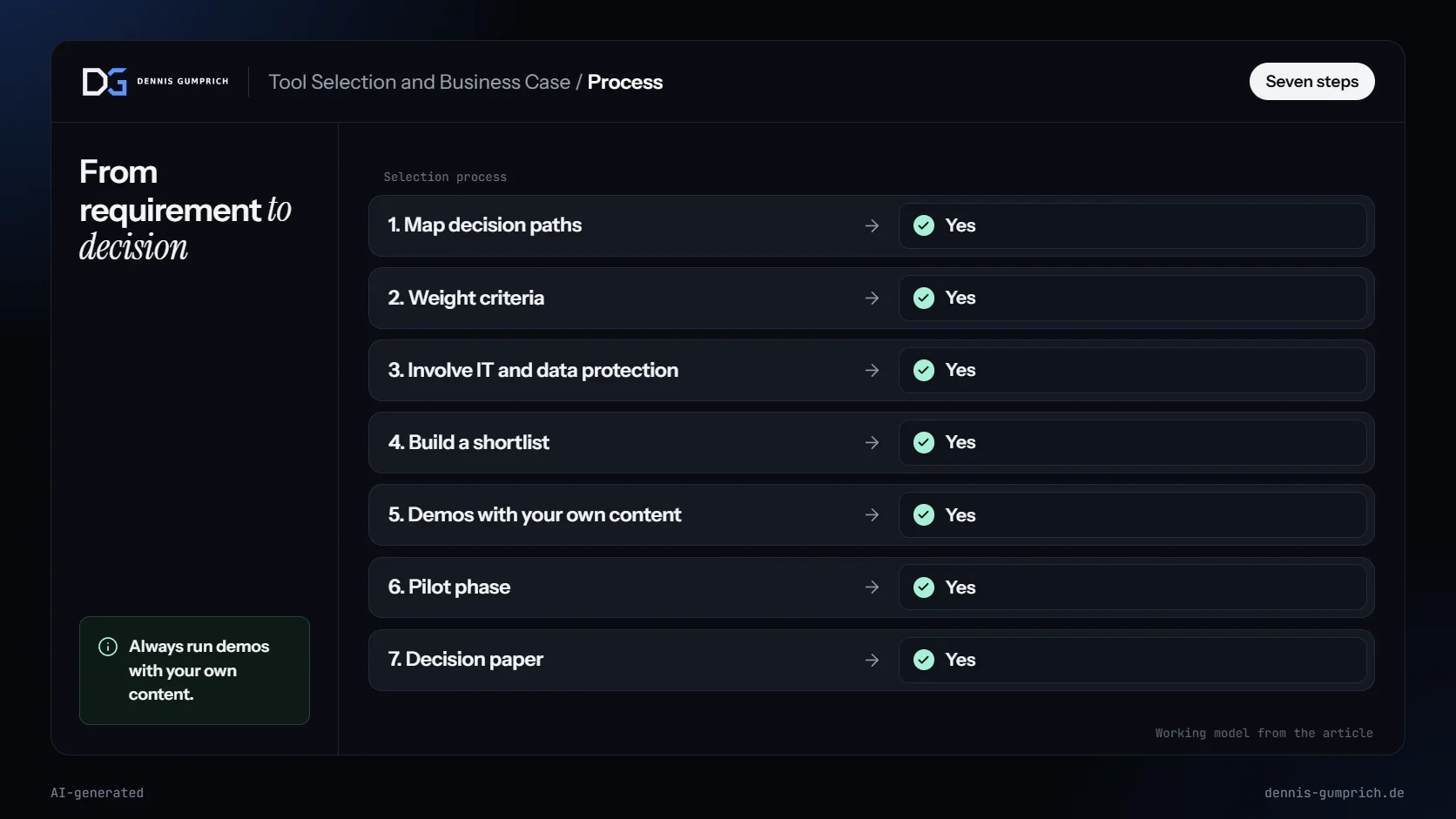
A process that has proven itself in the selections I have supported. The timings are guidelines for mid-sized organizations; in large corporations, every stage takes longer.
- Map decision paths, don't collect features. Take three real processes from recent months and trace who decided what and when. That gives you your criteria.
- Weight criteria. Must, should, could, with a maximum of ten must-have criteria and one check question each.
- Involve IT and data protection in advance. So that the compliance criteria are complete before you approach vendors.
- Market scan and shortlist. Two to three candidates; more makes the comparison blurrier rather than better.
- Demos with your own content. Not with sample data. Give every vendor the same real process and the same check questions.
- Test phase with a small group. What matters is not the duration, but whether one complete process has run from topic submission to evaluation. What matters in pilot and rollout is described there in detail.
- Decision paper. Assessment per criterion, business case, recommendation, named risks. How to put together the figures for it is described in the article on the business case.
Five mistakes that make the selection expensive
- Comparing channels instead of decision pathsThe mistake that sets this category apart from all others. If you check which channels a system serves, you buy a publishing tool. If you check how topics are created, prioritized and rejected, you buy a steering system.
- Only counting full usersThe license mistake from above. It shifts costs and benefits at the same time, because it leaves out precisely the approvers.
- Defining the topic hierarchy only after the purchaseHow you cut topic areas and what separates a topic from a story for you is a content decision. If you leave it to the system, you adopt its logic and later have to rebuild it laboriously.
- Putting compliance at the endA knockout criterion that is only checked after the professional decision costs the entire process.
- Not negotiating the implementation effortLicense prices are comparable, implementation efforts are not, as long as you don't ask for them. That is exactly where the surprises come from.
Self-check: Is your requirements catalog ready for a decision?
Tick everything that applies to you.
a brief note on our selection process for a newsroom system:
We did not compile our requirements from vendor documents, but derived them from three real processes from recent months. This results in at most ten must-have criteria, each with a check question that can be answered in a demo.
One point has a considerable impact on costs and rarely appears in standard offers: in our case, the number of readers and approvers clearly exceeds the number of active editors. Whether observer and approver roles have to be licensed additionally changes the total many times over. We therefore ask this question before the pricing discussion.
We involve IT and data protection before the shortlist, not afterwards, because server location and AI guardrails are knockout criteria and a late check puts the entire schedule at risk.
Conclusion: The list decides before the first vendor speaks
The outcome of a software selection is rarely settled only after the demos. It is settled as soon as it is clear what you compare against. If you go into the first meeting with 74 equally weighted lines, the presentation leads you. If you go in with eight must-have criteria, one check question each and an answered license question, you lead the conversation yourself.
The requirements catalog is therefore not a formality before the actual selection. It is the selection.
Frequently asked questions
How many vendors should be on the shortlist?
Two to three. That is the standard in the processes I have supported, and there is a practical reason: from four candidates on, the depth of comparison per vendor drops so far that the differences can no longer be worked out properly. In addition, management often requires at least one comparison vendor anyway, which sets the lower limit.
What distinguishes newsroom software from an editorial planning tool?
The steering level. An editorial planning tool organizes what appears on which channel and when. A newsroom system starts one level earlier, with the question of which topics are worked on at all and who decides. In practice, you recognize the difference by whether topics can be created, prioritized and rejected independently of channels.
Do we need AI features as a must-have criterion?
That depends on your maturity, and the answers vary widely in practice. How a team's AI maturity develops in phases is shown in The 5 phases of AI transformation. For some organizations, AI is an immediate must; for others, it is explicitly not decisive. Expectations of the guardrails, however, are almost uniform: can be switched off, no model training on your data, processing within the European legal area. These three points belong in the catalog even if you don't want to use AI at first.
How long does such a selection realistically take?
From a few months for smaller teams to one and a half to two years in large corporations. The biggest influence is not the demos, but the review loops with IT, data protection and procurement, and whether your budget cycle happens to fit.
Can we have a vendor create the requirements catalog?
You can, but then you get a list that fits that vendor. The opposite approach makes more sense: you create the catalog from your own processes and have it answered by several vendors. That is also why this article names no vendors.
What if we make the wrong choice?
Then the exportability of your data decides how expensive the mistake becomes. That is why it is at the top of the compliance block. A switch is manageable as long as topics, content and history can be exported in an open format. How such a move works is described in the article on migrating existing content.
Where does your content process lose time today?
In 30 minutes, we look together at where unnecessary coordination, manual tasks, tool switching or repetitive content work cost you time today.
If you are working on a requirements catalog right now, we look at your list together and assess which criteria actually tipped the balance in comparable processes.
Analyze your content process in 30 minutes Free of charge. You take away concrete starting points you can use internally right away.
Dennis Gumprich
Dennis helps marketing and communication teams fit generative AI into existing content processes without undermining quality, brand voice and approvals. Focus areas: content operations, AI governance and tool selection in mid-sized companies and corporations.
Transparency note: Dennis works for contentbird, a provider of AI-powered content software. This article deliberately names no vendors and makes no product recommendation, not even for contentbird. More about Dennis (in German) · LinkedIn
Read more
Sources
- W3Techs: Usage statistics of content management systems, continuously updated survey, as of October 30, 2026: WordPress on 39.5 percent of all websites, 58.2 percent market share among websites with a known CMS. Accessed October 31, 2026.
- European Union: Regulation (EU) 2016/679 (General Data Protection Regulation), April 27, 2016, Art. 28(3): processing by a processor only on the basis of a contract or other legal act. Accessed October 31, 2026.
- European Union: Regulation (EU) 2023/2854 (Data Act), December 13, 2023, applicable since September 12, 2025, Art. 23: obligation for providers of data processing services to enable switching and the export of customer data. Accessed October 31, 2026.
- Tobias Rohrbach, Diana Ingenhoff (University of Fribourg), Mykola Makhortykh (University of Bern), Philipp Bachmann (Lucerne University of Applied Sciences): Ein Modell, viele Wege. Corporate Newsrooms in der Schweiz 2026 (Corporate Newsroom Study 2026, in German), study report, supported by Newsroom Communication, Axpo, SBB and Innosuisse. Online survey of 216 communication leaders in German- and French-speaking Switzerland, November and December 2025, self-assessments; tools and tool landscape pp. 20 to 21. Accessed October 31, 2026.
- Nils Becker, Mediamoss: Die vier Werkzeuge im Corporate Newsroom (in German), blog post of May 21, 2026: meetings, topic planning tool, content strategy and planning process as tools, meetings across the horizons of year, quarter, month, week and daily morning briefing, moderated by the managing editor team; if a tool is missing, lead times and alignment loops get longer; planning tools with several time horizons and links to the topic architecture are considered significantly more efficient than Excel lists or individual calendars. Self-publication by a consultancy, assessment from consulting experience without figures. Accessed October 31, 2026.
- Mediamoss: Neue Mediamoss-Studie: Was bringt ein Corporate Newsroom? (in German), blog post of October 23, 2026 on the study "The Corporate Newsroom Effect" by the Mediamoss Institute, analysis July and August 2026, complete before-and-after pairs of the Corporate Newsroom Score for 76 of 179 institutions: average increase from 2.73 to 7.32 points (scale 1 to 10), assessed against seven criteria (strategy, transparency, planning and data, steering, topic management, media management, creative management), weak development in planning and data, insights from performance measurement often do not flow back into topic selection. Self-publication by a consultancy with its own assessment model, without a control group. Accessed October 31, 2026.
How this article was created
This article was created with the help of AI. Structure, research and draft wording were developed with AI support. Professional assessment, review of the statements and the final version are the responsibility of Dennis Gumprich. The English version was translated with AI and reviewed. Read the original German version.
How reliable are the statements?
Documented are the results of the Corporate Newsroom Study 2026 (self-assessments by 216 respondents in Switzerland), the prevalence of WordPress as a CMS (W3Techs), the obligation to conclude a data processing agreement under Art. 28 GDPR and the data portability obligation when switching providers under Art. 23 Data Act, as well as the seven criteria of the Corporate Newsroom Score, the weak development in planning and data and the assessment of linked planning tools (Mediamoss, self-publications by a consultancy with its own assessment model, without a control group or without figures). The patterns described come from consulting conversations ahead of system decisions. They are experience-based, not measured values, and individual organizations are not named. The article deliberately contains no vendor comparison, no prices and no product recommendation. The calculation with eight editors, 25 readers and the factor of four is a sample calculation. As of October 31, 2026.