
Over the weekend, complaints about a delayed delivery piled up under an Instagram post from Friday. Two of them also came in as direct messages, another via LinkedIn. On Facebook, someone asked for a copy of an invoice and posted their customer number publicly in the comment.
It is unclear who was on duty over the weekend. The colleague who usually keeps an eye on everything is on vacation. Three people now open three different apps, two answer the same message, and the public customer number is still there.
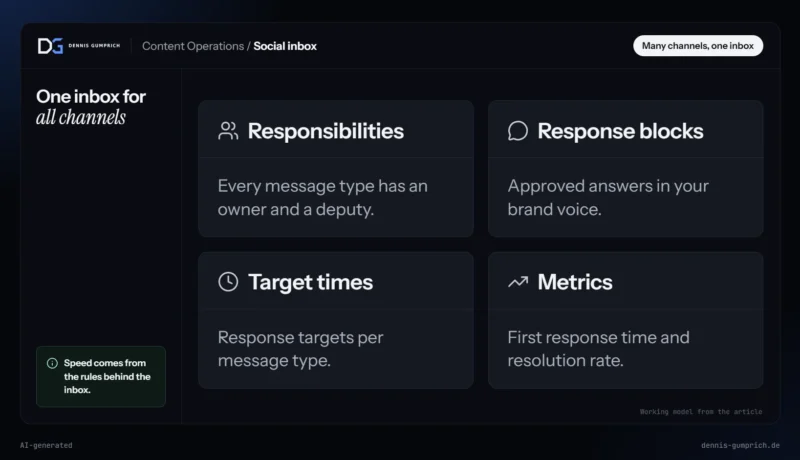
Bundle comments and direct messages from all channels in a social inbox, but first define who answers what. Three things make you faster: clear responsibilities with deputies, response blocks in your brand voice and target times per message type. For Meta channels only, the Meta Business Suite is often enough. With several networks, several people handling messages or handovers to customer service and subject matter departments, a tool with assignment, status and reporting pays off.
How can I handle social media messages centrally and answer them faster?
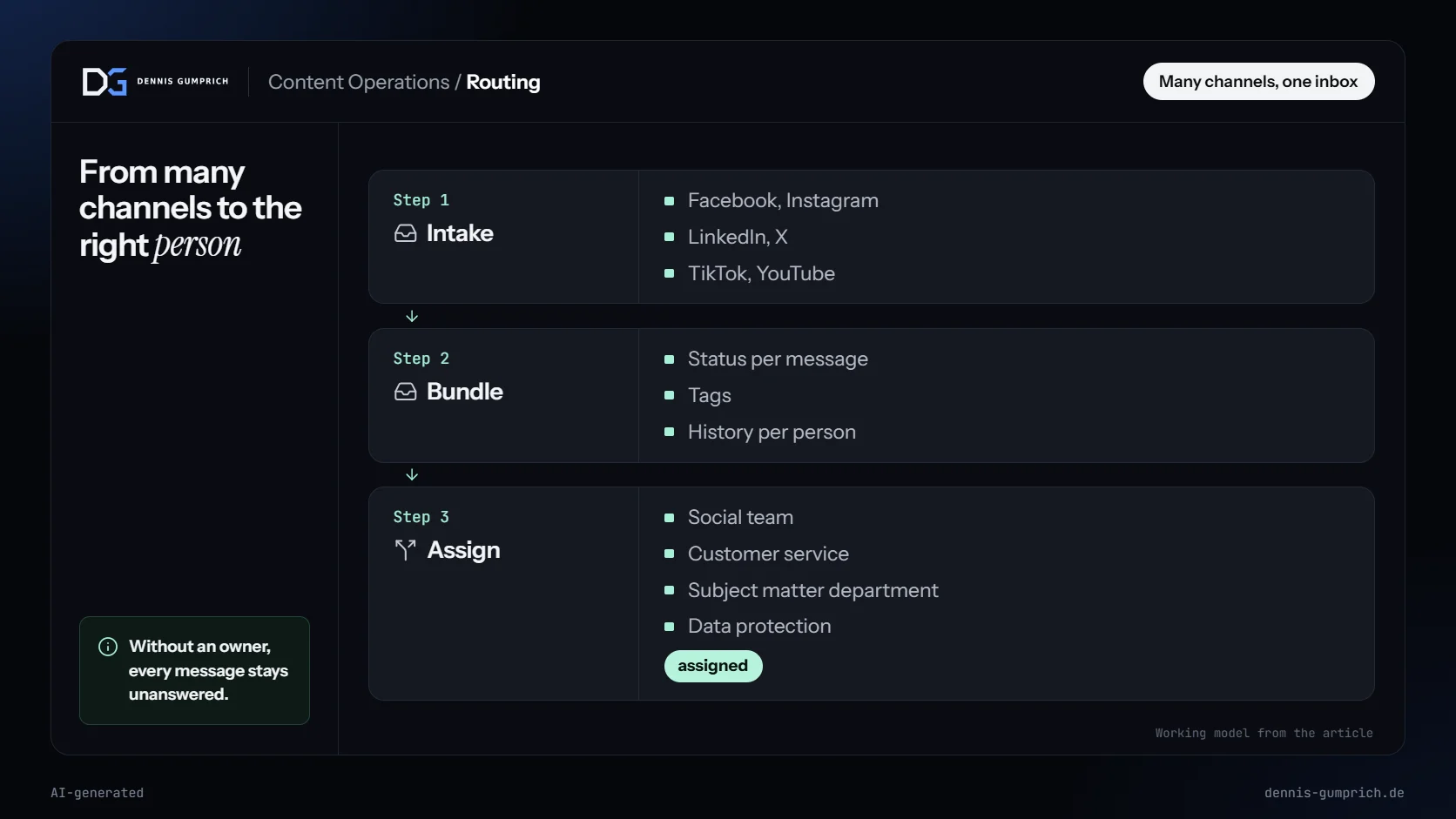
By bringing all incoming messages into one shared view, assigning each message to a responsible person and keeping approved answers ready for recurring requests. The tool for this is called a social inbox. But speed does not come from the view alone, it comes from the rules behind it: who answers, by when, with which blocks and where a message goes if the social team cannot resolve it itself.
Without a central view, everyone checks the channels they currently feel responsible for in the respective apps. Messages get answered twice or not at all, and requests to customer service disappear into emails whose outcome rarely finds its way back into the channel. A social inbox shows everything in one place, makes visible who is currently working on what and keeps track of status. The rest is organization. That is why introducing one starts with a responsibility list, not with tool selection.
Why is social media response time a business issue?
Because customers have long been using social media as a service channel and expect a quick answer. According to the Sprout Social Index 2025, around three quarters of respondents expect an answer within 24 hours or faster. 73 percent of social media users say they will buy from a competitor if a brand does not respond on social media. An unanswered message is therefore a revenue risk, not a matter of style.
Then there is the public nature. An unanswered comment sits visibly under your post, for everyone who reads it later. According to a Sprout Social pulse survey from the fourth quarter of 2025, around half of those who contact a brand publicly (51 percent) want a public answer first, before the conversation moves to a private message. Pointing straight to "DM us" does not meet this expectation.
Besides customers, disorder costs working time: duplicate handling, searching for the status and follow-up questions add up over weeks. And in a crisis, the risk rises that the first answer comes too late or inconsistently. Both can be influenced more by organization than by software.
The pressure on capacity is noticeable in marketing departments too; Germany is one example. In the Bitkom study "Marketing im digitalen Wandel" (in German) from 2026 by the German digital association, 38 percent of the companies surveyed cite a growing resource requirement for social media as an internal challenge, 37 percent the coordination of marketing processes. For you this means: before you request additional headcount, check how much time clear responsibilities and approved response blocks win back. One caveat: the online survey of 180 digital industry companies from the Bitkom network is not representative.
The Sprout Social figures come from international surveys by a software vendor, not specifically from your market. They show a direction, not a target value for your company. You are best off measuring your own baseline for two weeks before setting targets.
What is a social inbox and what is it not?
A social inbox is a shared mailbox for comments, direct messages and mentions from several social networks. It shows the history per person, allows assignment and status and records who answered what. It is not a social listening tool, not a ticket system for all of customer service and not a substitute for clear responsibilities.
Incoming messages from several channels in one view, assignment to people or teams, status such as open, assigned or done, tags for reporting, saved replies, visibility of who is currently answering, and metrics such as response time.
Find brand mentions across the entire web (that is social listening), process complaints through to a credit note (that stays with customer service), define tone and approval rules (that is your job) and replace missing deputies.
In practice, the distinction from customer service is the most important one. Many social media requests are service requests: delivery, invoice, complaint. The social inbox is then the entry point, the solution happens in the customer service system. What matters is that you define the handover: who hands over, in which format, and who tells the customer in the channel when the case is resolved. How such handovers between marketing and other areas work is described in Handovers between marketing and subject matter departments.
Are built-in tools like the Meta Business Suite enough, or do you need a platform?
For teams that are mainly active on Facebook and Instagram and answer with few people, built-in tools are often enough. Meta describes the Business Suite as the place where businesses manage messages, notifications and alerts for Facebook and Instagram together. As soon as LinkedIn, TikTok or YouTube are added, several people work in parallel or you want to evaluate response times, built-in tools reach their limits, because each platform only shows its own channels.
Meta introduced the Meta Business Suite in 2020 as a shared interface for Facebook and Instagram and in 2022 explicitly recommended it for larger message volumes across Facebook, Messenger and Instagram. Since June 2026, Meta has also been rolling out an AI assistant, the Meta Business Agent. According to Meta, it answers questions in Messenger, is being extended to Instagram and in its early rollout is also accessible via the Meta Business Suite. You define when a human takes over.
You handle LinkedIn comments without an additional tool directly in LinkedIn's page admin, messages to the company page in the page inbox, provided you have activated the messaging feature. That works as long as one person keeps track of all apps. That very person is then missing during vacation.
| Option | Channels according to vendor | What matters for teams |
|---|---|---|
| Meta Business Suite | Facebook, Messenger, Instagram | Meta channels only, AI assistant Meta Business Agent being rolled out |
| Hootsuite Inbox | Facebook, Instagram, X, TikTok, LinkedIn, Threads | Assignment, saved replies, AI reply suggestions, response time reporting; SLAs and audit trail as enterprise add-on |
| Sprout Social Smart Inbox | Including X, Facebook, Instagram, LinkedIn, TikTok, YouTube, Threads | Assignment via cases, collision detection for parallel handling; automated rules from the Advanced plan |
| Agorapulse | Facebook, Instagram, Threads, LinkedIn, X, YouTube, Google, TikTok | Assignment, labels, rule-based Inbox Assistant; saved replies from the Advanced plan |
| Swat.io | Including Instagram, Facebook, LinkedIn, YouTube, TikTok, Messenger | Tickets with status, assignment, tags, AI reply suggestions from the Medium plan; servers in Europe according to the vendor |
| Content platform with social inbox, e.g. contentbird* | Depending on connected profiles | Delegate comments, due dates, AI reply suggestions; in the same system as topic planning, creation and approval, as the Social Plus add-on |
The list is not complete. Other vendors such as NapoleonCat are frequently mentioned in comparisons. For the selection, three questions matter more than the feature list: does the tool cover all channels on which you actually receive messages? Can your responsibility logic be mapped, meaning assignment, deputies and handover? And which features are tied to which plan? Saved replies, automations and reporting in particular sit in higher plans with several vendors.
Whether a dedicated inbox tool or a platform that connects inbox, planning and approval makes more sense depends on how many tools you already maintain in parallel today. This trade-off is described in Individual tools or platform: when switching pays off. Whether the investment pays off you can work through with your own hours in the ROI calculator (in German).
Who is responsible for which message?
Every message type needs a responsible role, a named deputy and an escalation path. The social team takes on first response, moderation and routing. Service requests go to customer service, expert questions to the subject matter department, access and deletion requests to data protection. Writing this list before tool selection tells you exactly which assignment features you need.
| Message type | Responsible | Deputy | Escalation to |
|---|---|---|---|
| Praise, general question, moderation | Social team, shift duty | Second person in the social team | Social media team lead |
| Delivery, invoice, complaint | Customer service after handover | Service mailbox | Head of customer service |
| Product or expert question | Subject matter department provides the answer, social team publishes | Named contact per area | Head of department |
| Access, deletion, objection | Data protection | Data protection coordination | Data protection officer |
| Press inquiry, crisis topic | Corporate communications | Communications on-call | Crisis team |
| Insult, threat, legal violation | Social team documents and hides | Team lead | Legal department |
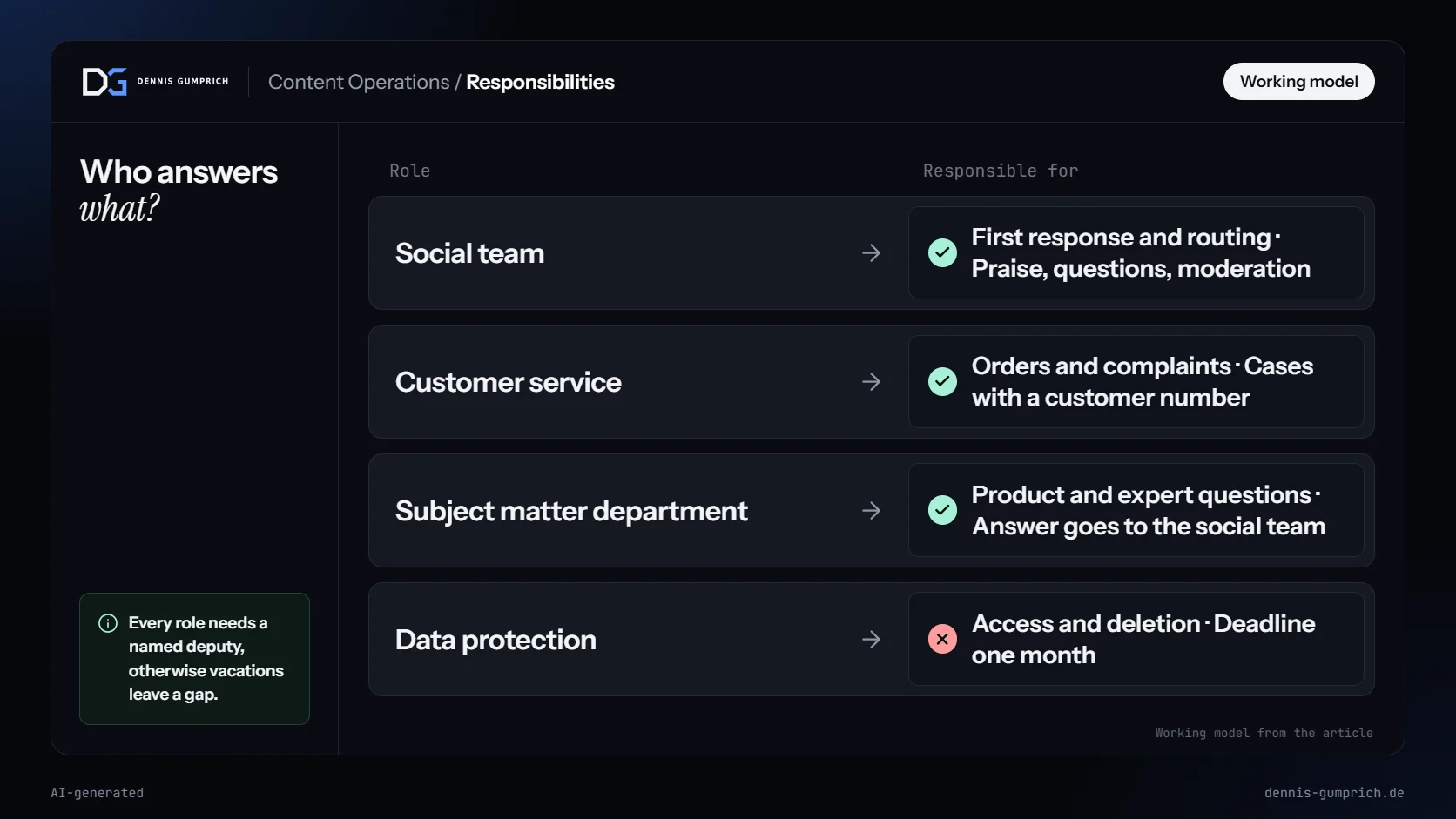
Two rules make the matrix robust. First: the first response stays with the social team, even if the solution lies elsewhere. A short sentence like "Thank you, we are clarifying this with customer service and will get back to you by tomorrow noon" meets the target time while the actual answer is being prepared. Second: whoever passes a message on remains responsible until the answer is in the channel. Otherwise every handover ends in an open loop.
The deputy question deserves a separate check. In many teams only one person knows all logins, response blocks and special cases. If that person drops out, the inbox stays untouched. How to distribute knowledge and access so that operations continue is covered in When one person drops out. How roles in the content team can be divided in principle is described in Who does what in the content team.
How do answers stay in your brand voice when many people respond?
With a maintained collection of response blocks and a short tone rule for social media. Blocks cover the most frequent occasions and are personally added to before sending. The tone rule defines how you address people, how formal you are, how you handle criticism and which phrases are off-limits. Both belong in one place that everyone handling messages, and the AI too, can access.
A good starting scope is fifteen to twenty-five blocks for the occasions that come up most often in your channels. Derive them from the messages of the last three months, not from imagining what might come. Each block has an occasion, a text with placeholders for names and details, a note on when it does not fit and a responsible person who keeps it current.
- Step 1Collect occasionsEvaluate the messages of the last three months and group them by occasion. The most frequent groups get a block.
- Step 2Define toneFormal or informal address per channel and language, degree of formality, handling of criticism, forbidden phrases. One page is enough.
- Step 3Write and approve blocksThe responsible subject matter department approves sensitive blocks once, for example on prices, delivery times or health.
- Step 4MaintainOnce a month, the responsible person checks which blocks are missing, outdated or never used.
Approving once in advance is the real time saver. Starting a new alignment for every answer on an expert topic loses hours. In the PR industry, 53 percent of respondents in Cision's Inside PR 2026 study cite slow approvals as an obstacle. How to shorten approvals in general is covered in Approval processes: why three weeks is normal and how to halve it. How to store brand voice so that team and AI use it equally is described in Storing brand voice.
May AI reply suggestions be sent directly?
As a suggestion yes, as an automatic reply only in narrowly defined cases. Several inbox tools now suggest replies via AI, for example Hootsuite, Agorapulse and Swat.io. A simple rule has proven itself: the AI drafts, a human reviews and sends. For complaints, expert statements, prices, legal topics and anything with crisis potential, a second look applies in addition.
Acceptance on the customer side is there. According to the Sprout Social pulse survey from the fourth quarter of 2025, 69 percent of respondents are fine with brands using AI for faster service. Being fine with it does not mean that wrong or inappropriate answers have no consequences. An AI that promises a delivery time that does not exist, or answers a complaint cheerfully, causes the damage the fast answer was supposed to prevent.
| Level | Occasion | Rule |
|---|---|---|
| Automatically allowed | Acknowledgment outside business hours, note on opening hours | Fixed, approved text, no content statement |
| Suggestion, one person reviews | Praise, general questions, questions with an existing block | The person handling it reads, adapts and sends |
| Suggestion, second person reviews | Complaint, expert statement, price, delivery time, legal topic | Four-eyes principle or approval by the responsible role |
| No AI reply | Crisis topic, press, health, threat | Only approved texts from communications or crisis team |
The quality of the suggestions depends on what the AI can access. Without stored tone, blocks and product knowledge, it phrases things generically and friendly, but not in your language and not with your facts. How to check AI results before sending is described in Review criteria for AI texts. How AI agents take on tasks in the content team without blurring responsibility is covered in AI agents in the content team.
Which metrics show whether your social inbox works?
Two metrics are enough to start: first response time and resolution rate. First response time measures how long it takes until the first human reaction. Resolution rate measures which share of requests is answered conclusively, without the person having to ask again. Measure both separately by message type, because a complaint needs different targets than praise.
| Metric | What it shows | What to watch |
|---|---|---|
| First response time | Time until the first human answer | Separate business hours and weekends, median instead of average |
| Resolution rate | Share of conclusively resolved requests | A repeat query from the same person on the same topic counts as unresolved |
| Open messages older than target time | Backlog | Daily look, not a monthly report |
| Handover rate | Share passed to customer service or subject matter department | A high share points to missing blocks or permissions |
| Most frequent occasions | What people write about | Feedback to topic planning and product |
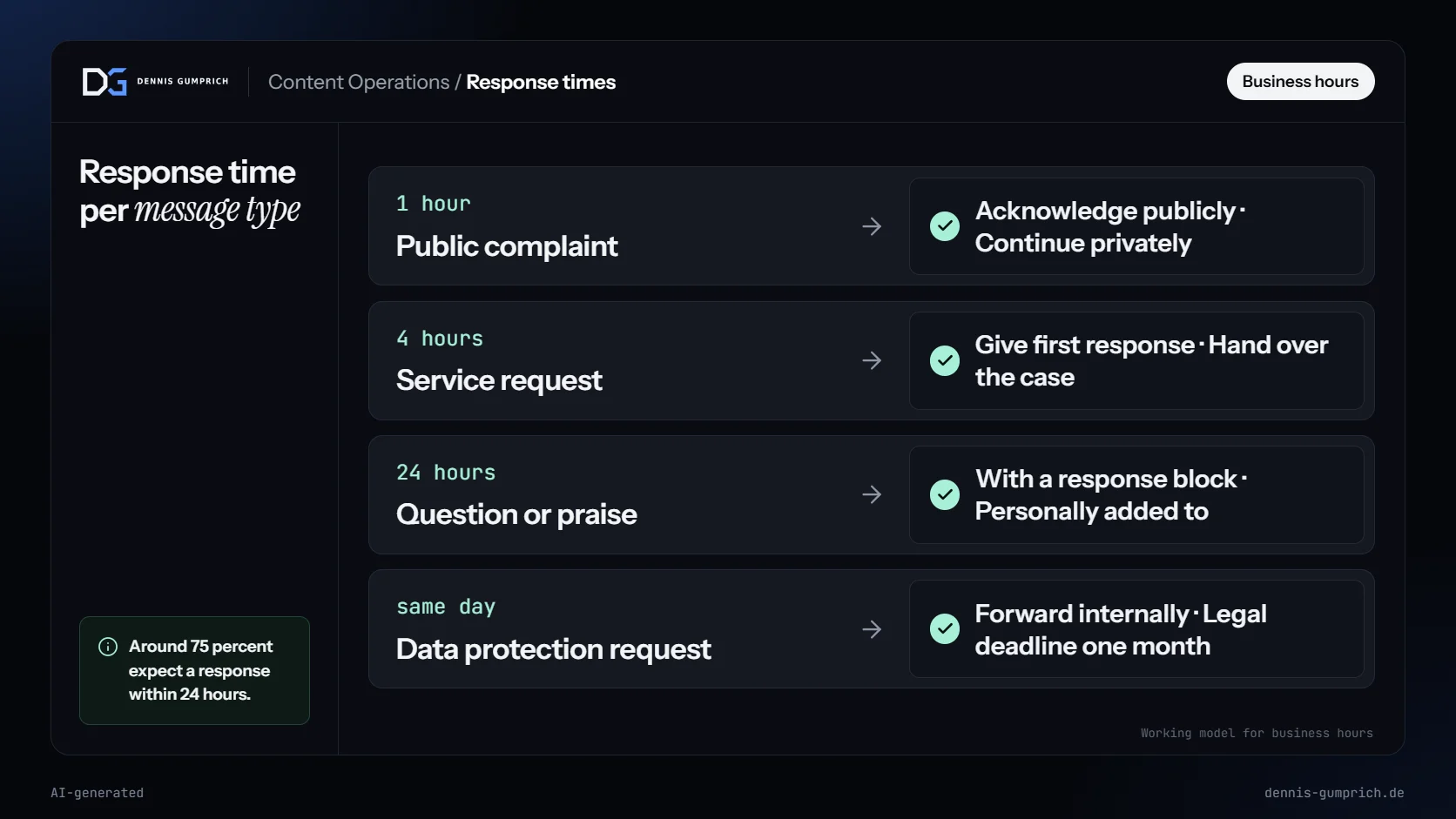
There are no universally valid values for target times. A useful starting point is a staggering by urgency that you adjust after four weeks based on your measured values. More important than an ambitious target is one you can also keep during vacation periods.
Many inbox tools measure response time themselves. Hootsuite, for example, names response time, number of replies sent and customer satisfaction as metrics of its inbox. The most frequent occasions, on the other hand, are the metric with the most impact beyond the inbox: if the same question comes up twenty times every week, the answer belongs on the website, in the FAQ or in the next article. How to translate such values into reporting that management also reads is described in Proving content impact.
What do you need to consider on data protection in the social inbox?
Messages in the social inbox are personal data: name, profile, content, often also order numbers or health information. Under the EU General Data Protection Regulation (GDPR), this leads to four obligations: access only for the roles that need it, fixed deletion periods, a data processing agreement with the tool vendor under Art. 28 GDPR and a defined path for access and deletion requests that come in via social media.
For company pages on Facebook, the Court of Justice of the European Union ruled on June 5, 2018 (case C-210/16) that the operator of a fan page is jointly responsible with Facebook for processing the data of page visitors. So you are not just a user of someone else's platform but share responsibility. If an inbox tool is added, another vendor processes the same messages. If it generates AI reply suggestions, the message contents also go to a model provider.
| Topic | What you regulate |
|---|---|
| Access rights | Not everyone in marketing needs access to all direct messages. Assign rights by role and channel and revoke them immediately when someone leaves the team. |
| Deletion periods | Under the storage limitation principle in Art. 5 GDPR, you keep messages only as long as you need them. Define a period for completed cases and check whether your tool can implement it. This also applies to exports. |
| Data processing | Conclude a data processing agreement with the vendor of the inbox tool. Ask explicitly whether and where messages are passed on for AI features. |
| Data subject requests | If someone writes via direct message "Delete my data" or "What do you store about me?", that is a request under the GDPR. Under Art. 12(3) GDPR, you inform them about the action taken within one month. The message therefore goes to data protection the same day. |
| Publicly posted data | If a customer number, address or health information appears in a public comment, hide it and ask the person to send the request privately. |
This check is fastest when data protection and IT are at the table during selection and not only before the contract is signed. What that looks like in concrete terms is described in Involving IT and data protection early. This section is not legal advice. Clarify the specific deadlines and legal bases with your data protection officer; outside the EU, local data protection law applies.
What happens in the social inbox in a crisis?
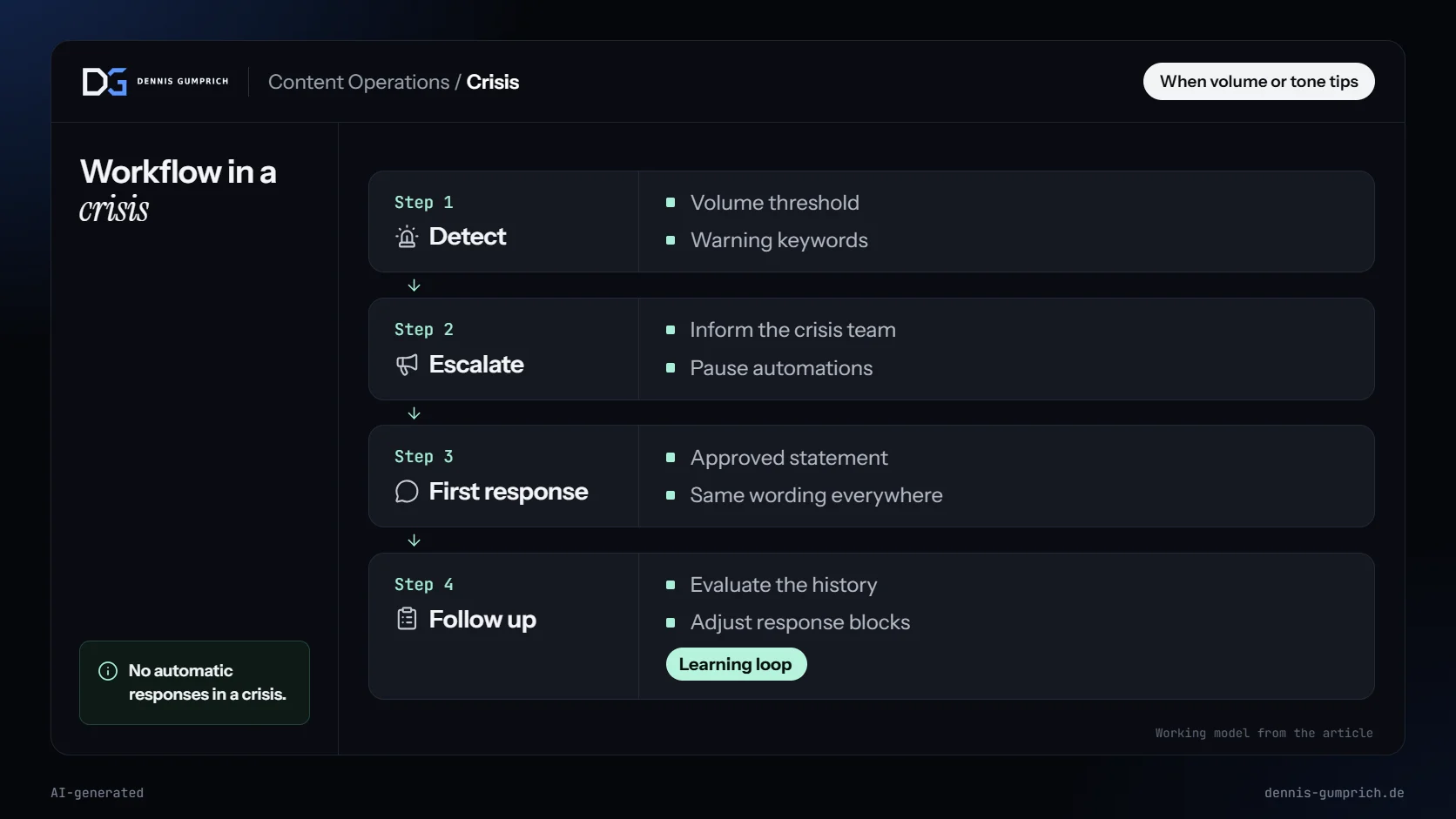
In a crisis, the inbox switches from normal operation to a defined workflow: detect, escalate, answer consistently, follow up. What matters is that thresholds, responsibilities and the first response are set in advance. Automatic replies and AI suggestions are paused, because a cheerful standard text causes more damage in a crisis than an hour of silence.
- Step 1DetectDefine thresholds from which the social team escalates, for example an unusually high volume on one topic or certain keywords such as recall, accident or data leak.
- Step 2EscalateThe social team informs communications and the crisis team via a fixed channel. Automations, scheduled posts and AI suggestions are paused.
- Step 3First responseA statement approved by the crisis team goes out with the same wording in all channels. Individual replies refer to it until new information is approved.
- Step 4Follow upEvaluate history, response times and reactions. Adjust response blocks, thresholds and responsibilities.
For the most frequent crisis scenarios in your industry, prepare a first statement as a template with placeholders and test the workflow once a year with a simulation exercise. If your communications team runs a newsroom, the social inbox belongs in its steering. The model for this is described in Corporate newsroom: the steering model.
Five mistakes when introducing a social inbox
- Starting with the toolA tool without a responsibility matrix only bundles the disorder in one place. Roles first, then selection.
- Connecting only favorite channelsIf LinkedIn or TikTok are left out, someone keeps checking the apps individually. Connect all channels on which you actually receive messages.
- Not naming a deputyThe inbox works exactly as long as the one person who knows everything is there. Every role needs a second person with access and knowledge.
- Sending AI suggestions unreviewedFast and wrong is worse than an hour later and right. Define which occasions need which review.
- Collecting data but not using itThe most frequent occasions in the inbox are topics for website, FAQ and editorial plan. Not evaluating them means answering the same question individually for years.
Disclosure
I work for contentbird. With the Social Plus add-on, contentbird also offers a social inbox. There, comments can be delegated, given a due date and answered with AI suggestions, in the same system as topic planning, creation and approval. That is why contentbird is marked with * in the table above. The same selection questions apply to contentbird as to any other vendor: coverage of your channels, mapping of your responsibilities, plan limits and data protection documentation.
Self-check: how well is your social inbox organized?
Tick everything that applies to you.
A short assessment of why we should organize our social media messages centrally:
Comments and direct messages reach us via several channels and are handled in different apps. Who is responsible often depends on who happens to be checking. According to Sprout Social, around three quarters of customers expect an answer within 24 hours, and 73 percent say they buy from a competitor if a brand does not respond.
Proposal: we first define who answers which message, who deputizes and where we hand over to customer service, subject matter departments and data protection. Add target times per message type and approved response blocks. After that we choose a tool that maps exactly this logic.
The effort for matrix, blocks and target times is a few working days. We measure the effect via first response time and resolution rate after four weeks.
Conclusion: a social inbox is a process, not a mailbox
You do not answer social media messages faster because they sit in one view, but because it is clear who handles them, with which blocks, by when and where they go next. The Meta Business Suite and other built-in tools are enough as long as you look after few channels with few people. With several networks, handovers and deputies, you need a tool that handles assignment, status and reporting. The social inbox is thus the feedback channel of your content operations: the questions that arrive there belong in the next topic planning.
The order decides success: responsibilities, blocks and target times first, then AI suggestions with a clear approval rule, then data protection and crisis workflow in writing. Proceeding this way gains you not only response time but also an overview of what really concerns your customers.
Frequently asked questions
What is the difference between a social inbox and social listening?
A social inbox collects what is addressed directly to you: comments under your posts, direct messages and mentions of your profiles. Social listening searches the web for conversations about your brand or your topics, even where you are not tagged. Some tools offer both, but the processes behind them are different.
Should social media requests go straight into the customer service ticket system?
Service requests yes, everything else no. Praise, questions about content and moderation stay with the social team. For service requests, define when they are handed over and who answers the person in the channel when the case is resolved. Some inbox tools offer connections to service systems for this, sometimes only in higher plans.
Do we have to answer on weekends?
That depends on your industry and your promise. What matters is that the expectation is clear: an automatic acknowledgment with a note on business hours is better than silence. For crises you still need an on-call person who is informed when a threshold is exceeded.
May we hide or delete critical comments?
You should answer criticism, not remove it, because removing it often attracts more attention than the criticism itself. Insults, threats, spam and publicly posted personal data you may and should hide. Set rules for this in a netiquette and document what you hide and why.
How many people does a social inbox need?
At least two per role, so that vacation and sick leave are covered. How many in total depends on message volume. Measure for two weeks how many messages come in per day and how long handling takes on average. That tells you how many hours per week the inbox needs.
Where does your content process lose time today?
In 30 minutes, we look together at where unnecessary coordination, manual tasks, tool switching or repetitive content work cost you time today.
You get a concrete assessment of which tasks you can simplify, automate or organize better, and where AI and tools actually help instead of adding complexity.
Analyze your content process in 30 minutes Free of charge. You take away concrete starting points you can use internally right away.
Dennis Gumprich
Dennis helps marketing and communication teams fit generative AI into existing content processes without undermining quality, brand voice and approvals. Focus areas: content operations, AI governance and tool selection in mid-sized companies and corporations.
Transparency note: Dennis works for contentbird, a provider of AI-powered content software. Product mentions are marked in the article. More about Dennis (in German) · LinkedIn
Read more
Sources
- Sprout Social: Social media customer service statistics (Sprout Social Index 2025, Q4 2025 Pulse Survey). sproutsocial.com. Accessed October 31, 2026.
- Meta: A Faster and Easier Way to Manage Your Business on Facebook and Instagram, September 17, 2020. about.fb.com. Accessed October 31, 2026.
- Meta: Announcing New Products to Make Business Messaging Easier, May 19, 2022. about.fb.com. Accessed October 31, 2026.
- Meta: Be There for Every Customer With Meta Business Agent, June 3, 2026. about.fb.com. Accessed October 31, 2026.
- Hootsuite: Social media inbox. hootsuite.com. Accessed October 31, 2026.
- Sprout Social Help Center: Introduction to Engagement. support.sproutsocial.com. Accessed October 31, 2026.
- Agorapulse: Social Media Inbox Management Tool. agorapulse.com. Accessed October 31, 2026.
- Swat.io: Inbox and Help Center "Swat.io Inbox: your central message hub". swat.io, help.swat.io. Accessed October 31, 2026.
- Cision: Inside PR 2026 (around 600 PR professionals in the US and the UK). prnewswire.com (in German). Accessed October 31, 2026.
- Court of Justice of the European Union, judgment of June 5, 2018, case C-210/16 (Wirtschaftsakademie Schleswig-Holstein), summarized at beck-aktuell.de (in German). Accessed October 31, 2026.
- Regulation (EU) 2016/679 (GDPR), in particular Art. 5, Art. 12(3) and Art. 28. eur-lex.europa.eu. Accessed October 31, 2026.
- Bitkom: Marketing im digitalen Wandel: Zwischen Effizienz, Automatisierung & Wettbewerb. Lagebild der Marketingpraxis in deutschen Unternehmen 2026 (in German), study 2026 by the German digital industry association, DOI 10.64022/2026-marketing, online survey of 180 digital industry companies from the Bitkom network, calendar weeks 44 to 50 of 2025: 38 percent cite growing resource requirements for social media, 37 percent the coordination of marketing processes as an internal challenge. Not representative, published under CC BY 4.0. Accessed October 31, 2026.
How this article was created
This article was created with the help of AI. Structure, research and draft wording were developed with AI support. Professional assessment, review of the statements and the final version are the responsibility of Dennis Gumprich. The English version was translated with AI and reviewed. Read the original German version.
How reliable are the statements?
Backed by sources are the survey values from Sprout Social, Cision and Bitkom (non-representative survey of 180 digital industry companies in Germany), the information on the CJEU judgment and on Art. 12 GDPR, and the feature details on the tools named. The latter reflect the vendors' own descriptions on their pages as of October 31, 2026 and may change. Information on the Meta Business Suite is based on Meta's newsroom. The information on LinkedIn is deliberately kept general, because activation and features vary by account. The responsibility matrix, approval rule, set of metrics, response time targets and crisis workflow are working models from consulting practice, not collected measurements. The article is not legal advice.