
After three weeks, the expert article is approved. The specialist department corrected it twice, the legal department toned down one sentence, the head of division changed the headline. Now it just has to go on the website.
The web editor opens the CMS, copies the text from the document, repairs the subheadings, looks for the images on the shared drive, writes alt texts, adds the meta description, sets three internal links and chooses category and tags. At 6:40 p.m. the article is online. The next morning, the legal department gets in touch: the toned-down sentence appears on the page in its old version. It was copied from the wrong document.
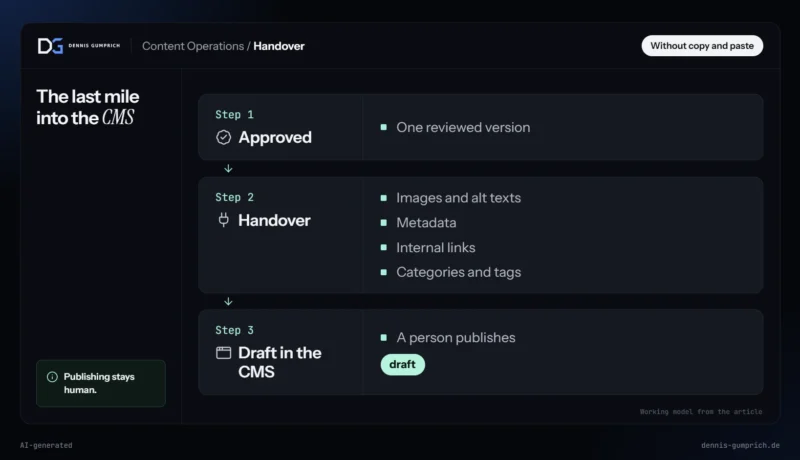
The last mile is the path from the approved text to the published page. It hardly appears in any process description, but costs half an hour to an hour of manual work per article and is the most common point where the approved and the published version diverge. With a connection via MCP, content can be created directly from the working environment as a draft in the CMS, matching the structure there. Publishing itself remains a human decision.
What is the last mile in the content process?
Everything that happens between approval and go-live: transferring text, repairing formatting, uploading images, maintaining alt texts and metadata, setting categories, adding internal links, checking the preview, publishing. Added to this are later corrections, which then have to be maintained in two places.
In most teams, an article counts as finished as soon as it is approved. The plan shows it as done, and those involved turn to the next topic. What happens afterwards is the task of a person who was often not involved in creating it: the web editorial team, a working student or, in smaller teams, the head of marketing in the evening.
The term comes from logistics. There it refers to the last section of the supply chain to the front door, which is considered particularly costly relative to the distance. The parallel is more precise than it first seems. In the content process, too, the last section is short, fiddly, poorly standardized and therefore disproportionately expensive.
The work steps themselves are trivial. None of them requires special expertise. That is exactly why they are not planned, not measured and not improved. They simply happen, sometime between approval and the moment someone asks why the article is not online yet.
Why does the last mile not appear in any effort calculation?
Because it is spread across many small steps that seem harmless individually, and because it often falls to people whose time is not attributed to the article. In total, it is nevertheless one of the larger items per publication.
When estimating the effort for an article, people think of research, writing and alignment. Those are the visible parts. How much time actually goes into the invisible items is described in the article on where the nine hours per article really go. The last mile is one of these items, and it grows with every additional channel and every additional website.
The following breakdown is a working model from conversations with content teams, not a measurement. It helps you estimate your own effort realistically.
| Work step | Typical effort | Risk of error |
|---|---|---|
| Transfer text and repair formatting | 10 to 15 minutes | high, wrong version or lost markup |
| Find, upload and crop images | 5 to 15 minutes | medium, image rights and sizes |
| Write alt texts | 5 minutes | high, often left out |
| Meta title and description | 5 to 10 minutes | medium, length and relation to content |
| Categories, tags, author | 2 to 5 minutes | low, but inconsistent |
| Set internal links | 5 to 10 minutes | medium, cut under time pressure |
| Check preview and publish | 5 minutes | low |
| Maintain later corrections twice | irregular | high, document and page diverge |
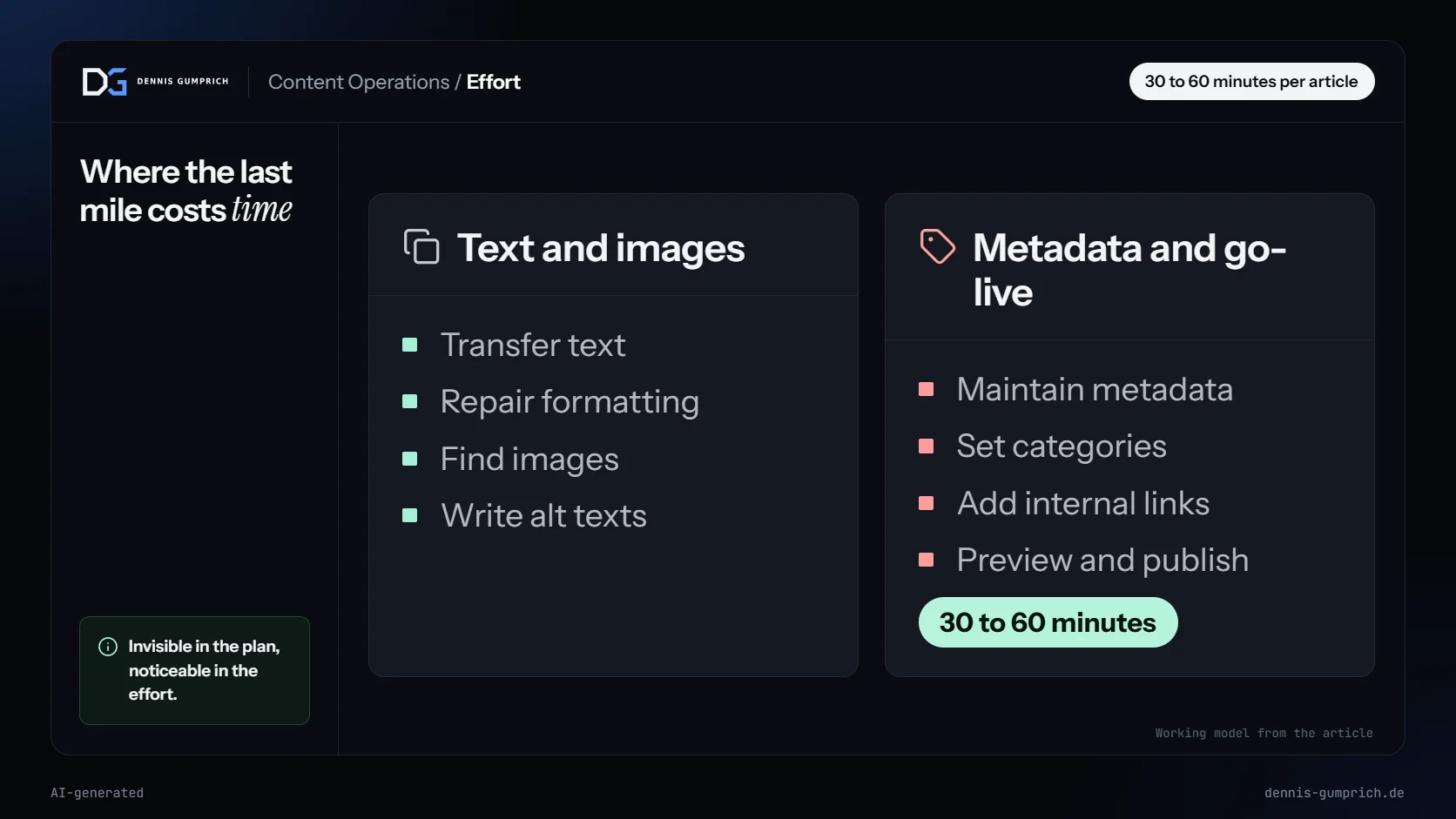
With eight articles a month, that quickly adds up to six to eight hours nobody planned for. With several websites, language versions or microsites, the value multiplies, because the same steps occur for each target system. That is not a dramatic number. What is dramatic is that it does not appear in any report, so nobody is tasked with reducing it.
Which mistakes happen when transferring content into the CMS?
Five mistakes recur: the wrong version is published, formatting is lost, metadata is missing, image information is incomplete, and later corrections only end up on the website, not in the document. All five have the same cause: the content changes systems, and context is lost at this boundary.
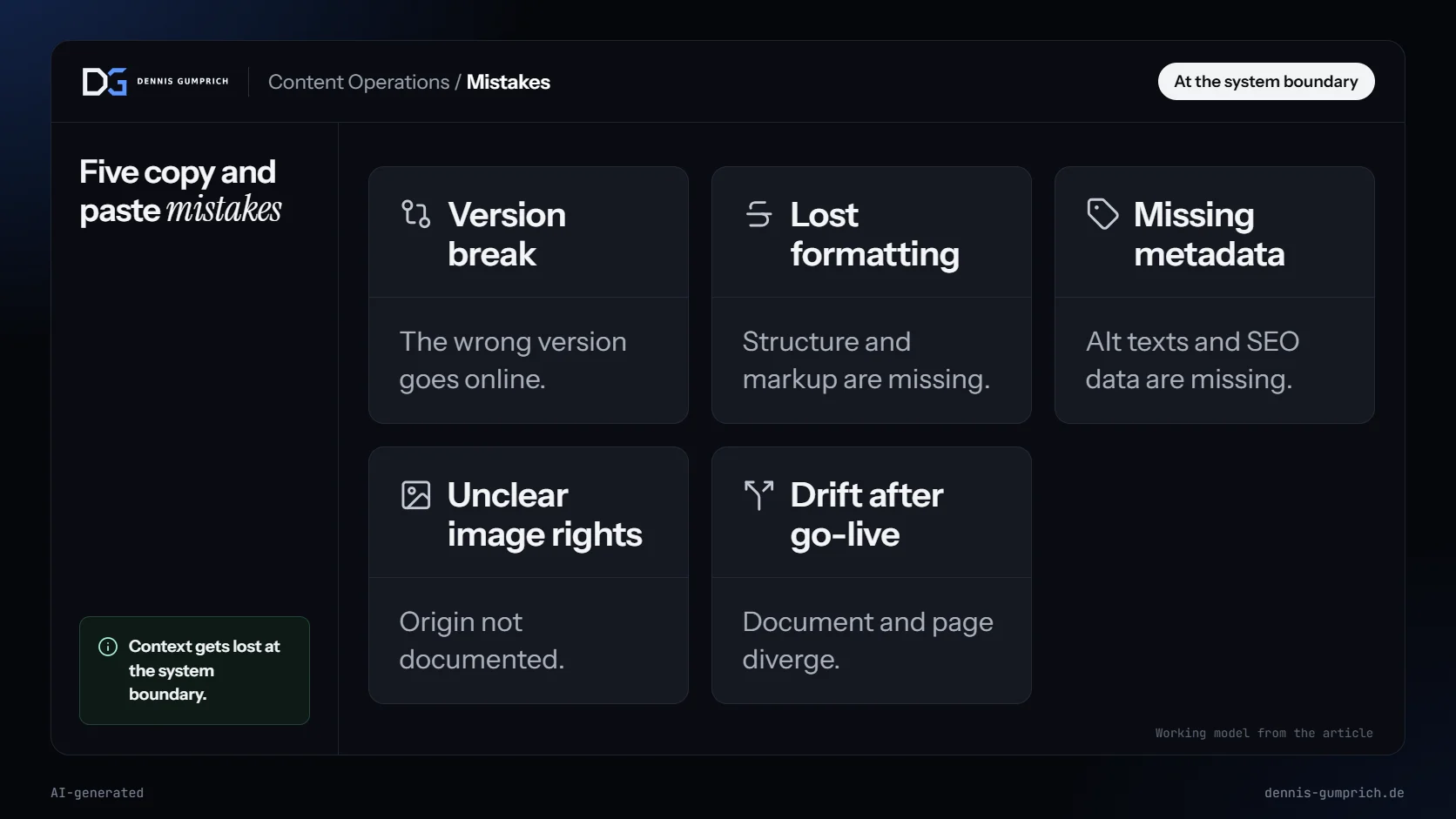
- Version breakThe document exists in several versions, and the one that happens to be open is copied. The approval applied to another. This is the most expensive mistake, because it is only noticed when someone reads the page who knows the reviewed version.
- Lost formattingSubheadings become bold text, lists become paragraphs, tables become spaces. For readers this is annoying; for search engines and AI systems that evaluate structure, it is a real disadvantage.
- Missing metadataMeta description, alt texts and categories are the first things dropped under time pressure. They are invisible, so nobody notices they are missing until the page performs poorly in search.
- Unclear image rightsThere is an image file on the drive without information on author and usage rights. Whoever transfers it has to guess or ask. Both cost time, and guessing adds risk.
- Drift after go-liveA typo is corrected directly in the CMS, a figure updated. The document keeps the old version. At the next update, content is copied from the document again, and the old mistake is back.
The decisive question is not whether your web editorial team works carefully. It is: in how many places does a published article exist at the same time, and which of them is valid? Every answer greater than one is a source of errors, regardless of care.
Why previous solutions were not enough
The problem is not new, and there have always been attempts to solve it. Each of them covered one part and opened another.
Writing directly in the CMS. The most obvious route. If you work in the CMS straight away, you do not have to transfer anything. The price is high: a CMS is built for management and display, not for collaboration. Comments from the specialist department, change tracking, approval levels, brand voice, AI support with context are all missing or only rudimentary. Teams that work this way therefore move alignment into emails and chats, and the same version problem arises there, just in a different place.
Copy aids and export functions. Tools that bring documents into the CMS more cleanly solve the formatting loss. They do not solve the question of which version is copied, and they do not fill in metadata. The step becomes faster, but it does not disappear.
Fixed interfaces. Until now, the technically cleanest option was a programmed integration between content tool and CMS. It works, but it is expensive: it has to be built for each CMS, maps a fixed content model and has to be maintained with every major update. For a company with a main site in TYPO3 and two microsites in WordPress, this means two projects, two maintenance contracts and two places where something can break. Many teams therefore did without and stuck with copying.
What all three routes lack is an understanding of the target structure. A CMS is not just a text field. It has fields, components, content types, page trees and workspaces. If you want to hand content over cleanly, you have to know where each part belongs. Until now, a person had to know that, or a program that knew exactly one model.
What is MCP and why does it change publishing?
MCP stands for Model Context Protocol, an open standard through which AI applications talk to other systems. For publishing, this means: the AI can read the structure of a CMS, that is, fields, components and categories, and create content as a matching draft. Instead of a rigid integration per system, there is a shared language.
The protocol was published at the end of 2024 and has since established itself as a widespread standard for connecting AI to tools. The basic idea is simple: a system describes which actions it offers and which data it provides. An AI application can read this description and perform the actions, within the rights it has been given.
For the last mile, one point is decisive. A classic interface transfers data into a predefined format. A connection via MCP can also recognize how the target system is structured. It sees that the article type in Contentful has a field for the teaser, that a specific component for quotes exists in Storyblok or that a category has already been created in WordPress. Content is thus not simply dumped, but sorted into the existing structure.
That does not mean every interface becomes superfluous. When a fixed integration remains the better choice, for example with very high volumes or fully automated processes without human review, is described in the article MCP or API: which route is right for your data. For the typical editorial case, that is, a few to a few dozen publications a month with human review, MCP is the much easier route.
The text is handed over as a block. What is a teaser, a subheading or a quote has to be assigned by hand in the CMS. Each target system needs its own programming.
The structure of the target system is read, and content lands in the matching fields and components. The same working environment can serve several CMS without a separate integration project for each.
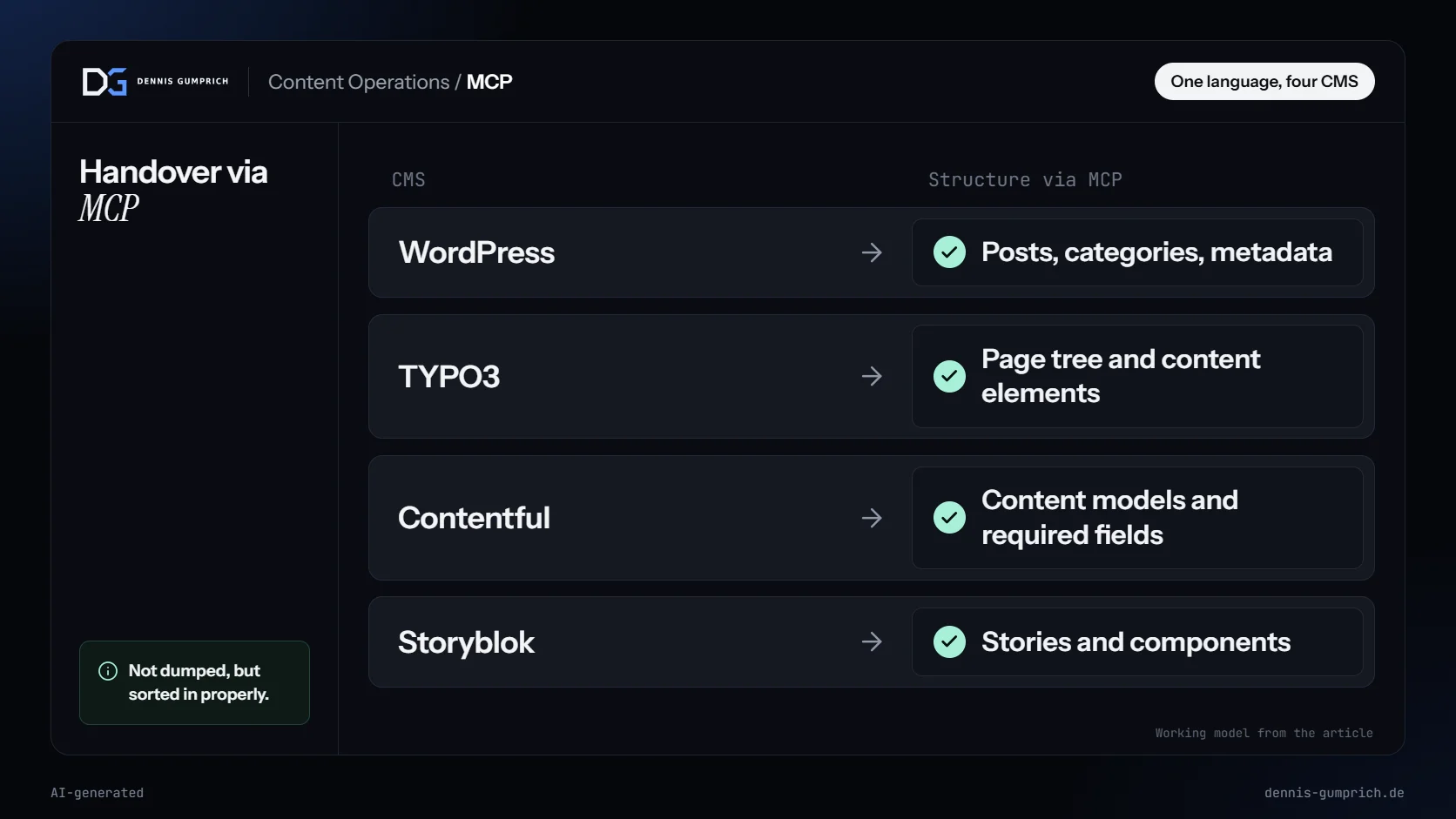
How do WordPress, TYPO3, Contentful and Storyblok differ when it comes to connecting them?
Mainly in how they organize content. WordPress thinks in posts with categories and tags, TYPO3 in page trees with content elements, Contentful in freely defined content models, Storyblok in stories built from reusable components. The more structured the system, the more important it is that the handover knows this structure.
In many companies, the system landscape is mixed. The main site runs on TYPO3 because it was built with an agency years ago. The campaign pages and the blog run on WordPress because it was quicker. A headless system was recently introduced for the product area. It is exactly this mix that makes the last mile so expensive, because each transfer works differently. If you are planning a relaunch, you can avoid this mix by clarifying the content process before choosing a CMS. How is described in Website relaunch: clarify the content process first, then the CMS.
| CMS | How content is organized | What matters for the handover | Typical stumbling block |
|---|---|---|---|
| WordPress | Posts and pages with categories, tags and metadata | Create as a draft, match tone and structure of existing posts, include categories and metadata | Page builder layouts that do not consist of plain text |
| TYPO3 | Page tree with content elements | Create content as pages and content elements, ideally prepared in a workspace | Custom-developed content elements that must be known first |
| Contentful | Freely defined content models, entries in spaces and environments | Fill the model's fields exactly, drafts instead of published entries | The connection must be set up per space, required fields and references |
| Storyblok | Stories made of nested components | Use existing components and content types, check drafts before go-live | Deep nesting, components that only allow certain children |
WordPress is the simplest case. The structure is manageable, and a post essentially consists of title, content, excerpt, category, tags and SEO fields. It only becomes more difficult when pages are designed with a page builder and content sits in nested layout elements. Then it is worth defining a lean template for posts into which content is handed over, instead of recreating every layout.
TYPO3 is established in many mid-sized companies and in the public sector, especially in German-speaking countries. Here, the most important function for the last mile is the workspace: an area in which changes are prepared and checked before they go live. A handover that places content there fits exactly into the logic TYPO3 editorial teams work with anyway. Beforehand, you should clarify which custom content elements your agency has built, because they must be known for the handover.
Contentful is a headless system. There are no pages in the classic sense, but content types with precisely defined fields that are used by different output channels. For the handover, this means: every field must be filled exactly, required fields must not remain empty, and references to other entries must be correct. This is where a structure-aware handover plays out its greatest advantage, because with complex models a person would otherwise search for a long time to find where things belong.
Storyblok combines a headless approach with visual editing. Pages consist of components nested inside each other. Good Storyblok setups have a manageable library of components, and a handover should use exactly these instead of inventing its own structures. Drafts can be checked in the preview before go-live, which makes control easy for the web editorial team.
What does a handover process look like in which nothing gets lost?
Six steps: approval on the content rather than the document, define the target structure once, hand over as a draft, have the web editorial team check the preview, maintain corrections in one place only and report the live status back to the plan.
Technology is the smaller part. If you set up a connection without clarifying the process, you only automate copying from the wrong version. This order has proven effective.
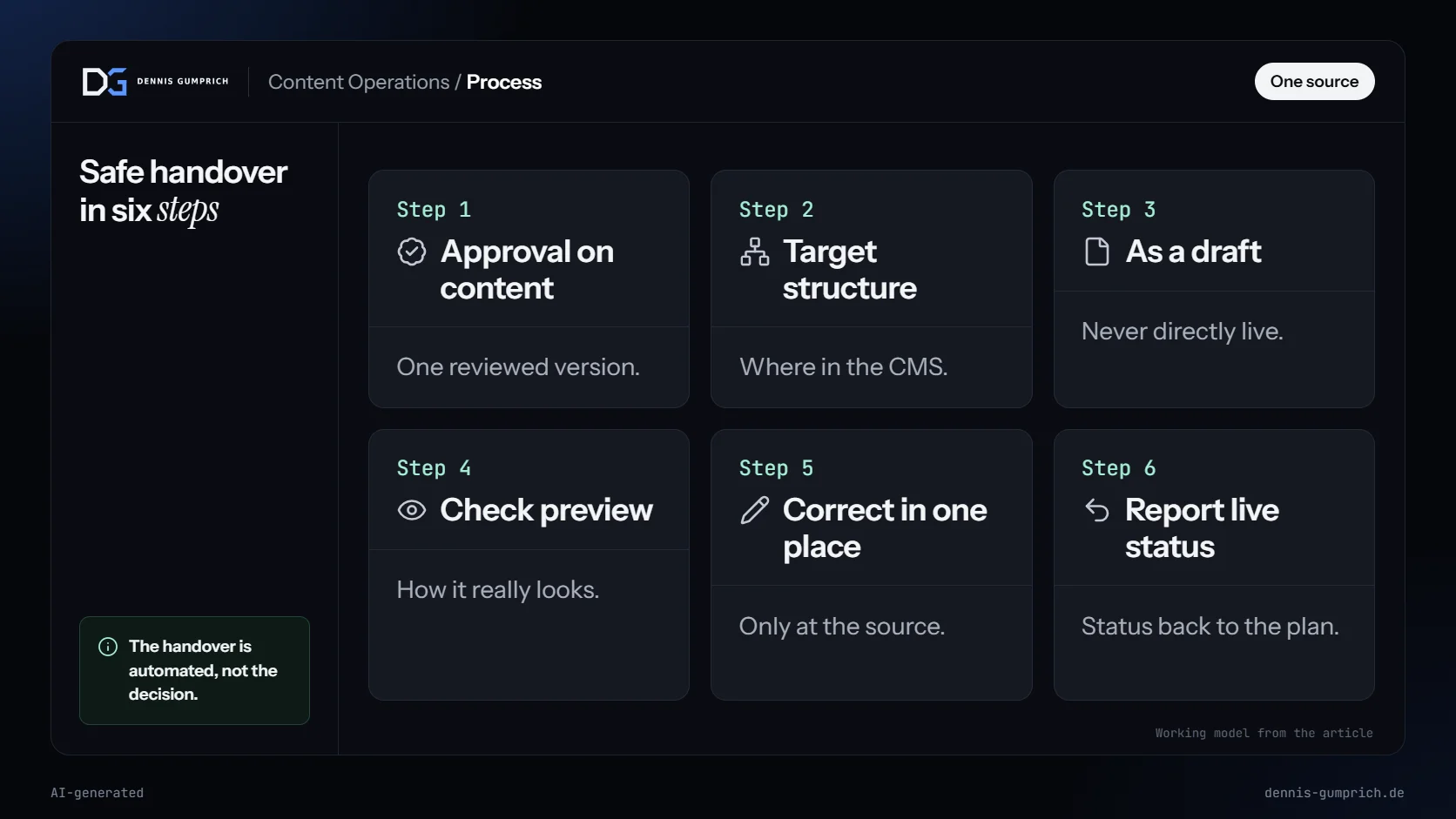
- Step 1Approval on the content, not the documentAs long as approvals are attached to files, there are several versions. Approval must happen where the content is created, so that it is clear which version is handed over. How to make approvals shorter in the process is described in the article on approval processes.
- Step 2Define the target structure onceFor each content type, clarify once where it belongs in the CMS: post type, category, fields, components. That is one hour of work with the web editorial team and saves every individual decision afterwards.
- Step 3Always hand over as a draftThe connection creates content as a draft or in the workspace, never directly live. This is not a technical restriction, but a process decision you make consciously.
- Step 4Preview by the web editorial teamThe web editorial team checks display, images and links in the preview and publishes. Their role shifts from transferring to reviewing, and that is exactly where their experience is worth the most.
- Step 5Corrections in one placeLater changes are made in the working environment and handed over again, not directly in the CMS. Otherwise, a second version arises again after go-live.
- Step 6Report the live status backThe plan learns that and where the article is online. From here on, results can be assigned to the topic instead of being laboriously pieced together later.
The fifth step is the most uncomfortable because it changes habits. Correcting a typo directly in the CMS is faster. If you still do it at the source, you prevent the same mistake from coming back at the next update. A simple rule helps: everything that concerns the content is changed at the source. Everything that only concerns the display may stay in the CMS.
For the preview in step 4, Google has a clear recommendation. In its "Guidance on using generative AI content" in Google Search Central, as of October 2026, Google advises manually reviewing AI-generated output before publication, explicitly including title, meta description, structured data and alt texts. Google gives the reason in how the models are built: they predict likely word sequences and can therefore hallucinate. If the handover fills in metadata in future too, it belongs on the web editorial team's checklist, on an equal footing with text and images. One limitation: this is a Google platform guideline, not a survey.
Who may do what? Rights and responsibility for the connection
The connection only gets the rights it needs for the handover: reading, to know the structure, and creating drafts. Publishing stays with people. Every action is logged, and IT knows from the start which technical access exists with which rights.
The most common concern in conversations about this type of connection is: then the AI publishes. This concern is justified if the rights are assigned incorrectly. It is unfounded if they are assigned correctly. Most CMS already separate roles that create drafts from roles that may publish. The connection gets the first role.
| Action | Connection | Web editorial team | Marketing |
|---|---|---|---|
| Read structure and categories | yes | yes | yes |
| Create or update a draft | yes | yes | yes |
| Upload images to the media library | yes, with details | yes | by agreement |
| Publish | no | yes | by agreement |
| Delete existing pages | no | yes | no |
| Change settings and plugins | no | no | no |
Three questions are important for IT: which technical user does the connection run through, what rights does it have, and where is it traceable what it has done? If you can answer these questions before the connection is set up, you shorten the review considerably. How to involve IT and data protection so that this does not become a weeks-long loop is described in Involve IT and data protection early.
What changes for the web editorial team and marketing?
The change is greatest for the web editorial team, and it is often viewed skeptically at first. Those who used to transfer content fear becoming superfluous. The opposite is the case. Transferring was never the valuable part of the work. What is valuable is knowing how a page has to work, which structure search engines and readers need and which components fit in which situation. Exactly this knowledge flows into step 2, defining the target structure, and step 4, the review.
For marketing, the main change is visibility. Until now, the overview ended with approval. What happened afterwards was invisible to planning. With a handover that reports the live status back, planning sees what has actually been published and when. That sounds like a small thing, but it changes conversations about capacity. Instead of asking why something is not online yet, you can see where it is.
For teams with several websites, there is a third effect. A topic that is to appear as an expert article on the main site and as a shorter version on a microsite is worked out in one place and handed over to two target systems. The derivation is created where the core is. How to organize core and derivations in principle is described in the article on managing content channels centrally.
How does a CMS connection pay off?
Through three items: the transfer time saved, the correction loops avoided after incorrect publications, and more complete metadata that is reflected in visibility. The first item can be calculated cleanly; you should name the other two, but not inflate them in euros.
A simple calculation is enough for the first item. Take the number of publications per month, multiply it by the effort for the last mile and by the number of target systems a piece of content typically reaches. Multiply the result by twelve and your internal hourly rate.
| Assumption | Value |
|---|---|
| Publications per month | 12 |
| Last mile effort per publication | 45 minutes |
| Of which avoidable through handover as a draft | about two thirds |
| Hours saved per year | around 72 |
| Internal hourly rate | 70 euros |
| Calculated value per year | around 5,000 euros |
On its own, this is not a figure that justifies an investment. It becomes interesting in combination with the other items and the number of target systems. With three websites or several language versions, the value quickly doubles or triples. And it becomes complete when you add what a single mistake costs in which a statement that was not approved goes public. How to bring such items into a business case for the conversation with management without exaggerating is described in the template for the business case.
A note about myself
I work for contentbird. Since autumn 2026, approved content can be handed over there via MCP directly to WordPress, TYPO3, Contentful and Storyblok, as a draft, matching the page tree, content model or components of the respective system. The reason was exactly the situation in this article: in conversations with content teams, missing publishing was one of the most common reasons why the working environment and the website remained separate.
Incidentally, the German original of this article was created this way itself. It was handed over as a draft via an MCP connection into this WordPress and checked here in the CMS before publication.
When is a CMS connection not worth it?
If you only publish a few articles a month, if your pages are mainly individually designed landing pages, or if the approval process before it has not yet been clarified. In the last case, you only automate the mistake.
With two or three publications a month, the last mile is annoying but not expensive. Here it is better to put the work steps into a checklist so that metadata and alt texts are not forgotten. That costs nothing and eliminates the most common mistakes.
For pages that are designed individually each time, such as campaign pages with their own structure, the effort lies not in transferring text, but in design. A handover can deliver text and modules, but the actual work remains in the visual editor. The benefit is smaller here.
And if it is still unclear which version is approved and who approves, a connection does not solve this problem. It makes it visible faster, which can be a gain, but the process comes first.
Self-check: how expensive is your last mile?
Tick everything that applies to you.
A quick assessment of our publishing:
Between approval and go-live, there are several steps per article: transferring text, repairing formatting, images, alt texts, metadata, categories, internal links. This costs an estimated half an hour to an hour per publication and does not appear in any plan. It is also the point where the approved and the published version can diverge.
Content can now be handed over directly from the working environment as a draft into the CMS via an open standard called MCP, matching the structure of WordPress, TYPO3, Contentful or Storyblok. Publishing is still done by us, after a check in the preview.
Proposal: we measure the actual effort of the last mile for one month and clarify with IT which rights such a connection would need. Then we decide based on our own figures.
Conclusion: an article is only finished when it is online correctly
The last mile is not a spectacular problem. It is a series of small steps that nobody plans and nobody measures. That is exactly why it is so expensive, and exactly why the mistakes that are most embarrassing in hindsight happen there: the old version on the page, the missing alt texts, the correction that disappears again at the next update.
What has changed is the technology. With MCP, there is for the first time a way to hand content over to different CMS in a structure-aware way without setting up a separate integration project for each system. What has not changed is responsibility. The decision about what goes live remains with people. The work that has kept them from concentrating on this decision does not have to.
Frequently asked questions
Will the AI then publish on our website by itself?
Only if you give it that right, and that is not advisable. A sensible connection creates content as a draft or in a workspace. A person then publishes after checking the preview. Most CMS separate these rights via roles anyway.
Do we need an agency or development for this?
Usually not for the connection itself, but for clarifying the target structure if your CMS is heavily customized. With TYPO3 with custom content elements or Contentful with complex content models, a short alignment with the agency that built the system is worthwhile. With WordPress and well-maintained Storyblok setups, it usually works without.
What happens to our page builder layouts?
For editorial content such as expert articles or news, it is best to define a lean template into which content is handed over. Elaborately designed individual pages remain work in the visual editor. A handover can deliver texts and modules there, but does not replace the design.
Is MCP secure?
MCP is a protocol, not a security guarantee. A connection becomes secure through the rights you assign, through a dedicated technical user and through logging. If you clarify these three points with IT before setting it up, you have answered the most important questions.
Can we connect several CMS at the same time?
Yes, and that is where the greatest benefit lies. Content is worked out and approved once and then handed over to different target systems, for example as an expert article on the TYPO3 main site and as a short version in the WordPress blog. Each handover follows the structure of the respective system.
What about existing content that is already in the CMS?
The connection can read existing content and use it as a template for structure and tone. Whether you also bring older content into the working environment is a separate decision. How to plan such a transfer is described in Planning a migration. A content inventory helps review existing content before you migrate anything.
Where does your content process lose time today?
In 30 minutes, we look together at where unnecessary coordination, manual tasks, tool switching or repetitive content work cost you time today.
You get a concrete assessment of which tasks you can simplify, automate or organize better, and where AI and tools actually help instead of adding complexity.
Analyze your content process in 30 minutes Free of charge. You take away concrete starting points you can use internally right away.
Dennis Gumprich
Dennis helps marketing and communication teams fit generative AI into existing content processes without undermining quality, brand voice and approvals. Focus areas: content operations, AI governance and tool selection in mid-sized companies and corporations.
Transparency note: Dennis works for contentbird, a provider of AI-powered content software. Product mentions are marked in the article. More about Dennis (in German) · LinkedIn
Read more
Sources
- Christian Brabänder: Die Letzte Meile: Definition, Prozess, Kostenrechnung und Gestaltungsfelder (The last mile, in German), Springer Gabler, essentials series, 2020: the last mile of distribution logistics is cost-intensive. Accessed October 31, 2026.
- Anthropic: Introducing the Model Context Protocol, announcement of November 25, 2024: MCP as an open standard for connecting AI applications with the systems where data lives. Accessed October 31, 2026.
- Model Context Protocol Blog: MCP joins the Agentic AI Foundation, post of December 9, 2025: transfer to a foundation under the umbrella of the Linux Foundation, according to its own figures more than 97 million SDK downloads per month and 10,000 active servers. Accessed October 31, 2026.
- TYPO3 documentation: Workspaces, system extension for preparing and reviewing changes separately from the live site before publication. Accessed October 31, 2026.
- Contentful Developer Documentation: Data model, structure of spaces, content model with content types and fields, entries and references. Accessed October 31, 2026.
- Storyblok documentation: Content Modeling on stories, components and nestable blocks, and Fields on restricting which blocks may be inserted into a field. Accessed October 31, 2026.
- WordPress.org: Roles and Capabilities, documentation of the standard roles: contributors can write their own posts but not publish, authors and editors may publish. Accessed October 31, 2026.
- Google Search Central: Guidance on using generative AI content, documentation, as of October 7, 2026: AI may help with research and structuring; models predict likely word sequences, so hallucinations are possible; review output manually before publication, including title, meta description, structured data and alt texts. Platform guideline without its own data. Accessed October 31, 2026.
How this article was created
This article was created with the help of AI. Structure, research and draft wording were developed with AI support. Professional assessment, review of the statements and the final version are the responsibility of Dennis Gumprich. The English version was translated with AI and reviewed. Read the original German version.
How reliable are the statements?
Evidence exists for the origin of the term in logistics (Brabänder), the publication and spread of the Model Context Protocol (Anthropic and the MCP blog), the basic structures of TYPO3, Contentful and Storyblok (the respective documentation), the separation of writing and publishing rights using WordPress roles as an example, and the recommendation to manually review AI-generated output including title, meta description, structured data and alt texts before publication (Google Search Central platform guideline). The effort values and the example calculation are working models from conversations with content teams, not measured values. The description of the four CMS is deliberately simplified; the actual structure depends heavily on the respective setup. The information on the MCP handover in contentbird describes the author's own product. Status: October 31, 2026.