
The relaunch has been running for four months. The new CMS has been selected, the agency has built 38 design modules, the staging environment looks excellent. In the project meeting, the project lead asks about the status of the content. Silence.
Of 600 pages, 40 have been revised. Nobody knows exactly which old pages will be dropped. The product managers are supposed to approve texts but have no time. And the country teams are asking when they will get their versions. Go-live is postponed by three months, not because of the technology, but because of the content.
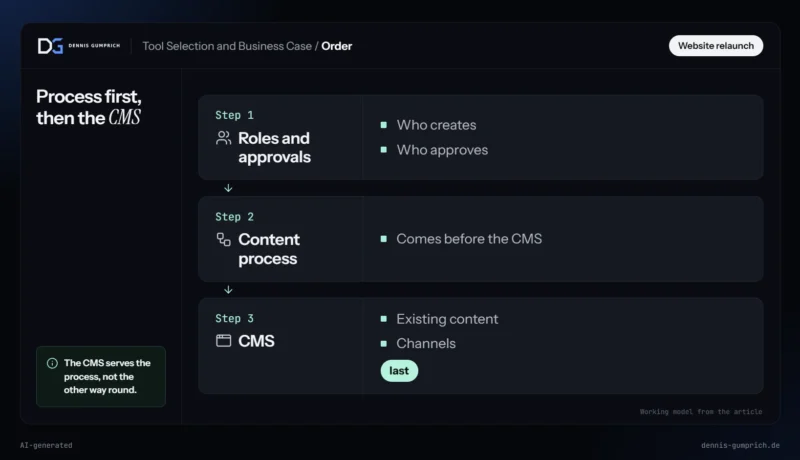
A website relaunch rarely fails because of the technology but almost always because of the content: missing responsibilities, unresolved approvals, migration of existing content and the fact that nobody has decided where content will be created in future. That is why five clarifications belong before the CMS selection: who creates and approves content, for which channels and countries it is needed, which content types exist, what happens to existing content and whether the CMS should be the workplace or the delivery channel. Answering these questions first leads to the better-fitting system and a more punctual go-live.
Why do website relaunches rarely fail because of the technology?
Because the technology is a clearly defined project with a service provider, timeline and acceptance, but the content is not. Content is created in many places, needs input from subject matter experts and approval from people with other priorities. If these workflows are not clarified before the relaunch, they become the bottleneck during the relaunch.
In conversations with marketing and communication teams, I currently come across the same situation remarkably often: a relaunch or CMS migration is running, and at the same time it becomes clear that the content process behind it does not hold up. The triggers vary. Sometimes the old CMS is at the end of its life, sometimes a switch to a headless system is due, sometimes many country sites are to be merged. The pattern behind it is always the same: the organization invests heavily in delivery and hardly at all in creation.
This has consequences far beyond go-live. A new CMS with old workflows produces the same problems as before, just on a more modern interface. Texts are still entered by copy and paste, approvals still run by email, and after two years the new website is as inconsistent as the old one.
CMS selection, design modules, development. Content is treated as a migration task towards the end. Approvals and responsibilities are improvised during the project. Result: delayed go-live and old workflows in the new system.
Responsibilities, approvals, content types and existing content are clarified before system selection. The CMS is then chosen by how well it supports this process. Result: a realistic timeline and a workflow that keeps working after go-live.
Which questions do you clarify before choosing a CMS?
Five questions: who creates and who approves? For which channels, brands and countries is content needed? Which content types exist and how are they structured? What happens to existing content? And should the CMS be the place where content is created or the place where it is delivered? The answers give you the requirements against which you measure systems.
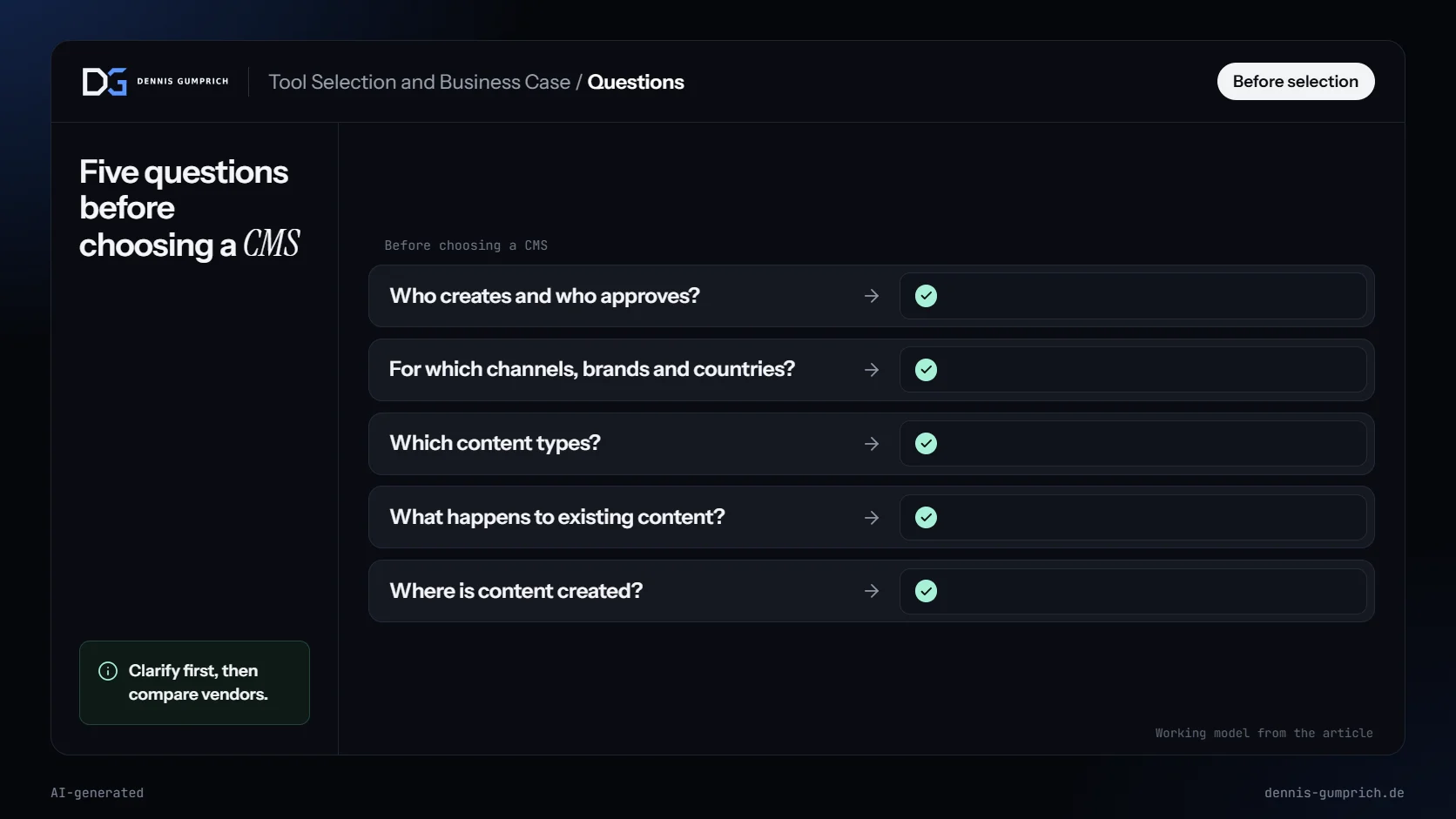
| Question | What you clarify | What follows for the system |
|---|---|---|
| Who creates and approves? | Roles in marketing, subject matter departments, agencies, legal and management | Permission and role model, approval workflows, access for externals |
| For which channels, brands and countries? | Website, shop, newsletter, social, apps, language versions | Multilingual support, multi-tenancy, content reuse |
| Which content types? | Product pages, expert articles, landing pages, case studies, job ads | Content model with fields and components instead of free text areas |
| What happens to existing content? | Keep, revise, merge, delete | Migration path, redirects, import interfaces |
| Where is content created? | In the CMS itself or in an upstream tool | Editorial features in the CMS or interfaces for handover |
For a mid-sized website, these clarifications take two to four weeks and save months later on. They are also the best basis for briefing agencies and system vendors, because they then have to respond to concrete workflows instead of offering features.
Should the CMS be the workplace or the delivery channel?
That depends on how many channels you serve and how many people are involved. If content is created mainly for the website and few people maintain it, the CMS can be the workplace. If the same topics appear on the website, social media, newsletters and in several countries, creation should happen upstream and the CMS should serve as one of several delivery channels.
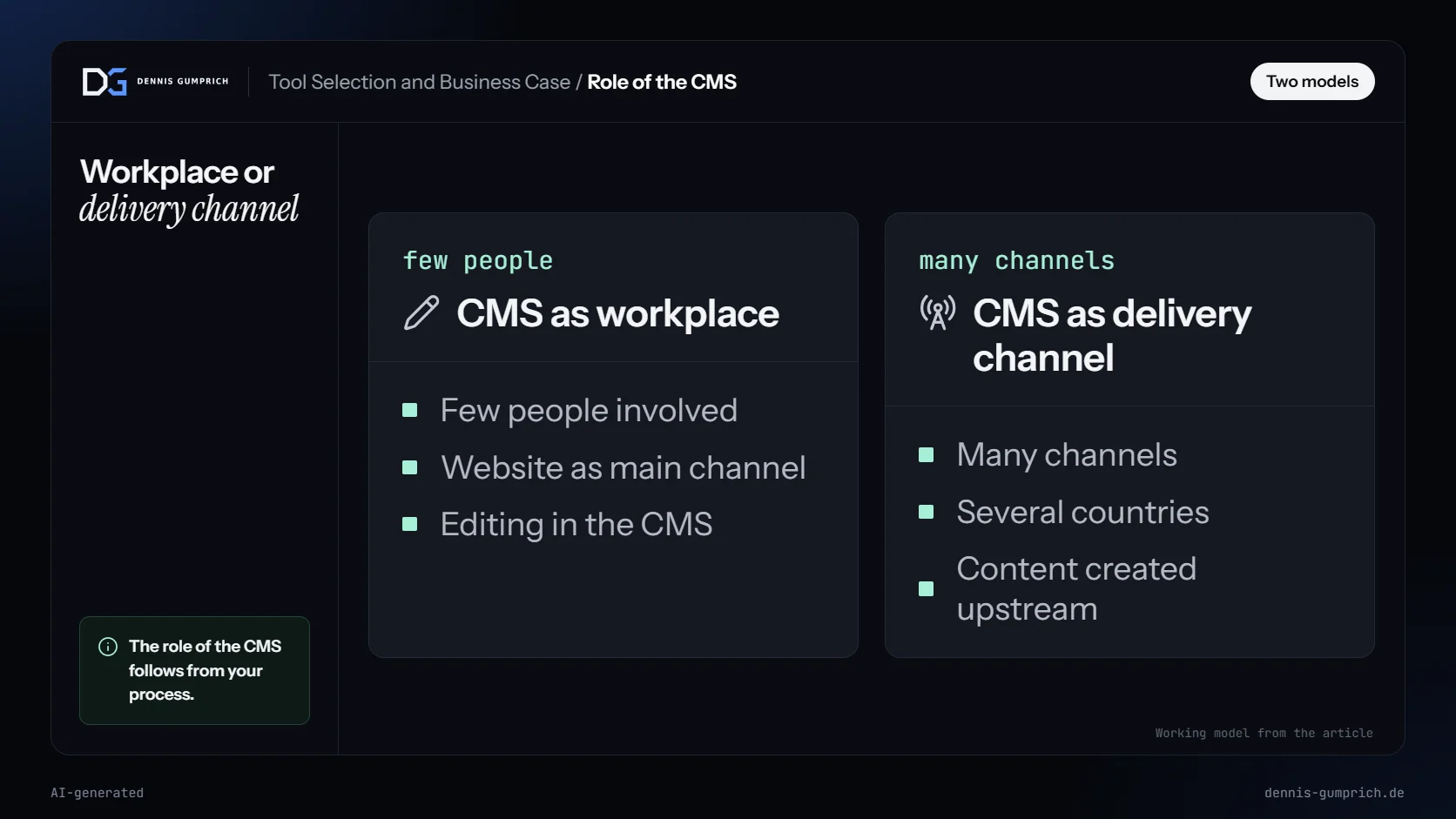
This question is almost never asked in relaunches, even though it strongly shapes the system choice. Classic CMSs often offer their own editorial features. Headless systems are designed to store content in a structured way and deliver it to many channels, but usually offer less for creating, coordinating and approving content. Choosing a headless system without clarifying where content is created quietly moves editorial work into emails, text documents and spreadsheets.
When creation happens upstream, the handover to the CMS becomes the decisive interface. A lot has changed here in recent months: with connections via MCP, approved content can be handed over to the CMS as a draft in a structure-aware way, matching fields and components. How this last mile works without copy and paste is described in The last mile: content into the CMS without copy and paste. When a classic interface fits and when MCP does is covered in MCP or API.
Headless or classic: what the content process reveals about the choice
A classic CMS fits when the website is the main channel, a manageable team maintains it and editors should work directly in the system. A headless system fits when content is delivered to many channels, apps or countries, development capacity is available and editorial work can take place elsewhere. The decision follows from the process, not from the trend.
| Criterion | Rather speaks for classic, for example WordPress or TYPO3 | Rather speaks for headless, for example Storyblok or Contentful |
|---|---|---|
| Channels | The website is the central channel | Website, apps, shop, displays and other channels from one source |
| Team | A few editors working directly in the system | Many people involved, editorial work partly outside the CMS |
| Development | Limited development capacity, agency maintains | Own or permanently available development capacity |
| Content structure | Pages with free content areas are sufficient | Strict content model with reusable building blocks wanted |
| Countries and languages | Few language versions | Many markets with shared and local content |
A note from practice: the complexity of a headless system is regularly underestimated. Every new component needs development, every change to the content model needs coordination. That is not an argument against headless, but an argument for deliberately keeping complexity low and building only the building blocks the content process really needs.
Why does the content model come before the design modules?
Because design modules describe what content looks like, while the content model describes what it consists of. Designing modules first means building containers without knowing what goes into them. The result is beautiful pages with free text fields in which every editor works differently, and content that can neither be reused nor cleanly handed over to other channels.
A content model defines which content types exist and which fields they consist of. A product page, for example, has a one-sentence benefit, technical data, application examples, frequently asked questions and a target audience. An expert article has a core message, a short answer, sections, sources and an assigned topic. Once these fields are set, design modules can display them specifically, search engines and AI systems can understand them better, and other channels can take them over automatically.
Metadata that is not visible but steers things is especially valuable: audience or persona, topic, customer journey phase, market, approval status. It later decides whether you can evaluate which topics work and whether content for countries and channels can be derived automatically. If you do not set it up during the relaunch, you will have to add it laboriously later.
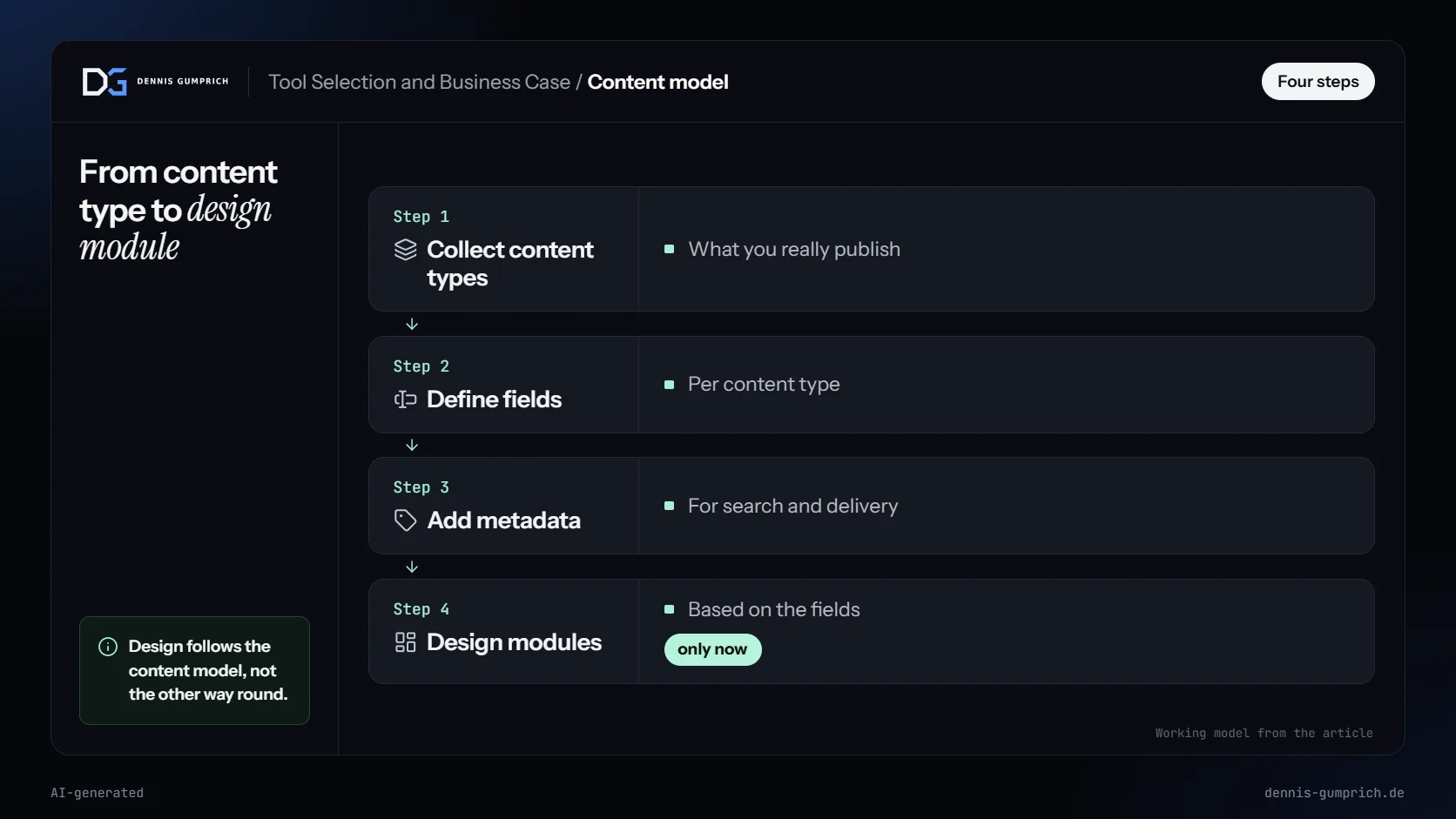
- Step 1Collect content typesList all kinds of pages and content that exist today and should exist in future. Usually there are eight to fifteen types.
- Step 2Define fieldsDefine mandatory and optional fields for each type. The guiding question: what information does the audience need, and what does another channel need?
- Step 3Add metadataSet up topic, audience, journey phase, market and status as fixed fields, not as free tags.
- Step 4Only then designDevelop design modules based on the fields. Each module displays specific fields instead of taking any content.
What happens to existing content?
It is reviewed before migration and every page gets a decision: keep, revise, merge or delete. Pages with visitors, rankings or external links are protected with redirects. Migrating existing content one to one without review carries old problems into the new system. Deleting it without review loses visibility.
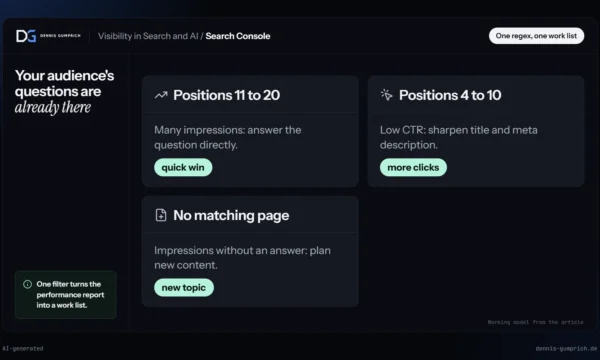
The inventory is the part that most often starts too late in relaunch projects. It needs data from web analytics and Search Console, an assessment from subject matter departments and a clear decision rule. At the same time it is a big opportunity: on many websites a considerable share of pages can be merged or removed, which permanently reduces maintenance effort. How to structure the inventory is described in Content inventory: what you have before you plan anything new. The technical and organizational side of the transfer is covered in Planning the migration.
| Decision | When | What to do |
|---|---|---|
| Keep | Page has visitors or rankings and is up to date | Transfer into the new content model, keep the URL where possible |
| Revise | Page has visitors or rankings but is outdated or incomplete | Update before migration, involve the subject matter department |
| Merge | Several pages cover the same topic | Combine into one stronger page, redirect old URLs |
| Delete | Hardly any visitors, no rankings, no external links, no purpose | Remove, redirect to a suitable page if needed |
The four decisions correspond to a widely used framework. In his 2022 article "Über den Business Value von Content Audits" (in German), consultant Robert Weller describes implementation according to DUCK: Delete, Update, Consolidate, Keep. He separates the inventory, meaning what exists, from the analysis of how good a piece of content is and why, and explicitly names relaunch, migration and CMS switch as occasions for an audit. His recommendation: frequent small audits rather than large rare ones. For you this means: use the relaunch for the big review, but define at the same time how often you will check existing content afterwards, so that the next inventory does not start from zero again. One caveat: it is an article from consulting practice.
How do you handle roles and approvals for the relaunch and beyond?
With clear responsibility per content type, fixed deadlines for approvals and a rule for what happens when a deadline passes. These rules apply not only to the project but are the operating mode afterwards. A relaunch is the best occasion to introduce them, because everyone involved is at the table anyway.
In a relaunch, many approvals come together at the same time: product management, legal, countries, management. Without deadlines, everything piles up in the last weeks before go-live. What has proven effective: define approval per content type instead of per page, and involve people without regular editorial work as observers who comment and approve without having to work in the system themselves. How to shorten approvals without giving up diligence is covered in the article on approval processes. Which roles a content team needs on an ongoing basis is described in Who does what in the content team.
If you work with several countries or sales subsidiaries, one more question belongs here: what does headquarters create, what do the countries create, and who may change what? The answer shapes the permission model in the CMS as much as the workflow. A proven model is described in One headquarters, many countries.
How do you plan for AI and visibility in AI search from the start?
By setting up content in a structured way, deliberately allowing or excluding AI crawlers and planning the use of AI in creation as part of the content process instead of as a later add-on. A relaunch is the cheapest opportunity for this, because structure, technology and workflows are being reset anyway.
Three points belong in every relaunch concept. First, a content model with clear fields, short answers and frequently asked questions. For AI Overviews and AI Mode, Google states in its own documentation that it requires no additional markup and no special formats; the normal principles for search apply. A clear content model therefore pays off mainly in comprehensibility and reuse. Second, a deliberate decision on AI crawlers, made together with IT and data protection and documented in the new system. Third, a plan for how AI is used in creation, translation and review, with stored brand voice instead of individual prompts. What makes content citable is covered in Visible in ChatGPT, Perplexity and AI Overviews. How to store brand voice so that it applies in every draft is described in Building a knowledge base.
Which structural features can be worth setting up as fixed building blocks is suggested by the analysis "GEO-Mythen im Datencheck" (in German) by Sistrix from October 2026. The tool vendor compared 96,418 URLs from 17,380 domains in the German-speaking DACH region, in each case cited and non-cited pages of the same domain in ChatGPT, AI Mode and AI Overviews. On a scale where 1.0 means no difference, a table of contents with jump links reached 1.7, Article schema and at least five H2 headings 1.6 each, FAQPage schema and a table with a header row 1.5 each. A visible update date came to 1.3 but was found on only 5 percent of pages. At the same time, only 10 percent of cited pages meet many of these features. For your relaunch this means: set up such elements as fields and components in the content model instead of leaving them to each editor. One caveat: this is a tool vendor's analysis covering one language region; it shows correlations, not causes. Google itself, as described above, requires no additional markup for its AI features.
What does a realistic timeline with two workstreams look like?
Technology and content run as two separate workstreams with their own owners but shared milestones. The content workstream starts before system selection and does not end at go-live, but with a well-established operation afterwards.
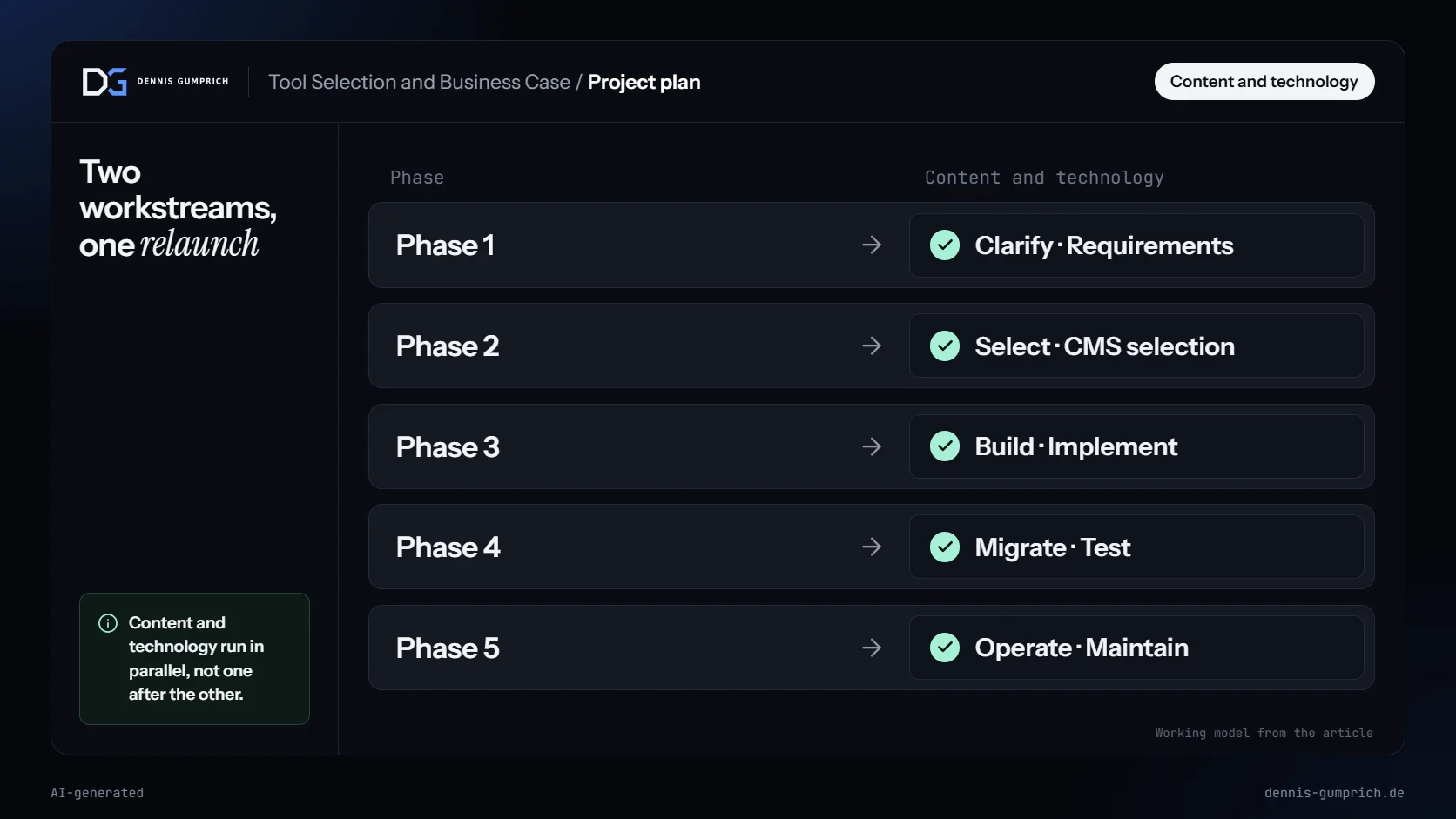
| Phase | Content process | Technology |
|---|---|---|
| 1 Clarify | Roles, approvals, channels, content types, place of creation | Derive requirements from the content process |
| 2 Select | Draft the content model, start the inventory | Select CMS and service provider, involve IT and data protection |
| 3 Build | Revise existing content, create new content in the target model, test workflows | Implement the content model, develop design modules, build interfaces |
| 4 Migrate | Transfer content, complete approvals, check redirects | Import, tests, performance, set up redirects |
| 5 Operate | Regular operation with topic plan, approval rules and reporting | Maintenance, further development as needed |
The fifth phase decides whether the investment pays off. A new website is not finished at go-live; that is when it starts to work. If operation afterwards is not clarified, decay begins on day one. By the way, you should involve IT and data protection as early as phase 2, not only when the contract is signed. How this saves you weeks is covered in Involving IT and data protection early.
Five mistakes in a website relaunch
- Choosing the CMS before the processChoosing the system first means adapting the process to the system later instead of the other way round. That leads to workarounds that stay for years.
- Treating content as a migration taskContent is not moving freight that gets loaded at the end. It needs its own owners, its own time and its own workstream in the project plan.
- Building design modules without a content modelBeautiful modules with free text fields lead to inconsistent pages and prevent reuse in other channels.
- Taking over existing content one to oneOutdated and duplicate pages do not get better in the new system. The inventory before migration permanently saves maintenance effort.
- Not planning operation after go-liveWithout a topic plan, approval rules and responsibilities after go-live, the new website starts to age immediately.
When is it still right to start with the technology?
When the old system is an acute security risk or its support ends at short notice. Then the technical move takes priority. Even in this case, it pays to start a small content workstream in parallel that clarifies responsibilities and approvals for operation afterwards.
A second case is very small websites with few pages and a single responsible person. There the content process is manageable and clarification takes hours instead of weeks. It is also true that a relaunch with a content workstream takes longer in preparation. But it usually makes up the time during implementation, because go-live no longer depends on missing content and approvals.
Disclosure
I work for contentbird. The platform is designed for exactly the situation in which content is created upstream and the CMS is one of several delivery channels: topic planning, AI-assisted creation with stored brand voice, workflows and approvals in one place. Approved content can be handed over via MCP as a draft to WordPress, TYPO3, Contentful and Storyblok. No software takes the clarification of roles, content model and existing content off your hands, and for a small team with a simple website an additional platform is often not necessary.
Self-check: is your relaunch prepared for content?
Tick everything that applies to you.
A short proposal for our website relaunch:
Experience shows that relaunches are rarely delayed by the technology but by the content: missing responsibilities, approvals that pile up at the end and existing content that is reviewed too late.
I propose investing two to four weeks in clarifying the content process before the final CMS decision: roles and approvals per content type, channels and countries, content model, handling of existing content and the question whether content is created in the CMS or upstream. From this we derive the requirements for the system.
In the project plan we run content as its own workstream with its own milestones, including operation after go-live.
Conclusion: the website is only as good as the process behind it
A website relaunch is one of the biggest investments in a company's external presence. But it only pays off if the content gets better afterwards too, and that depends less on the system than on the workflows behind it. Clarifying first who creates, approves and maintains content, where it is created and what happens to existing content leads to the better-fitting CMS and a more punctual go-live.
The most important sentence for the next project meeting is therefore: before we talk about the system, we clarify the process. That costs a few weeks at the start and saves months at the end.
Frequently asked questions
How long does a website relaunch take?
For a mid-sized corporate website, six to twelve months is realistic, longer with many countries or brands. The content workstream is more often the critical path than the technology. Starting it early shortens the overall duration.
When should we create the content for the relaunch?
As early as possible, as soon as the content model is in place. Content can already be created in the target format while the technology is still being built. Starting only after the modules are finished almost always delays go-live.
Headless CMS or classic CMS: which is better?
Neither is fundamentally better. Headless fits when content is delivered to many channels and markets and development capacity is available. A classic CMS fits when the website is the main channel and editors work directly in the system. What matters is where your content should be created.
How do we avoid ranking losses during a relaunch?
Through an inventory with data from Search Console and web analytics, URLs that stay as stable as possible for important pages and complete redirects for changed or merged pages. After go-live, monitor rankings and error pages closely for a few weeks.
Who should own the content workstream in the relaunch?
A person from marketing or communications with decision-making authority over content, not the agency and not IT. They coordinate subject matter departments, approvals and existing content and remain responsible for operation after go-live.
Should we already use AI in the relaunch?
Yes, if brand voice is stored and approvals are defined. AI helps with revising existing content, deriving language versions and checking against guidelines. Without stored rules, however, it produces inconsistent texts that have to be reworked later.
Where does your content process lose time today?
In 30 minutes, we look together at where unnecessary coordination, manual tasks, tool switching or repetitive content work cost you time today.
You get a concrete assessment of which tasks you can simplify, automate or organize better, and where AI and tools actually help instead of adding complexity.
Analyze your content process in 30 minutes Free of charge. You take away concrete starting points you can use internally right away.
Dennis Gumprich
Dennis helps marketing and communication teams fit generative AI into existing content processes without undermining quality, brand voice and approvals. Focus areas: content operations, AI governance and tool selection in mid-sized companies and corporations.
Transparency note: Dennis works for contentbird, a provider of AI-powered content software. Product mentions are marked in the article. More about Dennis (in German) · LinkedIn
Read more
Sources
- Anna Kaley, Nielsen Norman Group: Content Inventory and Auditing 101, article from September 27, 2020: inventory and audit before redesign projects, with a decision per piece of content. Accessed October 31, 2026.
- Google Search Central: Site Moves and Migrations, documentation, as of August 20, 2026: mapping old to new URLs, permanent server-side redirects for at least about one year, monitoring crawl errors and temporary ranking fluctuations after the move. Accessed October 31, 2026.
- Google Search Central: Google's common crawlers, documentation, as of October 30, 2026: robots.txt token Google-Extended to control the use of content for Gemini training and grounding, without influence on Google Search. Accessed October 31, 2026.
- Google Search Central: AI features and your website, documentation, as of December 10, 2025: no additional requirements, files or markup for AI Overviews and AI Mode. Accessed October 31, 2026.
- Robert Weller, Toushenne: Über den Business Value von Content Audits: persönliche Insights, Beispiele, Tipps & Tool-Empfehlungen (in German), article from September 9, 2022: distinction between inventory (what exists) and analysis (how good, why), occasions including relaunch, migration or CMS switch, rebranding, localization and change of owners, ARA and ROT evaluation frameworks after Bloomstein, implementation according to DUCK (Delete, Update, Consolidate, Keep), frequent small audits better than large rare ones. Article by an independent consultant who names contentbird as a project reference. Accessed October 31, 2026.
- Johannes Beus, Julia Weißbach, Sistrix: GEO-Mythen im Datencheck: Was 96.418 URLs über AI-Citations verraten (in German), analysis from October 22, 2026, 96,418 URLs from 17,380 domains in the DACH region, Q2 2026, ChatGPT, AI Mode and AI Overviews, comparison of cited and non-cited pages of the same domain: factor 1.7 for table of contents with jump links, 1.6 for Article schema and at least five H2, 1.5 for FAQPage schema and table with header row, 1.3 for visible update date (only 5 percent of pages), 1.0 means no difference; only 10 percent of cited pages meet many features. Tool vendor analysis, correlation, not causation. Accessed October 31, 2026.
How this article was created
This article was created with the help of AI. Structure, research and draft wording were developed with AI support. Professional assessment, review of the statements and the final version are the responsibility of Dennis Gumprich. The English version was translated with AI and reviewed. Read the original German version.
How reliable are the statements?
Backed by sources are the review of existing content before a redesign (Nielsen Norman Group), the recommendations on URL mapping, redirects and monitoring after the move, the control of AI use via Google-Extended and Google's statement that no additional markup is needed for AI features in search (Google Search Central), as well as the DUCK framework and the relaunch as an occasion for an audit (article by Robert Weller) and the relationship between structural features and AI citations (analysis by the tool vendor Sistrix, correlation, not causation). The clarification questions, decision rule, system comparison and phase model are working models from consulting practice. The observation that relaunches often get stuck on content rather than technology comes from conversations with marketing and communication teams in 2026. The system comparison is guidance and not an evaluation of individual products. The time and quantity figures, such as two to four weeks of clarification, six to twelve months of relaunch and eight to fifteen content types, are experience values. The information on contentbird's MCP handover describes the product status of my employer. As of October 31, 2026.